

Amber - Simple Markdown
DONGWOOK LEE Productivity iPhoneiPadiPod touchMac
Amber - Simple Markdown is a paid Productivity app for iPhone and iPad by DONGWOOK LEE. Rated 5.0/5 from 3 ratings. Requires iOS 17.4.
- Rating
- 5.0
- 3 ratings
- Price
- 2.99 USD
- on the App Store
- Size
- 14 MB
- Age 4+
- Updated
- Aug 22
- 2026 · v2.0
Screenshots

About Amber - Simple Markdown
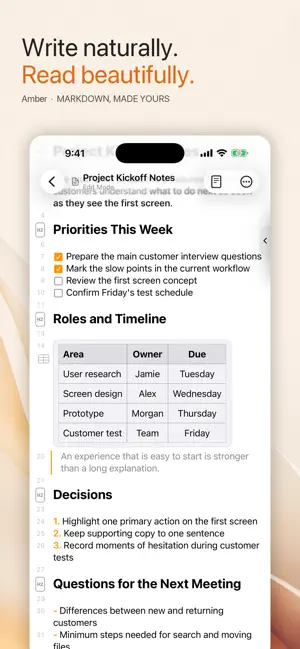
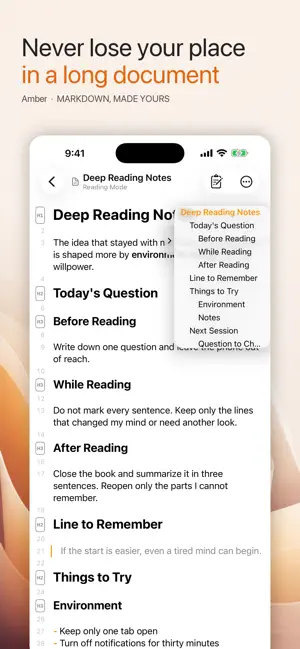
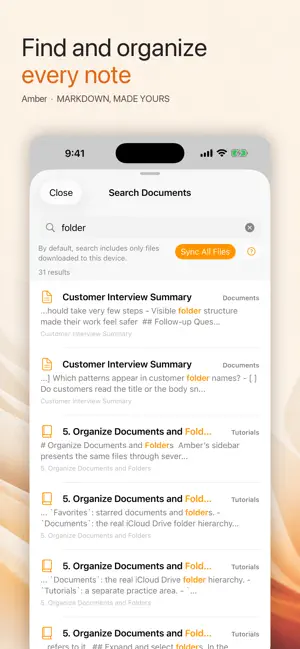
Your writing should stay yours—and remain easy to open with other tools. Amber is a Markdown document app that stores regular .md files in iCloud Drive. You can see the originals in the Files app on iPhone and iPad or in Finder on Mac, so your work never depends on a proprietary document format. Natural to write, clear to read Markdown markers appear when you need them, while headings, lists, quotes, links, images, checkboxes, and code blocks stay easy to read. Reading Mode lets you select and copy without worrying about accidental edits. Editing Mode gets you straight back to writing. Tables you can edit in place Amber turns Markdown tables into clear, editable grids. Change cells, add or remove rows and columns, choose header rows or columns, and adjust alignment without leaving the document. The source remains regular Markdown. Stay oriented in long documents Jump to any section with the heading navigator, or fold a heading to see only the shape of your document. Find within the current file, search your entire library, use line numbers, and move back or forward between documents. Keep a growing library organized Recent Documents, Favorites, and folders keep important files close. Choose a destination before creating a document or folder, then rename, move, delete, and restore items with a familiar flow on iPhone, iPad, and Mac. Recover from accidental changes Amber can keep earlier contents in version history on the current device. Preview an older version, compare it with the current document, and restore the one you need. History is stored separately on each device rather than in iCloud, and its storage limit is under your control. Continue across iPhone, iPad, and Mac Your documents sync through iCloud Drive. Capture a thought on iPhone, shape a longer draft on iPad, and work with the original files in Finder on Mac. No separate Amber account is required. Amber includes an interface and built-in guides in Korean, English, Japanese, and Russian. Terms of Use and EULA: https://www.apple.com/legal/internet-services/itunes/dev/stdeula/ Privacy Policy: https://drfranken.net/apps/amber/privacyPolicy_en.html
What’s new
Version 2.0 · Updated August 22, 2026
Amber 2.0 is a major update that refreshes the reading and writing experience across iPhone, iPad, and Mac. • View Markdown tables as clear grids, then edit cells, rows, columns, headers, and alignment right in the document. • Use Reading Mode to select and copy without accidental changes, or switch to Editing Mode and start writing immediately. • Recent Documents, Favorites, folders, search, creation, Trash, and Settings now feel consistent across devices. • Find what you need faster with improved search across your entire library, even with many documents or very long files. • Move back and forward between documents, see a centered title and current mode, and jump through long files with the heading navigator. • Enjoy more natural headings, lists, quotes, dividers, links, images, checkboxes, code blocks, folding, and line numbers. • Get smoother typing and scrolling in long documents, plus more reliable document switching and iCloud syncing. • Learn Amber from the beginning with completely rewritten guides in four languages.
App privacy
The developer, DONGWOOK LEE, reported these privacy practices to Apple.
Data Not Collected
The developer does not collect any data from this app.
Alternatives to Amber - Simple Markdown
Looking for apps like Amber - Simple Markdown? Here are 6 similar apps on the App Store. The highest rated is Obsession: Goal Accountability (5.0/5), and 5 of the 6 are free to download.
-
 Obsession: Goal Accountability
5.0
Obsession: Goal Accountability
5.0
-
 Scribo: AI Keyboard & Writer
5.0
Scribo: AI Keyboard & Writer
5.0
-
 FlipScape
-
 Calendar Schedule
-
 Just Did - Task Tracker
5.0
Just Did - Task Tracker
5.0
-
 Calculator Keyboard - Faster
4.4
Calculator Keyboard - Faster
4.4
| App | Rating | Price | Last updated | Compare |
|---|---|---|---|---|
| Amber - Simple Markdown | 5.0 / 5 (3 ratings) | 2.99 USD | August 22, 2026 | |
| Obsession: Goal Accountability | 5.0 / 5 (1) | Free | Apr 22, 2026 | Compare |
| Scribo: AI Keyboard & Writer | 5.0 / 5 (1) | Free | Aug 29, 2026 | Compare |
| FlipScape | – | Free | Jan 28, 2026 | Compare |
| Calendar Schedule | – | Free | May 30, 2026 | Compare |
| Just Did - Task Tracker | 5.0 / 5 (7) | Free | Sep 20, 2026 | Compare |
| Calculator Keyboard - Faster | 4.4 / 5 (9) | 2.99 USD | Jul 22, 2026 | Compare |