

Kaomi: Kaomoji Picker
Aliaksei Bychkou Utilities iPhoneiPadiPod touchMac
Kaomi: Kaomoji Picker is a free Utilities app for iPhone and iPad by Aliaksei Bychkou. Requires iOS 16.0. Updated October 12, 2026.
- Price
- Free
- on the App Store
- Size
- 19 MB
- Age 4+
- Updated
- Oct 12
- 2026 · v1.1
Screenshots



About Kaomi: Kaomoji Picker
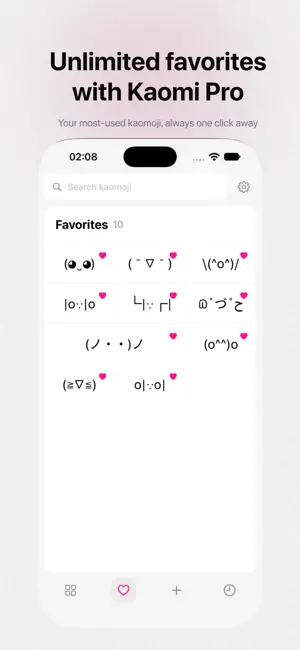
Kaomi is the fastest and cutest way to use Japanese emoticons (kaomoji). Whether you're messaging friends, posting on social media, or just adding personality to your writing — Kaomi gives you instant access to hundreds of handcrafted kaomoji, right on your iPhone and iPad. WHY KAOMI? - Hundreds of curated kaomoji organized by mood and category - Lightning-fast search — find the perfect face in seconds - Favorites — save the ones you use most - Custom collections, categories, and tags to make Kaomi your own - Beautiful, clean design that fits right in - Lightweight and privacy-friendly — works fully offline - No account, no tracking, no nonsense CATEGORIES INCLUDE - Happy and Joyful - Sad and Crying - Love and Cute - Angry and Flip - Surprised - Animals - Shrug and Meh - Design, Video, Audio and more HOW IT WORKS 1. Open Kaomi and browse or search for the perfect kaomoji 2. Tap to copy — instantly 3. Paste anywhere: Messages, Notes, Safari, social apps, and beyond That's it. No setup, no learning curve. KAOMI PRO Unlock everything with a one-time purchase — no subscriptions: - Unlimited favorites - Custom kaomoji collections - Custom categories and tags - Save kaomoji from the catalog - 6 premium app icons - Support indie development Your support keeps Kaomi independent and ad-free. PERFECT FOR - Chatting on Messages, Telegram, Slack, Discord, and more - Social media posts and comments - Adding personality to emails and notes - Anyone who loves Japanese internet culture - Designers, writers, and creative people PRIVACY FIRST Kaomi works entirely on your device. No data collection. No analytics. No internet connection required. Your usage is yours alone. Made with love for everyone who believes a well-placed kaomoji can brighten someone's day. Got feedback or ideas? We'd love to hear from you.
What’s new
Version 1.1 · Updated October 12, 2026
- The interface has been redesigned for iPhone and iPad. - Navigation and category tabs have been moved to the bottom on iPhone for easier access. - App icons have been refreshed, with Dreamer set as the new default. - Interface colors have been matched to the selected icon, and dark mode contrast has been improved. - Recent history has been redesigned as a single page without scrolling. - Custom collections have been organized into tabs showing the selected group. - Copy feedback has been refined with a subtle animation. - Favorite buttons on iPad and tab alignment have been fixed.
App privacy
The developer, Aliaksei Bychkou, reported these privacy practices to Apple.
Data Not Collected
The developer does not collect any data from this app.
Alternatives to Kaomi: Kaomoji Picker
Looking for apps like Kaomi: Kaomoji Picker? Here are 6 similar apps on the App Store. The highest rated is Kaimoji (5.0/5), and 5 of the 6 are free to download.
-
 Text Studio: Kaomoji
-
 Glyphs: Unicode Keyboard
3.0
-
 Kaomoji-Emoticons & ASCII Art
-
 Kaimoji
5.0
-
 Artist 3D Viewer
3.8
-
 Font Size Decrease for Safari
| App | Rating | Price | Last updated | Compare |
|---|---|---|---|---|
| Kaomi: Kaomoji Picker | – | Free | October 12, 2026 | |
| Text Studio: Kaomoji | – | Free | Oct 5, 2026 | Compare |
| Glyphs: Unicode Keyboard | 3.0 / 5 (1) | Free | Oct 26, 2026 | Compare |
| Kaomoji-Emoticons & ASCII Art | – | Free | Mar 23, 2026 | Compare |
| Kaimoji | 5.0 / 5 (4) | Free | Sep 25, 2026 | Compare |
| Artist 3D Viewer | 3.8 / 5 (12) | 1.99 USD | Mar 28, 2026 | Compare |
| Font Size Decrease for Safari | – | Free | Dec 7, 2025 | Compare |