

Text Studio: Kaomoji
Emad Alhalabi Utilities iPhoneiPadiPod touch
Text Studio: Kaomoji is a free Utilities app for iPhone and iPad by Emad Alhalabi. Requires iOS 18.2. Updated October 5, 2026.
- Price
- Free
- on the App Store
- Size
- 43 MB
- Age 4+
- Updated
- Oct 5
- 2026 · v4.5.0
Screenshots

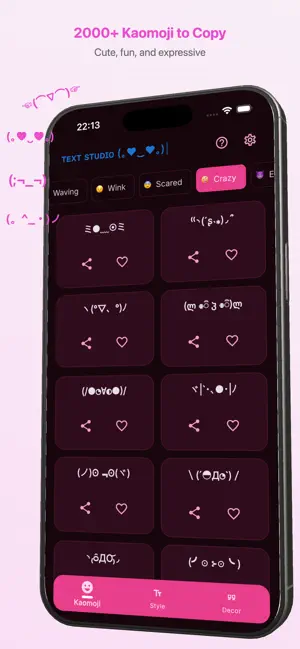


About Text Studio: Kaomoji
Text Studio: Kaomoji is a fast and simple way to create stylish text for chats, captions, bios, and posts Browse a large collection of kaomoji (Japanese emoticons) (。◕‿◕。), generate fancy text styles, and apply text decorations in seconds. Just type your text, copy the result, and paste it anywhere Whether you want a cute kaomoji, a bold text style, or a decorated message, everything is organized in one place for quick use. Key Features • Large kaomoji library with multiple categories (。◕‿◕。) • Fancy text generator for creative styles • Text decoration templates for framed text • One-tap copy for fast sharing • Favorites to save items you use most • Clean, modern, and easy-to-use interface • Works across all chat and social apps Perfect for • Chat messages • Social media captions • Profile bios • Usernames and nicknames • Status updates • Creative text posts Fast and easy to use Text Studio: Kaomoji is designed for speed • Open the app • Pick a kaomoji, style, or decoration • Copy and paste instantly No complicated setup. No extra steps. Just useful text tools in one app.
What’s new
Version 4.5.0 · Updated October 5, 2026
- Add Symbols - Add Nickname Generator - Add Caption Helper
App privacy
The developer, Emad Alhalabi, reported these privacy practices to Apple.
Data Used to Track You
The following data may be used to track you across apps and websites owned by other companies:
- Location: Coarse Location
- Identifiers: Device ID
- Usage Data: Advertising Data
Data Linked to You
The following data, which may be collected and linked to your identity, may be used for the following purposes:
- Identifiers: Device ID
- Usage Data: Advertising Data
Used for: Third-Party Advertising
Data Not Linked to You
The following data, which may be collected but is not linked to your identity, may be used for the following purposes:
- Location: Coarse Location
- Diagnostics: Crash Data, Performance Data
Used for: Third-Party Advertising, App Functionality
Alternatives to Text Studio: Kaomoji
Looking for apps like Text Studio: Kaomoji? Here are 6 similar apps on the App Store.
-
 SeukArt: Fonts, Symbols & Text
-
 AI Health Care Guide
-
 QuillKeys — Fonts Keyboard
-
 Fonkii - Font & AI Translation
-
 Text-Pimp
-
 Fonts Keyboard: Emoji & Fonts
| App | Rating | Price | Last updated | Compare |
|---|---|---|---|---|
| Text Studio: Kaomoji | – | Free | October 5, 2026 | |
| SeukArt: Fonts, Symbols & Text | – | Free | Sep 11, 2026 | Compare |
| AI Health Care Guide | – | Free | Jul 8, 2026 | Compare |
| QuillKeys — Fonts Keyboard | – | Free | Aug 1, 2026 | Compare |
| Fonkii - Font & AI Translation | – | Free | Aug 4, 2026 | Compare |
| Text-Pimp | – | Free | Mar 31, 2025 | Compare |
| Fonts Keyboard: Emoji & Fonts | – | Free | Oct 13, 2026 | Compare |