

CueFrame: Video Teleprompter
Dennis Macaspac Photo & Video iPhoneiPadiPod touch
CueFrame: Video Teleprompter is a free Photo & Video app for iPhone and iPad by Dennis Macaspac. Requires iOS 17.0. Updated May 31, 2026.
- Price
- Free
- on the App Store
- Size
- 3 MB
- Age 4+
- Updated
- May 31
- 2026 · v1.2
Screenshots


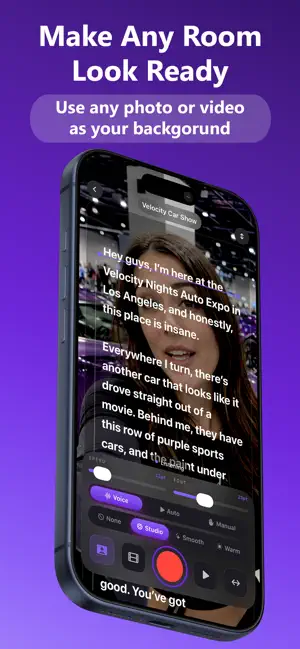

About CueFrame: Video Teleprompter
CueFrame is a video teleprompter for creators, educators, trainers, and professionals who record themselves speaking to camera. Write or paste your script, open the camera, and record with your words right where you need them. CueFrame helps you stay on pace while keeping your eyes close to the lens, so videos feel more natural and confident. WHY CUEFRAME - Voice scrolling. CueFrame can use Apple’s Speech framework to help move the script with your reading pace. - Auto and manual modes. Use fixed-speed scrolling or drag the script yourself when you want full control. - Built-in script manager. Create, edit, delete, pin, search, and sort scripts before recording. - Reading tools. See word count, estimated read time, script progress, elapsed recording time, and a clear reading line. - Adjustable teleprompter. Change font size, scroll speed, mirror, and flip settings to match your setup. - Camera recording. Record directly with your iPhone front camera and microphone. - Video quality options. Choose 1080p or 4K when supported by your device. - Simple video filters. Use clean, creator-friendly looks such as Studio, Smooth, and Warm. - Background replacement. Choose a photo background and record with a cleaner backdrop without needing a physical green screen. - Photos export. Finished videos are saved to your Photos library. - No account required. Start writing and recording without creating a login. HOW IT WORKS - Create a script or paste in text you already wrote. - Open the teleprompter and choose Voice, Auto, or Manual scrolling. - Adjust font size, speed, mirror, flip, quality, filters, or background. - Tap record and read naturally while CueFrame keeps the script visible. - Save the finished video to Photos. CueFrame is built for talking-head videos, short-form content, course lessons, product demos, presentations, training videos, and social media content. Privacy first. Scripts are stored on your device. Recording and video processing happen on device. CueFrame does not require an account, subscription, app-owned backend service, or third-party integration. Privacy Policy: https://cueframeapp.com/privacy-policy Terms of Use: https://cueframeapp.com/terms-of-service
What’s new
Version 1.2 · Updated May 31, 2026
Added AI Script Helper (Beta) to privately generate teleprompter scripts on supported Apple Intelligence devices.
App privacy
The developer, Dennis Macaspac, reported these privacy practices to Apple.
Data Not Collected
The developer does not collect any data from this app.
Alternatives to CueFrame: Video Teleprompter
Looking for apps like CueFrame: Video Teleprompter? Here are 6 similar apps on the App Store. The highest rated is Cue: Teleprompter for Creators (5.0/5), and 5 of the 6 are free to download.
-
 Cueframe: Teleprompter Video
-
 Souffleo Teleprompter
-
 Teleprompter: OtterScroll
-
 Videocraft: Video Maker
4.6
-
 Cue: Teleprompter for Creators
5.0
-
 EyePrompt Teleprompter Camera
4.6
| App | Rating | Price | Last updated | Compare |
|---|---|---|---|---|
| CueFrame: Video Teleprompter | – | Free | May 31, 2026 | |
| Cueframe: Teleprompter Video | – | Free | Oct 12, 2026 | Compare |
| Souffleo Teleprompter | – | Free | Sep 22, 2026 | Compare |
| Teleprompter: OtterScroll | – | Free | Oct 10, 2026 | Compare |
| Videocraft: Video Maker | 4.6 / 5 (405) | 0.99 USD | Apr 5, 2026 | Compare |
| Cue: Teleprompter for Creators | 5.0 / 5 (1) | Free | Sep 15, 2026 | Compare |
| EyePrompt Teleprompter Camera | 4.6 / 5 (9) | Free | Oct 12, 2026 | Compare |