

Lockup - Phone Free Sessions
LOCKUP TECHNOLOGIES LIMITED Productivity iPhoneiPadiPod touch
Lockup - Phone Free Sessions is a free Productivity app for iPhone and iPad by LOCKUP TECHNOLOGIES LIMITED. Requires iOS 16.4. Updated September 6, 2026.
- Price
- Free
- on the App Store
- Size
- 37 MB
- Age 4+
- Updated
- Sep 6
- 2026 · v2.2.2
Screenshots

About Lockup - Phone Free Sessions
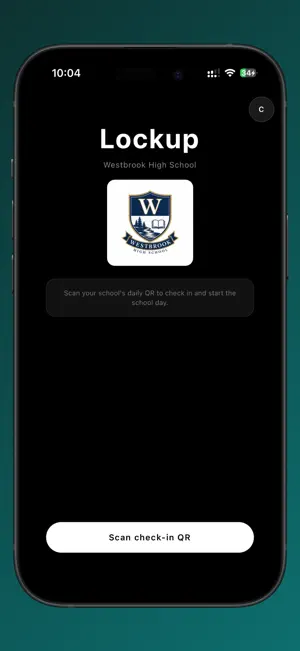
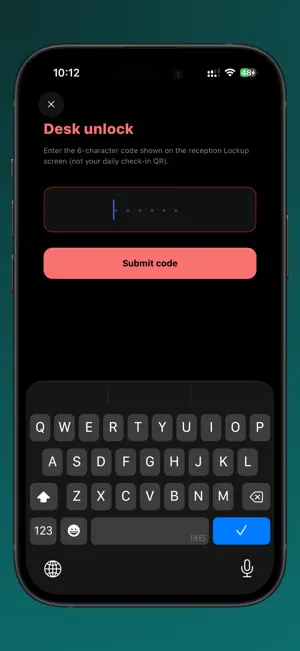
One code puts every phone in the room away. Start a session, share a six-character code, and every phone that joins has its distracting apps blocked until the session ends. Use it for a class, a study group, a team meeting, a rehearsal, or dinner at home. STARTING A SESSION - Create a free account in the app or on the web - Start a session and choose how long it runs, from 20 to 60 minutes - Share the code, or let people scan it - Up to 30 people can join - Phones unlock when you end the session, or when the time runs out - The person who started the session's phone is never blocked, so they always keep control of the room JOINING A SESSION - Tap Join, enter the code, and you are in - No account needed to join a session - Distracting apps stay blocked until the session ends FOR SCHOOLS Schools can run Lockup across the whole timetable instead of session by session: - Students scan their school's code to check in for the day - Distracting apps are blocked automatically during school hours - Breaks and lunch unlock on their own schedule - Teachers can grant a temporary unlock when a lesson needs phones - Everything unlocks automatically when the school day ends - Teachers and admins manage classes, breaks and unlocks from the Lockup dashboard - Student accounts are created by the school, and Lockup runs on each student's own device HOW BLOCKING WORKS Lockup uses Screen Time to block the selected apps, and a local network connection to stop blocked apps and websites reaching the internet around the block. Both are active only while a session or a school day is running. - Blocking turns off automatically when a session ends, at the end of the school day, during scheduled breaks, and when a teacher grants a temporary unlock. - The network connection exists solely to enforce on-device app and website blocking. Lockup does not use it to monitor, collect, or sell browsing activity, and does not route traffic to third parties for advertising or analytics. - Lockup is not a general-purpose or anonymizing VPN. PERMISSIONS LOCKUP ASKS FOR - Screen Time: to block the selected apps while blocking is active - Camera: to scan session join codes and school check-in codes. Nothing is recorded. - Notifications: to say when a phone locks, unlocks, or a break begins PRIVACY Lockup is used in schools, so it is built to collect as little as possible. Lockup shows no ads, uses no advertising identifiers, and does not sell personal data. Lockup does not track browsing history and does not record what anyone types or says. Lockup records the device model and a device identifier so that an account can only be signed in on one phone at a time. This prevents a second device being used to get around blocking. Privacy policy: https://lockup-app.com/privacy
What’s new
Version 2.2.2 · Updated September 6, 2026
Support for more iPhones Lockup now runs on iOS 16.4 and later, so older handsets can be set up alongside newer ones. A simpler setup Granting Screen Time access is now a single step. Students are no longer asked to pick individual apps during onboarding. Fixes and improvements • Granting Screen Time access during setup is no longer mistakenly recorded as removing it, so a student no longer appears flagged moments after signing in for the first time. • Changes to blocking permissions now reach teachers immediately instead of after a short delay. • Improvements to reliability when reconnecting after a break or a loss of signal.
App privacy
The developer, LOCKUP TECHNOLOGIES LIMITED, reported these privacy practices to Apple.
Data Linked to You
The following data, which may be collected and linked to your identity, may be used for the following purposes:
- Contact Info: Email Address, Name
- Identifiers: Device ID
Used for: App Functionality
Alternatives to Lockup - Phone Free Sessions
Looking for apps like Lockup - Phone Free Sessions? Here are 6 similar apps on the App Store. The highest rated is BreakOff: Block Apps Together (4.8/5), and all 6 are free to download.
-
 BreakOff: Block Apps Together
4.8
-
 LeadMeNot: Screen Time Control
4.7
-
 QTF Wallet
1.3
-
 Barrier: Screen Time For Focus
4.7
-
 DriveNow Test Cancellations IE
3.2
-
 Futureland – Goal Tracker
4.8
| App | Rating | Price | Last updated | Compare |
|---|---|---|---|---|
| Lockup - Phone Free Sessions | – | Free | September 6, 2026 | |
| BreakOff: Block Apps Together | 4.8 / 5 (15) | Free | Oct 26, 2026 | Compare |
| LeadMeNot: Screen Time Control | 4.7 / 5 (91) | Free | Oct 22, 2026 | Compare |
| QTF Wallet | 1.3 / 5 (3) | Free | Feb 20, 2026 | Compare |
| Barrier: Screen Time For Focus | 4.7 / 5 (344) | Free | Nov 2, 2026 | Compare |
| DriveNow Test Cancellations IE | 3.3 / 5 (4) | Free | Aug 10, 2026 | Compare |
| Futureland – Goal Tracker | 4.8 / 5 (104) | Free | Sep 14, 2025 | Compare |