

LeadMeNot: Screen Time Control
CJ2 Solutions, LLC Productivity iPhoneiPadiPod touch
LeadMeNot: Screen Time Control is a free Productivity app for iPhone and iPad by CJ2 Solutions, LLC. Rated 4.7/5 from 86 ratings. Requires iOS 17.4.
- Rating
- 4.7
- 86 ratings
- Price
- Free
- on the App Store
- Size
- 101 MB
- Age 4+
- Updated
- Oct 22
- 2026 · v1.0.86
Screenshots


About LeadMeNot: Screen Time Control
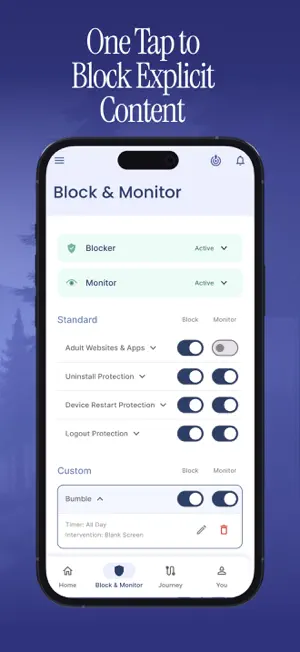
LeadMeNot — Digital Wellness & Focus Take back control of your screen time, protect your focus, and build healthier technology habits — for yourself or your whole family. LeadMeNot combines powerful app blocking, website filtering, and accountability tools with guided self-reflection to help you live with more intention and less distraction. WHY LEADMENOT? Most screen time apps just track what you do. LeadMeNot helps you actually change it — through smart controls, real accountability, and built-in tools for lasting habit growth. WHAT YOU CAN DO Block distracting or explicit apps and websites instantly. Set daily limits and custom schedules that fit your routine. Filter content by keyword so your boundaries are truly yours. Invite an accountability partner to receive alerts and stay in the loop. Monitor usage with clear activity reports. Reflect and grow with built-in journaling tools. Protect kids and teens with parental controls designed for real families. KEY FEATURES App & Website Blocker — block distracting or harmful content with intelligent filters Screen Time Limits — set daily caps and recurring schedules Custom Keywords & Rules — define what's off-limits, your way Accountability Alerts — notify a trusted partner when limits are crossed Activity Reports — see exactly where your time is going Journaling & Reflection — build self-awareness for long-term change Parental Controls — support healthy habits for kids and teens Multi-Device Coverage — extend protection across devices under one account Privacy-First — your data is encrypted and never sold or shared BUILT FOR People working through digital wellness or recovery. Parents wanting transparency without surveillance. Anyone looking to focus better and waste less time. Couples or friends who want mutual accountability. SUBSCRIPTION Free to download. Full access requires a monthly, annual, or lifetime subscription. Privacy Policy: leadmenot.org/privacy Terms of Use: leadmenot.org/terms
Ratings & reviews
4.7
86 ratings
What’s new
Version 1.0.86 · Updated October 22, 2026
LeadMeNot just got even stronger. • Enhanced Website Protection – We've introduced new VPN-powered technology to strengthen adult website blocking and help close more loopholes across your device. • Now Supporting Digital Gambling Protection – Expand your digital wellness journey by blocking access to online gambling websites directly within LeadMeNot. • Custom Keyword Blocking for Safari – Take control with personalized keyword blocking and monitoring in Safari. • Real-Time Accountability Alerts – Accountability partners can now receive alerts when custom keyword rules are triggered, creating faster conversations and stronger support. This update delivers more powerful protection, greater customization, and stronger accountability to help you stay focused on what matters most.
App privacy
The developer, CJ2 Solutions, LLC, reported these privacy practices to Apple.
Data Not Collected
The developer does not collect any data from this app.
Alternatives to LeadMeNot: Screen Time Control
Looking for apps like LeadMeNot: Screen Time Control? Here are 6 similar apps on the App Store. The highest rated is Phone Jail - Tools for Focus (4.8/5), and all 6 are free to download.
-
 BlockP: Adult Site Blocker
4.5
BlockP: Adult Site Blocker
4.5
-
 ShieldX: Privacy
4.2
ShieldX: Privacy
4.2
-
 Phone Jail - Tools for Focus
4.8
Phone Jail - Tools for Focus
4.8
-
 QuitBuddy: Quit Addiction
4.7
QuitBuddy: Quit Addiction
4.7
-
 Smart Cleaner : Free Storage
4.2
Smart Cleaner : Free Storage
4.2
-
 X Browser PRO - Private & Safe
4.4
X Browser PRO - Private & Safe
4.4
| App | Rating | Price | Last updated | Compare |
|---|---|---|---|---|
| LeadMeNot: Screen Time Control | 4.7 / 5 (86 ratings) | Free | October 22, 2026 | |
| BlockP: Adult Site Blocker | 4.5 / 5 (286) | Free | Oct 21, 2026 | Compare |
| ShieldX: Privacy | 4.2 / 5 (254) | Free | Apr 13, 2026 | Compare |
| Phone Jail - Tools for Focus | 4.8 / 5 (40) | Free | Apr 21, 2026 | Compare |
| QuitBuddy: Quit Addiction | 4.7 / 5 (229) | Free | Oct 22, 2026 | Compare |
| Smart Cleaner : Free Storage | 4.2 / 5 (442) | Free | Sep 30, 2026 | Compare |
| X Browser PRO - Private & Safe | 4.4 / 5 (677) | Free | Apr 29, 2025 | Compare |