

Google Tasks: VIBRA Tasks
VIBRA K.K. Productivity iPhoneiPadiPod touchApple Watch
Google Tasks: VIBRA Tasks is a free Productivity app for iPhone and iPad by VIBRA K.K. Requires iOS 26.0. Updated October 4, 2026.
- Price
- Free
- on the App Store
- Size
- 32 MB
- Age 4+
- Updated
- Oct 4
- 2026 · v1.0.33
Screenshots


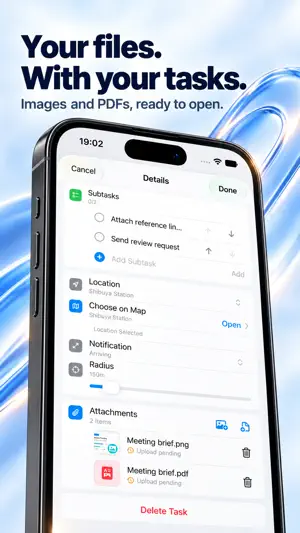

About Google Tasks: VIBRA Tasks
See tasks from multiple Google accounts in one view, without switching accounts. Set location reminders for arrivals and departures, attach photos and documents, and manage subtasks. View and edit saved tasks even when you’re offline. Find what you need with Today, Scheduled, Starred, All, and Completed views. Organize lists with colors and icons, and pin the ones you use most. Create and edit tasks and lists, mark tasks complete, or reopen them. Set a time as well as a date, schedule repeating tasks, and get reminders when you arrive at or leave a place. Attach photos, documents, and scans to keep the information you need with each task. Available on iPhone, iPad, and Apple Watch. Access tasks from Home Screen and Lock Screen widgets or the share sheet, and use Siri Shortcuts to open or complete tasks. Key features: - Location reminders for arrivals and departures - Photo, document, and scan attachments - View, create, edit, complete, and reorder subtasks - Offline access to view and edit saved tasks - All, Today, Scheduled, Starred, and Completed views - Create, rename, and delete Google Tasks lists - Create, edit, complete, reopen, and delete tasks - Notes, due times, stars, recurring tasks, and links in notes - Home Screen and Lock Screen widgets - Share sheet, Home Screen Quick Actions, Shortcuts, and deep links - List colors, icons, pinning, ordering, and organization Terms of Use (EULA): https://www.apple.com/legal/internet-services/itunes/dev/stdeula/
What’s new
Version 1.0.33 · Updated October 4, 2026
Improved app stability.
App privacy
The developer, VIBRA K.K., reported these privacy practices to Apple.
Data Used to Track You
The following data may be used to track you across apps and websites owned by other companies:
- Purchases: Purchase History
- Identifiers: User ID, Device ID
- Usage Data: Product Interaction, Advertising Data
Data Linked to You
The following data, which may be collected and linked to your identity, may be used for the following purposes:
- Usage Data: Advertising Data, Product Interaction, Other Usage Data
- Purchases: Purchase History
- Identifiers: User ID, Device ID
- Diagnostics: Crash Data, Performance Data, Other Diagnostic Data
- Contact Info: Email Address
- User Content: Other User Content
Used for: Developer’s Advertising or Marketing, Analytics, App Functionality
Data Not Linked to You
The following data, which may be collected but is not linked to your identity, may be used for the following purposes:
- Purchases: Purchase History
- Identifiers: User ID, Device ID
- Usage Data: Product Interaction
Used for: Developer’s Advertising or Marketing
Alternatives to Google Tasks: VIBRA Tasks
Looking for apps like Google Tasks: VIBRA Tasks? Here are 6 similar apps on the App Store. The highest rated is EasyReviews - Google Reviews (5.0/5), and all 6 are free to download.
-
 EasyReviews - Google Reviews
5.0
EasyReviews - Google Reviews
5.0
-
 Tidalist
-
 StoryCharts
-
 vibetime.
5.0
vibetime.
5.0
-
 Blocks: Budget Time Better
5.0
Blocks: Budget Time Better
5.0
-
 Henji - AI Reply Keyboard
| App | Rating | Price | Last updated | Compare |
|---|---|---|---|---|
| Google Tasks: VIBRA Tasks | – | Free | October 4, 2026 | |
| EasyReviews - Google Reviews | 5.0 / 5 (1) | Free | Sep 17, 2026 | Compare |
| Tidalist | – | Free | Jul 21, 2026 | Compare |
| StoryCharts | – | Free | Apr 23, 2026 | Compare |
| vibetime. | 5.0 / 5 (3) | Free | Jul 30, 2026 | Compare |
| Blocks: Budget Time Better | 5.0 / 5 (1) | Free | Sep 11, 2026 | Compare |
| Henji - AI Reply Keyboard | – | Free | Sep 15, 2026 | Compare |