

Fasting Clock: 16:8 OMAD Log
LEAN ASIA CO., LTD Health & Fitness iPhoneiPadiPod touch
Fasting Clock: 16:8 OMAD Log is a free Health & Fitness app for iPhone and iPad by LEAN ASIA CO., LTD. Requires iOS 17.0. Updated September 16, 2026.
- Price
- Free
- on the App Store
- Size
- 3 MB
- Age 4+
- Updated
- Sep 16
- 2026 · v1.1
Screenshots
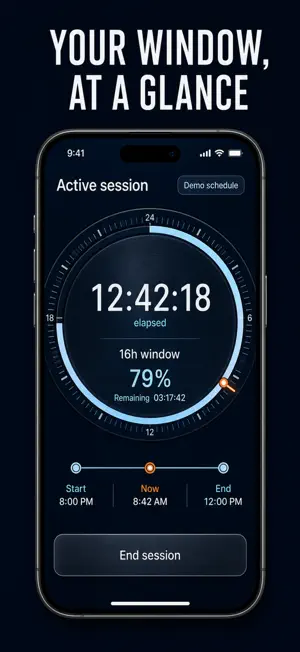

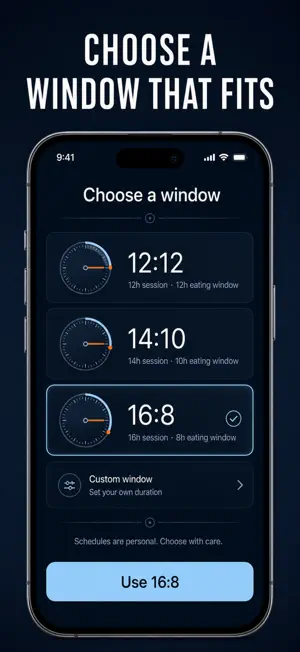

About Fasting Clock: 16:8 OMAD Log
Start a fasting timer, close the app, and trust the number when you come back. FastTrkr tracks your intermittent fasting window — 16:8, 14:10, 12:12, 18:6, 20:4 or OMAD — shows elapsed time against your target, then counts down the eating window that follows. Most fasting apps want your email, your weight, your meal photos and a coaching plan. FastTrkr is the opposite: a precise fasting clock with an honest log. The timer is anchored to your iPhone's continuous system clock, so elapsed time stays correct through reboots, timezone changes and clock adjustments. And it records the hours that actually ran — end at 15.2 hours and the log says 15.2, never a rounded-up target. WHAT YOU GET • Open the app 14 hours into a 16:8 and "14:22:07 of 16h" is already on the ring — the clock kept counting while the app was closed • End the fast and an eating-window countdown takes its place, so you know dinner has to land inside the next 7 hours 40 minutes • One local reminder fires the minute your window completes — no fast quietly stretching to 19 hours because you forgot it was running • A day streak, windows-met total and lifetime fast count sit under the ring every time you open the app • Tapped End by accident at hour 3? Edit the start and end times and the session is corrected, with a note field for how it felt • A 14-day bar chart shows your recorded fasting hours at a glance PERFECT FOR • 16:8 beginners who want one number, not a lifestyle program • OMAD and 20:4 practitioners who need a timer that takes long windows seriously • Anyone who quit a fasting app because it demanded an account and a weigh-in first • Shift workers whose windows move — custom hour targets when the standard presets don't fit WHY NOT JUST USE THE CLOCK APP? A plain timer forgets everything when it ends, loses your fast when the phone reboots, and knows nothing about eating windows. FastTrkr survives a reboot mid-fast, logs every session to an editable history, keeps your streak, and tells you when the eating window closes — things a stopwatch will never do. PRIVATE BY DEFAULT No account, no analytics, no ads, no server. Every session is stored on your iPhone and the app works fully offline. Nothing you record ever leaves the device. FastTrkr is a timer, not medical advice. Fasting is not suitable for everyone — read the in-app safety guidance and talk to a clinician if you are unsure. FULL ACCESS FastTrkr Pro unlocks the extended protocols — 18:6, 20:4, OMAD and custom targets up to 23 hours — plus the 14-day hours chart. Choose a weekly or yearly subscription, or a one-time lifetime purchase. Start your first 16:8 tonight — by breakfast the ring will tell you exactly where you stand. Terms of Use: https://leanstudio.asia/terms-of-use Privacy Policy: https://leanstudio.asia/privacy-policy Support: [email protected]
What’s new
Version 1.1 · Updated September 16, 2026
Bug fixes and performance improvements. Thanks for using the app — your feedback keeps it getting better.
App privacy
The developer, LEAN ASIA CO., LTD, reported these privacy practices to Apple.
Data Not Collected
The developer does not collect any data from this app.
Alternatives to Fasting Clock: 16:8 OMAD Log
Looking for apps like Fasting Clock: 16:8 OMAD Log? Here are 6 similar apps on the App Store. The highest rated is Hair Growth AI (5.0/5), and all 6 are free to download.
-
 CycleGuide - Menstrual Tracker
-
 Hair Growth AI
5.0
Hair Growth AI
5.0
-
 Intermittent Fasting: IF24
5.0
Intermittent Fasting: IF24
5.0
-
 Fast Easy - Fasting Timer
5.0
Fast Easy - Fasting Timer
5.0
-
 Diary 365 & me
4.9
Diary 365 & me
4.9
-
 نظام الطيبات الصحي
| App | Rating | Price | Last updated | Compare |
|---|---|---|---|---|
| Fasting Clock: 16:8 OMAD Log | – | Free | September 16, 2026 | |
| CycleGuide - Menstrual Tracker | – | Free | Jun 5, 2026 | Compare |
| Hair Growth AI | 5.0 / 5 (5) | Free | Feb 3, 2026 | Compare |
| Intermittent Fasting: IF24 | 5.0 / 5 (7) | Free | Sep 16, 2026 | Compare |
| Fast Easy - Fasting Timer | 5.0 / 5 (1) | Free | Feb 17, 2026 | Compare |
| Diary 365 & me | 4.9 / 5 (493) | Free | Mar 22, 2026 | Compare |
| نظام الطيبات الصحي | – | Free | Jul 8, 2026 | Compare |