

MegaMessenger
Michael Jandreau Productivity iPhoneiPadiPod touchMac
MegaMessenger is a paid Productivity app for iPhone and iPad by Michael Jandreau. Rated 5.0/5 from 1 ratings. Requires iOS 26.0. Updated October 1, 2026.
- Rating
- 5.0
- 1 ratings
- Price
- 2.99 USD
- on the App Store
- Size
- 16 MB
- Age 4+
- Updated
- Oct 1
- 2026 · v1.1
Screenshots

About MegaMessenger
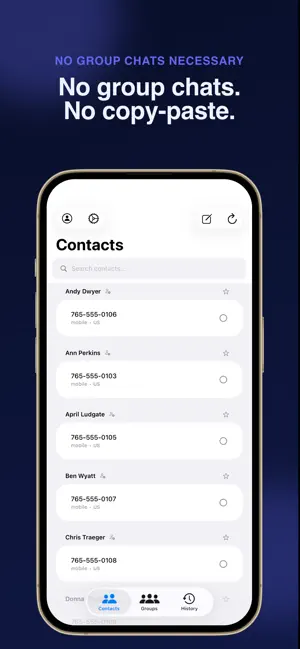
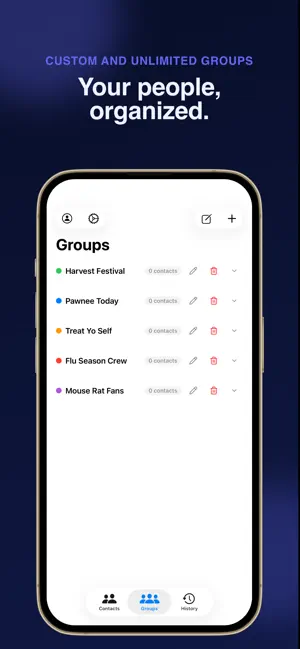
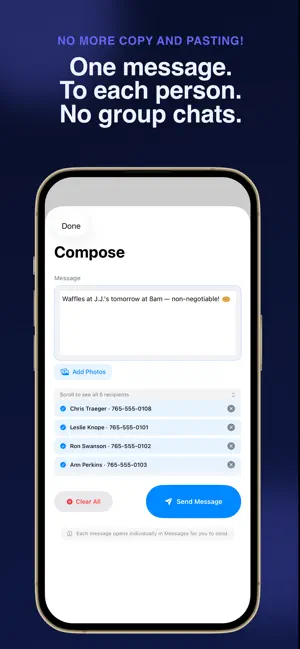
If you need to send the same message to a bunch of people separately but don’t want to copy and paste it every time, and you don’t want to use group chats, MegaMessenger is for you. Whether you’re coordinating with your team, reaching out to clients, or keeping family and friends in the loop, MegaMessenger handles the heavy lifting. Select your recipients, write your message once, and send — each person gets their own individual message, never a group chat. What you can do: Send to dozens (hundreds!) of contacts with just a few clicks — each receives a personal, individual message. No group chats are needed to send everyone the same message! Attach photos to your messages Build named Groups (Family, Work, Book Club) for one-tap recipient selection Assign keyboard shortcuts (⌘1–⌘9) to your groups for instant access. (macOS and iOS are both included in your purchase) Search and favorite your most-used contacts Review your full send history to easily re-send a past message if you missed someone. Works with iMessage and SMS — automatically falls back to SMS when iMessage isn’t available How it works: MegaMessenger uses the Messages app or Google Voice app on your device to send each message. No third-party servers. No account required. Your messages route through Apple’s or Google’s infrastructure, just like sending manually — only faster. Log in with iCloud: Sync your Groups and Message History across all of your devices. Login with Google and the Google Voice app are required for Google Voice to work (iOS only) Privacy first: Your contacts and messages never leave your device. MegaMessenger reads your Contacts and controls the Messages app locally — that’s it. By using MegaMessenger, you agree to Apple’s Standard Licensed Application End User License Agreement (EULA). For more information, please visit https://www.apple.com/legal/internet-services/itunes/dev/stdeula/
What’s new
Version 1.1 · Updated October 1, 2026
What's New • Log in with Google and use Google Voice to send your messages. • Automatically send iOS or Google Voice Messages with a built-in iOS Shortcut. No more tapping "Send" for every message. • Auto Send is more reliable — the one-tap send-to-everyone shortcut (iMessage and Google Voice) no longer silently fails partway through a batch. • Fixed a bug where selecting two different phone numbers for the same contact could send your message twice to one person and skip the other. • You can now send single-character messages and emoji — Send no longer stays greyed out for short messages. • Selecting a contact from your address book now shows the right selection state right away. • First time you use Auto Send, a quick heads-up explains that Shortcuts will briefly open and then bring you back — it won't show again after that. • Updated setup instructions for Google Voice to match the current iOS Settings path. • Updated in-app help documentation and an easier way to contact for support
App privacy
The developer, Michael Jandreau, reported these privacy practices to Apple.
Data Not Collected
The developer does not collect any data from this app.
Alternatives to MegaMessenger
Looking for apps like MegaMessenger? Here are 6 similar apps on the App Store. The highest rated is Documents & Scanner - DocDuck (5.0/5), and 5 of the 6 are free to download.
-
 Redactly: Redact PDF
-
 Documents & Scanner - DocDuck
5.0
Documents & Scanner - DocDuck
5.0
-
 Slate - Notes & Canvas
4.5
Slate - Notes & Canvas
4.5
-
 Markdown+ Text & Code Editor
-
 Tyze: Time Budget & Focus
-
 Prio.Space
5.0
Prio.Space
5.0
| App | Rating | Price | Last updated | Compare |
|---|---|---|---|---|
| MegaMessenger | 5.0 / 5 (1 rating) | 2.99 USD | October 1, 2026 | |
| Redactly: Redact PDF | – | Free | Oct 17, 2026 | Compare |
| Documents & Scanner - DocDuck | 5.0 / 5 (1) | Free | Oct 15, 2026 | Compare |
| Slate - Notes & Canvas | 4.5 / 5 (2) | Free | Feb 12, 2026 | Compare |
| Markdown+ Text & Code Editor | – | 9.99 USD | Sep 4, 2026 | Compare |
| Tyze: Time Budget & Focus | – | Free | Sep 6, 2026 | Compare |
| Prio.Space | 5.0 / 5 (2) | Free | Jan 5, 2026 | Compare |
Compare MegaMessenger with the top alternatives: ratings, updates, ASO score and keyword gaps →