

PaperPad - Handwritten Notes
Adam Malewski Productivity iPad
PaperPad - Handwritten Notes is a free Productivity app for iPad by Adam Malewski. Rated 5.0/5 from 1 ratings. Requires iOS 18.4. Updated October 14, 2026.
- Rating
- 5.0
- 1 ratings
- Price
- Free
- on the App Store
- Size
- 10 MB
- Age 4+
- Updated
- Oct 14
- 2026 · v1.1.3
Screenshots

About PaperPad - Handwritten Notes
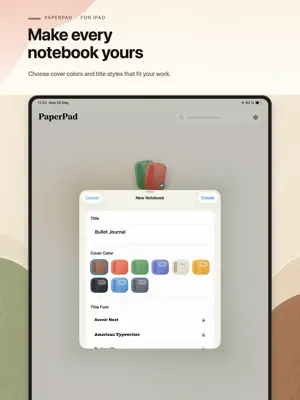
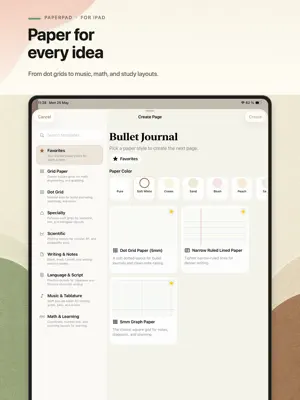
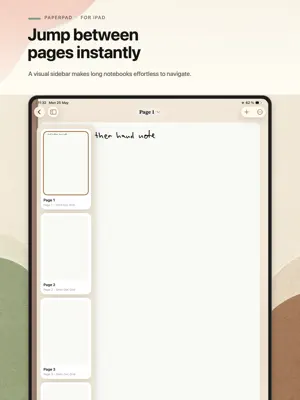
PaperPad is a calm iPad notebook app for handwriting, paper templates, and PDF-ready notes. Create notebooks for study, planning, work, journaling, or personal ideas. Choose a paper style, write with Apple Pencil or finger drawing, organize pages, and export clean PDFs when you need to save or share your notes. Start with the right paper: Blank pages Graph paper Dot grid Lined paper Cornell Notes Handwriting practice Language and script practice Music staff and tablature Math, scientific, and specialty layouts Write naturally: Use Apple Pencil input Enable finger drawing when needed Zoom in for detail Change page template and paper color Work with real page sizes: US Letter, A4, A5, and US Legal Organize your notebooks: Create custom notebook covers Choose cover colors and title fonts Browse pages in grid or list view Reorder notebook pages Open notebooks quickly with Home Screen widgets Protect the app with Face ID app lock Export your notes: Export a single page as PDF Export selected pages with Pro Export full notebooks with Pro PaperPad is local-first and does not require an account. Optional iCloud saving is available with Pro. Free includes: Up to 3 notebooks Up to 30 total pages Blank, Dot Grid 5mm, and Graph 5mm templates Single-page PDF export System, Light, and Dark themes Selected cover colors and title fonts All page sizes PaperPad Pro unlocks: Unlimited notebooks Unlimited pages All paper templates Full notebook PDF export Selected pages PDF export All notebook cover colors All title fonts All paper colors iCloud saving Pro themes PaperPad Pro is available monthly, yearly, or as a lifetime purchase. Terms of use: https://www.apple.com/legal/internet-services/itunes/dev/stdeula/
What’s new
Version 1.1.3 · Updated October 14, 2026
This update focuses on bug fixes and stability improvements: - Smoother page previews when browsing your notebooks. - Improved reliability for handwriting search and PDF export. - Better timing for rating prompts, with fewer interruptions while you work.
App privacy
The developer, Adam Malewski, reported these privacy practices to Apple.
Data Not Collected
The developer does not collect any data from this app.
Alternatives to PaperPad - Handwritten Notes
Looking for apps like PaperPad - Handwritten Notes? Here are 6 similar apps on the App Store. The highest rated is Simplify Notes: PDF Notebook (5.0/5), and all 6 are free to download.
-
 Compbook
-
 Papyrus - notes, PDF
-
 Simplify Notes: PDF Notebook
5.0
Simplify Notes: PDF Notebook
5.0
-
 Serious Notebook
5.0
Serious Notebook
5.0
-
 ScribblePad: Notes & PDF
5.0
ScribblePad: Notes & PDF
5.0
-
 NoteApp, Mindmap, PDF: InkNode
4.3
NoteApp, Mindmap, PDF: InkNode
4.3
| App | Rating | Price | Last updated | Compare |
|---|---|---|---|---|
| PaperPad - Handwritten Notes | 5.0 / 5 (1 rating) | Free | October 14, 2026 | |
| Compbook | – | Free | Oct 18, 2026 | Compare |
| Papyrus - notes, PDF | – | Free | Aug 20, 2026 | Compare |
| Simplify Notes: PDF Notebook | 5.0 / 5 (3) | Free | Oct 21, 2026 | Compare |
| Serious Notebook | 5.0 / 5 (1) | Free | Oct 12, 2026 | Compare |
| ScribblePad: Notes & PDF | 5.0 / 5 (3) | Free | Sep 7, 2026 | Compare |
| NoteApp, Mindmap, PDF: InkNode | 4.3 / 5 (7) | Free | Aug 10, 2026 | Compare |