

Compbook
Porcellus, Inc. Productivity iPad
Compbook is a free Productivity app for iPad by Porcellus, Inc. Requires iOS 17.0. Updated September 14, 2026.
- Price
- Free
- on the App Store
- Size
- 27 MB
- Age 4+
- Updated
- Sep 14
- 2026 · v1.0.8
Screenshots
About Compbook
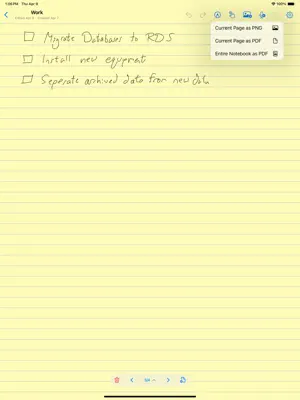
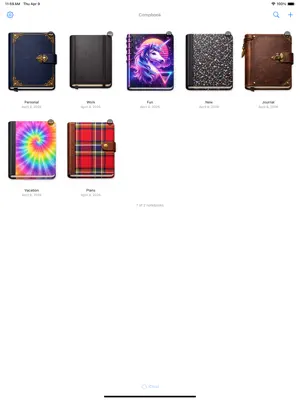
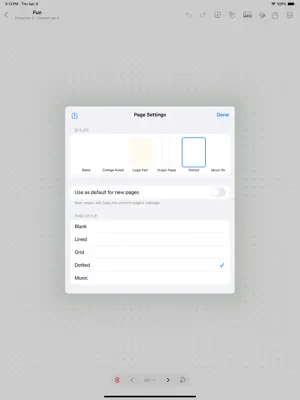
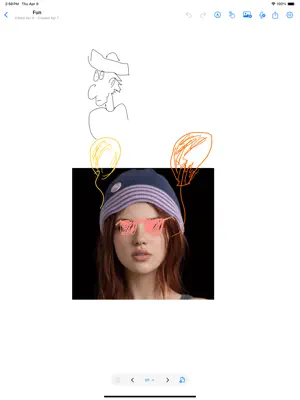
Compbook is a notebook app built for Apple Pencil, but compatible with third party styluses as well. No clutter — just open it up and start writing. -Paper styles for every use Choose from blank, college ruled, graph paper, dotted, and music sheet layouts. Adjust line spacing and colors to match how you like to work. Save your favorite setups as custom presets. -More than just ink Drop photos onto any page and arrange them alongside your notes. Record audio clips right on the page — perfect for lectures, meetings, or voice memos. Import PDFs and annotate them with your own handwriting. -Find anything you wrote Compbook recognizes your handwriting and lets you search across every notebook at once. Just type a word and jump straight to the page. -Organize your way Create as many notebooks as you need. Add, reorder, and remove pages freely. Each notebook gets its own cover — pick from classic composition, leather, denim, tie-dye, and more. -Always backed up Your notebooks sync automatically across your iPads with iCloud. Export everything as a single backup file to keep a local copy, or share it with a friend. Import backups to pick up right where you left off. -Share your work Export any page or an entire notebook as a PDF. Send notes to classmates, share sketches with collaborators, or just save a copy to Files. -No nonsense No login required. No ads. Your notebooks are yours. Get started free, or unlock Compbook Pro for unlimited notebooks, pages, and premium covers.
What’s new
Version 1.0.8 · Updated September 14, 2026
- Bookmarks — Save your place! Bookmark any page with a custom name, jump to bookmarks from inside a notebook, or browse them all from the new bookmarks button on the home screen. - Jump Back In — Your recently edited notebooks now appear at the top of the home screen, one tap away from the exact page you left off on. - Page Templates — Turn any page into a reusable template (style and drawings included), or import a photo as a full-page template. Find them alongside your styles in Page Settings. - View All Pages — New grid view in the page strip lets you see every page at a glance and jump straight to the one you need. - Bug fixes and performance improvements
App privacy
The developer, Porcellus, Inc., reported these privacy practices to Apple.
Data Not Collected
The developer does not collect any data from this app.
Alternatives to Compbook
Looking for apps like Compbook? Here are 6 similar apps on the App Store. The highest rated is Polite Fish Planner (5.0/5), and all 6 are free to download.
-
 NoteFolio: Digital Notebook
-
 Scriptum - Notebook Creator
-
 Notes at Hand
-
 Noteday: Notes, PDF & Notebook
-
 Polite Fish Planner
5.0
Polite Fish Planner
5.0
-
 Oaklet Notes
5.0
Oaklet Notes
5.0
| App | Rating | Price | Last updated | Compare |
|---|---|---|---|---|
| Compbook | – | Free | September 14, 2026 | |
| NoteFolio: Digital Notebook | – | Free | May 17, 2026 | Compare |
| Scriptum - Notebook Creator | – | Free | Sep 23, 2026 | Compare |
| Notes at Hand | – | Free | Aug 1, 2026 | Compare |
| Noteday: Notes, PDF & Notebook | – | Free | Sep 26, 2026 | Compare |
| Polite Fish Planner | 5.0 / 5 (1) | Free | Jun 30, 2026 | Compare |
| Oaklet Notes | 5.0 / 5 (1) | Free | Sep 23, 2026 | Compare |
Compare Compbook with the top alternatives: ratings, updates, ASO score and keyword gaps →