

PDF Converter - Smart Scanner
Yusuf OZCAN Productivity iPhoneiPadiPod touch
PDF Converter - Smart Scanner is a free Productivity app for iPhone and iPad by Yusuf OZCAN. Requires iOS 26.4. Updated September 24, 2026.
- Price
- Free
- on the App Store
- Size
- 6 MB
- Age 4+
- Updated
- Sep 24
- 2026 · v1.5.1
Screenshots


About PDF Converter - Smart Scanner
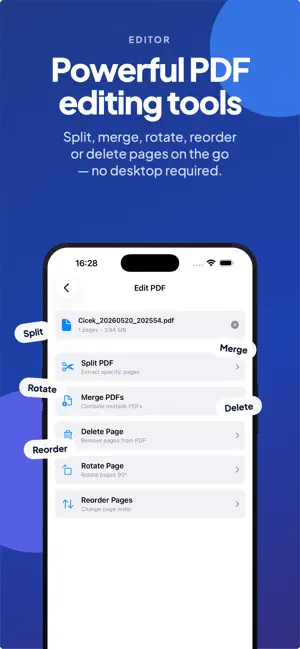
Welcome to PDF Converter — your all-in-one PDF productivity companion for iPhone and iPad. Edit, convert, compress, organize and secure your PDF files with a fast, modern, and completely ad-free experience. No subscriptions. No hidden limitations. Just powerful PDF tools built for productivity. Why choose PDF Converter? • Fast PDF Reader Open and read large PDF files smoothly with crisp rendering, fast loading, and instant navigation. • Powerful PDF Editing Rotate, delete, and reorder pages easily with safe, non-destructive editing. • Smart PDF Compression Reduce file size quickly while maintaining high-quality text and images. • Image to PDF Conversion Convert photos, scans, and screenshots into professional PDF documents instantly. • Secure Your Files Protect sensitive documents with password encryption while keeping everything stored locally on your device. • Privacy First Your files never leave your device. No uploads, no cloud storage, and no tracking. • Clean File Management Organize, access, and manage your PDFs in a simple and efficient workspace. • Modern Themes Choose between light, dark, system, and custom themes for a personalized experience. Built for speed. Designed for simplicity. Made for productivity. Download PDF Converter today and enjoy a truly free, private, and ad-free PDF experience.
What’s new
Version 1.5.1 · Updated September 24, 2026
This update focuses on reliability and safety of your documents. - Images to PDF and Scan handle large batches of high-resolution photos much more reliably - PDF pages from photos now use standard A4/Letter size - Password-protected PDFs can be opened in the viewer by entering the password - Merge, Compress and Edit now clearly tell you when a PDF is password-protected - Compression keeps rotated and cropped pages correct, and never saves a file that isn't smaller - Text to PDF supports more text encodings and lets you type text directly - If a photo can't be loaded, you're now told instead of it being silently skipped - Better support for file names with emoji and special characters - Support for larger text sizes (Dynamic Type) - Many stability and performance improvements
App privacy
The developer, Yusuf OZCAN, reported these privacy practices to Apple.
Data Not Collected
The developer does not collect any data from this app.
Alternatives to PDF Converter - Smart Scanner
Looking for apps like PDF Converter - Smart Scanner? Here are 6 similar apps on the App Store. The highest rated is SureDriver (3.0/5), and all 6 are free to download.
-
 PDF Scanner: Doc & OCR Convert
-
 Scanly — PDF Scanner & Tools
-
 Scanify: PDF & OCR Scanner
-
 SureDriver
3.0
SureDriver
3.0
-
 Image to PDF - Scan & Edit App
-
 Simple Payment Tracker
| App | Rating | Price | Last updated | Compare |
|---|---|---|---|---|
| PDF Converter - Smart Scanner | – | Free | September 24, 2026 | |
| PDF Scanner: Doc & OCR Convert | – | Free | May 27, 2026 | Compare |
| Scanly — PDF Scanner & Tools | – | Free | May 27, 2026 | Compare |
| Scanify: PDF & OCR Scanner | – | Free | Jun 11, 2026 | Compare |
| SureDriver | 3.0 / 5 (2) | Free | Nov 20, 2023 | Compare |
| Image to PDF - Scan & Edit App | – | Free | Jul 13, 2026 | Compare |
| Simple Payment Tracker | – | Free | Oct 22, 2026 | Compare |