

PDFfiled: PDF Editor-Scanner
Jeet Kakadiya Productivity iPhoneiPadiPod touch
PDFfiled: PDF Editor-Scanner is a free Productivity app for iPhone and iPad by Jeet Kakadiya. Requires iOS 18.0. Updated September 23, 2026.
- Price
- Free
- on the App Store
- Size
- 200 MB
- Age 4+
- Updated
- Sep 23
- 2026 · v1.1.1
Screenshots



About PDFfiled: PDF Editor-Scanner
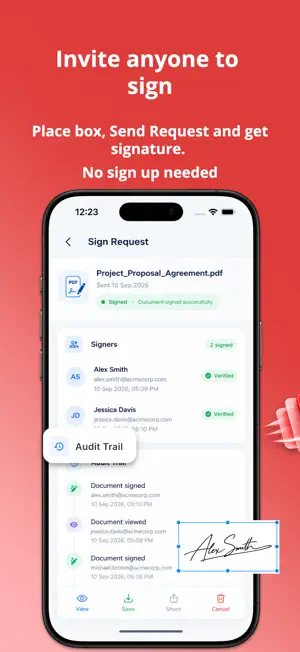
15 PDF tools. No watermark. No sign-up. Truly free. PDFfiled is a complete PDF toolkit — scan, edit, sign, and manage documents in one lightweight app that works entirely offline. Built for students, professionals, and small businesses who need real PDF tools without subscriptions, watermarks, or forced accounts. FILL & SIGN ANY DOCUMENT - Skip the printer entirely — fill out any form right on your screen, no pen or paper needed - Scan your signature once, then reuse it with a single tap, forever - Or draw a fresh signature directly on the page in seconds - Drop in images, stamps, or custom digital signatures anywhere you need them - Send a signing link straight to WhatsApp, Gmail, or SMS — no app download required on their end - Watch signed documents land back in your hands, instantly - Built for contracts, consent forms, agreements, and invoices — anything that used to mean printing, signing, and scanning back DOCUMENT SCANNER - Smart auto edge detection and perspective correction - Scan receipts, invoices, contracts, IDs, whiteboards, and textbooks - Multi-page scanning — combine into a single clean PDF - Automatic scan quality enhancement PDF READER & EDITOR - Read and annotate any PDF - Draw, highlight, and add comments on any page - Add blank or scanned pages to existing PDFs - Reorder, rotate, delete, and organize pages 15 PDF TOOLS IN ONE APP - Compress — reduce file size by up to 75% - Merge — combine multiple PDFs into one - Split — extract specific pages into new files - Lock / Unlock — add or remove password encryption - Watermark — add text or image watermarks - Image to PDF & PDF to Image — convert instantly, full quality - Page Numbers — add and customize numbering AI DOCUMENT SUMMARIZER - Summarize lengthy PDFs and documents in seconds with key takeaways - Export summaries directly as a formatted PDF or TXT file - Save time reading long contracts, reports, or research papers SHARE AND EXPORT - Share via WhatsApp, Gmail, Google Drive, Dropbox, and more - Export as PDF or image, full quality, no watermark - Files stay on your device unless you choose to share WHO IT'S FOR - Students — scan notes, textbooks, and assignments into clean PDFs - Professionals — sign contracts and invoices without printing a single page - Small businesses — merge, compress, and share client documents on the go - Anyone who wants a fast, reliable PDF app without confusing menus PDFFILED PRO - Unlock all 12+ professional PDF tools with an ad-free experience - Flexible weekly, monthly, and yearly plans - Instant purchase restoration across all your Apple devices - Manage your subscription anytime from the Active Member dashboard PRIVACY FIRST - Your documents are processed on your device — not uploaded to a server - No account required to scan, edit, or export - Full control over what you share, and with whom WHY PDFFILED - No watermark, ever — on any export - No forced account creation — open and start immediately - Fully offline — no internet required, your files never leave your device - Lightweight and fast — won't slow down your phone - Genuinely free — no hidden costs, no premium wall Download PDFfiled and go paperless today.
What’s new
Version 1.1.1 · Updated September 23, 2026
Welcome to the latest update of PDFfiled! In this version, we've introduced powerful new capabilities and major performance enhancements: ALL-NEW CROP PDF TOOL - Easily crop single pages, custom page ranges, or entire documents with precision. - Choose from standard aspect ratios or freely adjust margins to eliminate unwanted borders. - Preview cropped pages in real time before exporting high-quality output files. LOCALIZATION & QUOTA EXPERIENCE - Fully localized usage quota and subscription screens across all supported languages. - Seamless unlocked bonus uses and clear daily limit management. - Refined paywall and subscription dialog layouts for a smoother user experience. PERFORMANCE & PDF ENGINE UPGRADES - Upgraded PDF rendering engine for faster document loading and smoother page transitions. - Improved reliability when opening and viewing password-protected PDF files. - Optimized memory usage for large documents and overall app stability fixes. Thank you for using PDFfiled! If you love the app, please leave us a review on the App Store.
App privacy
The developer, Jeet Kakadiya, reported these privacy practices to Apple.
Data Used to Track You
The following data may be used to track you across apps and websites owned by other companies:
- Identifiers: Device ID
- Usage Data: Product Interaction, Advertising Data
Data Linked to You
The following data, which may be collected and linked to your identity, may be used for the following purposes:
- Identifiers: Device ID
- Usage Data: Product Interaction, Advertising Data
- Diagnostics: Crash Data, Performance Data
Used for: Third-Party Advertising, Analytics, App Functionality
Alternatives to PDFfiled: PDF Editor-Scanner
Looking for apps like PDFfiled: PDF Editor-Scanner? Here are 6 similar apps on the App Store. The highest rated is PDFix: Edit, Sign, Convert PDF (5.0/5), and all 6 are free to download.
-
 FileMaster: Offline Scanner
1.0
-
 PDFix: Edit, Sign, Convert PDF
5.0
-
 Private AI: Personal Chat
5.0
-
 All Document Reader & Scanner
4.8
-
 DGenius AI CV & Cover Builder
-
 PDF Extractor: Image & OCR
| App | Rating | Price | Last updated | Compare |
|---|---|---|---|---|
| PDFfiled: PDF Editor-Scanner | – | Free | September 23, 2026 | |
| FileMaster: Offline Scanner | 1.0 / 5 (1) | Free | Jul 27, 2026 | Compare |
| PDFix: Edit, Sign, Convert PDF | 5.0 / 5 (3) | Free | Oct 1, 2026 | Compare |
| Private AI: Personal Chat | 5.0 / 5 (1) | Free | Oct 10, 2026 | Compare |
| All Document Reader & Scanner | 4.8 / 5 (10) | Free | Jul 10, 2026 | Compare |
| DGenius AI CV & Cover Builder | – | Free | Jul 29, 2026 | Compare |
| PDF Extractor: Image & OCR | – | Free | Sep 7, 2026 | Compare |