

QuickTimeLapse
WEI HAN YEN Photo & Video iPhoneiPadiPod touch
QuickTimeLapse is a free Photo & Video app for iPhone and iPad by WEI HAN YEN. Requires iOS 18.0. Updated July 12, 2026.
- Price
- Free
- on the App Store
- Size
- 9 MB
- Age 4+
- Updated
- Jul 12
- 2026 · v1.2.1
Screenshots

About QuickTimeLapse
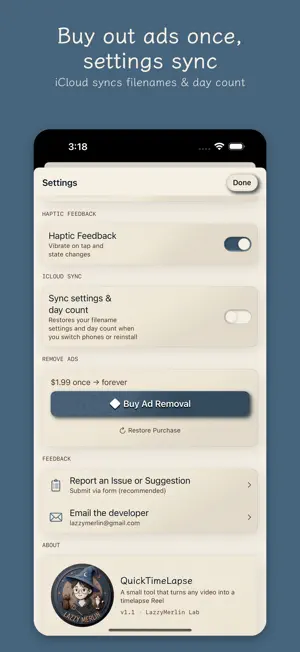
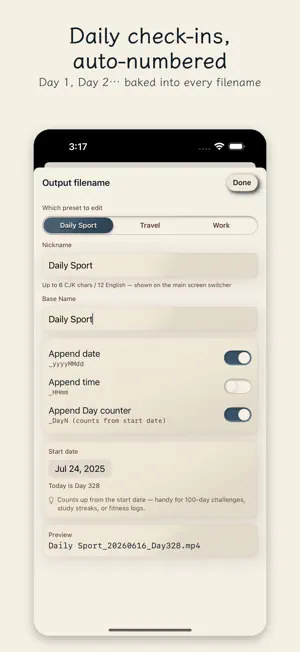
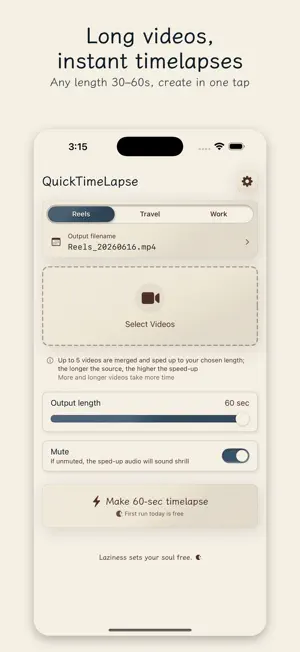
Turn long videos into 60-second timelapses, ready for Reels, TikTok, and YouTube Shorts. Pick 1 to 5 videos. QuickTimeLapse auto-calculates the speed and crunches them into a single 60-second clip. No sign-up, no uploads — your videos never leave your iPhone. — Features — • Up to 5 videos at once, auto-stitched into 60 seconds • Day Counter auto-numbering for daily check-ins (workouts, yoga, cooking, travel) — filenames carry Day 1 / Day 2 … • Custom filename templates — mix date, sequence, and your own text • PHPicker-based selection — no full Photos library access required • Fully on-device — nothing uploaded — Who it's for — Anyone tracking daily workouts, yoga, cooking, or travel vlogs as a timelapse series. Anyone who wants to crunch long footage into Reels, TikTok, or YouTube Shorts. — Pricing — Free to download. The first conversion each day is ad-free; from the second conversion on, you'll see one ad before processing. "Remove Ads" is a one-time purchase that removes all ads forever (no subscription). — Story — I film my workouts every day and wanted to compress them into 60-second timelapses for Instagram. I used to airdrop every clip to my Mac just to make a timelapse in iMovie — the back-and-forth was a hassle. I couldn't find a tool that felt right, so I vibe-coded one myself. Hope it helps if you're in the same boat. — Feedback — Tap Settings → Report a Problem inside the app to write to me directly. I'll do my best to reply.
What’s new
Version 1.2.1 · Updated July 12, 2026
v1.2.1 — Stability update: • Source videos are kept after conversion, so you can tweak settings and re-convert without picking again • Very short clips convert more reliably and are no longer falsely flagged as failed • Equal-split mode automatically falls back to uniform speed when a clip is too short • Clear upfront warning when a clip is assigned too much output time • Ads that occasionally get stuck now close automatically and return you to the app Found a bug or want a feature? Tap Settings → Report a Problem to write to me directly. I'll do my best to reply.
App privacy
The developer, WEI HAN YEN, reported these privacy practices to Apple.
Data Used to Track You
The following data may be used to track you across apps and websites owned by other companies:
- Location: Coarse Location
- Identifiers: Device ID
- Usage Data: Product Interaction, Advertising Data
Data Linked to You
The following data, which may be collected and linked to your identity, may be used for the following purposes:
- Location: Coarse Location
- Identifiers: Device ID
- Usage Data: Product Interaction, Advertising Data
Used for: Third-Party Advertising
Data Not Linked to You
The following data, which may be collected but is not linked to your identity, may be used for the following purposes:
- Diagnostics: Crash Data, Performance Data, Other Diagnostic Data
Used for: App Functionality
Alternatives to QuickTimeLapse
Looking for apps like QuickTimeLapse? Here are 6 similar apps on the App Store. The highest rated is ezTimelapse - Video Converter (5.0/5), and 5 of the 6 are free to download.
-
 ChronaFrame: Timelapse Creator
-
 ezTimelapse - Video Converter
5.0
ezTimelapse - Video Converter
5.0
-
 InstantCut - Video Editor
-
 Framer - Photos & Timelapse
5.0
Framer - Photos & Timelapse
5.0
-
 PlantsLapse: Plant Timelapse
-
 FastCut - Video Speed & Trim
| App | Rating | Price | Last updated | Compare |
|---|---|---|---|---|
| QuickTimeLapse | – | Free | July 12, 2026 | |
| ChronaFrame: Timelapse Creator | – | Free | Feb 18, 2026 | Compare |
| ezTimelapse - Video Converter | 5.0 / 5 (2) | 0.99 USD | Jan 26, 2026 | Compare |
| InstantCut - Video Editor | – | Free | Oct 27, 2026 | Compare |
| Framer - Photos & Timelapse | 5.0 / 5 (1) | Free | May 21, 2026 | Compare |
| PlantsLapse: Plant Timelapse | – | Free | Apr 15, 2026 | Compare |
| FastCut - Video Speed & Trim | – | Free | Jun 23, 2026 | Compare |
Compare QuickTimeLapse with the top alternatives: ratings, updates, ASO score and keyword gaps →