

AspectArc
Robert Corbin Photo & Video iPhoneiPadiPod touch
AspectArc is a paid Photo & Video app for iPhone and iPad by Robert Corbin. Requires iOS 17.0. Updated October 25, 2026.
- Price
- 0.99 USD
- on the App Store
- Size
- 33 MB
- Age 4+
- Updated
- Oct 25
- 2026 · v3.0
Screenshots


About AspectArc
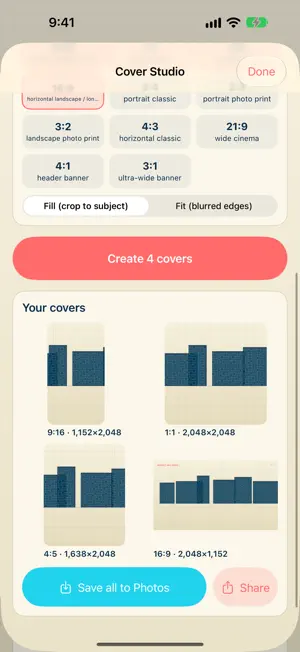
AspectArc is a local-first aspect-ratio studio for creators who need one video or photo to fit every format without guessing where the important parts will land. NEW IN 3.0: COVER STUDIO Pull the best frame from a clip and turn it into covers and thumbnails for every format at once. Scrub to the moment you want, or tap Suggest and AspectArc samples the clip and ranks frames that are sharp, well exposed and show faces. Choose your ratios (16:9, 9:16, 1:1, 4:5, 3:4, 2:3, banners and more) and every cover is cropped around the detected subject. Save them all to Photos or share them in one tap. ONE PRICE, EVERYTHING INCLUDED No subscription, no watermark, no account. Multi-format resizing, subject-aware reframing, batch export and cover making are all part of the app. CONVERT ANY CLIP OR PHOTO Pick a clip or still, choose a target ratio, set the focal point and export a clean result. Fit and Fill modes, padding styles (blur, solid, gradient, mirror and source color), quality and codec controls, and trimming are built in. SMART REFRAME AspectArc detects faces and salient subjects on the device and plans the crop for every ratio so your subject stays in frame. The Reframe Inspector shows how much of the subject survives each crop. SAFE ZONES AND DELIVERY AUDIT Preview safe-zone overlays for common interface areas so titles and captions stay clear. Delivery Audit checks the setup before you render: format match, export resolution, safe-zone coverage, crop risk, duration and estimated size, with a readiness score and fixes. WORK FASTER Multi-ratio batch export, saved workflow presets, an offline format reference, and conversion history with CSV export. Demo media lets you try every workflow without importing personal photos. PRIVATE BY DESIGN All media is processed on the device. Photo Library access is requested only when you import media or save an export. Nothing is uploaded.
What’s new
Version 3.0 · Updated October 25, 2026
AspectArc 3.0 adds Cover Studio and a cleaner, more modern layout. • Cover Studio: pick a moment from your clip or let AspectArc suggest the strongest frames (sharp, well exposed, faces in view), then export a cover image for 16:9, 9:16, 1:1, 4:5 and more in one tap. Each crop is framed on the detected subject. Save them all to Photos or share them. • The app now uses the system tab bar, with the new glass look on iOS 26. Sliders and the focal-point editor no longer risk switching tabs when you drag sideways. • Smart Reframe stays readable before a source is loaded and tells you what to do next. • More room for content: screens no longer sit under the tab bar.
App privacy
The developer, Robert Corbin, reported these privacy practices to Apple.
Data Not Collected
The developer does not collect any data from this app.
Alternatives to AspectArc
Looking for apps like AspectArc? Here are 6 similar apps on the App Store. The highest rated is Mosine (5.0/5), and all 6 are free to download.
-
 Traxxtar Videoview
-
 Mosine
5.0
Mosine
5.0
-
 berkbrain
5.0
berkbrain
5.0
-
 Afters: Disposable Camera
-
 Photo Clean: Photo Organizer
-
 Patchd: Video FX Playground
3.7
Patchd: Video FX Playground
3.7
| App | Rating | Price | Last updated | Compare |
|---|---|---|---|---|
| AspectArc | – | 0.99 USD | October 25, 2026 | |
| Traxxtar Videoview | – | Free | Oct 2, 2026 | Compare |
| Mosine | 5.0 / 5 (2) | Free | Oct 24, 2026 | Compare |
| berkbrain | 5.0 / 5 (1) | Free | Aug 13, 2026 | Compare |
| Afters: Disposable Camera | – | Free | Oct 26, 2026 | Compare |
| Photo Clean: Photo Organizer | – | Free | Oct 27, 2026 | Compare |
| Patchd: Video FX Playground | 3.7 / 5 (3) | Free | Oct 21, 2026 | Compare |
Compare AspectArc with the top alternatives: ratings, updates, ASO score and keyword gaps →