

DOKR PDF Pro: Scan & Sign
Waji Ahmed Productivity iPhoneiPadiPod touch
DOKR PDF Pro: Scan & Sign is a free Productivity app for iPhone and iPad by Waji Ahmed. Rated 4.0/5 from 1 ratings. Requires iOS 17.0. Updated June 23, 2026.
- Rating
- 4.0
- 1 ratings
- Price
- Free
- on the App Store
- Size
- 8 MB
- Age 4+
- Updated
- Jun 23
- 2026 · v4.3.0
Screenshots



About DOKR PDF Pro: Scan & Sign
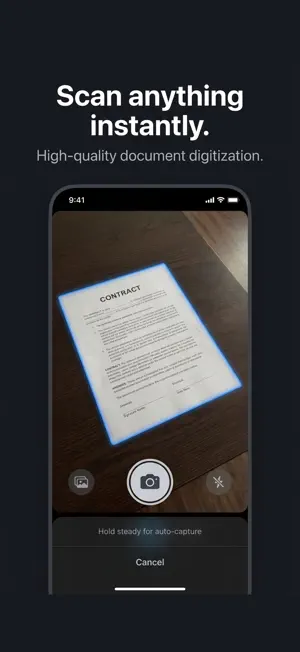
DOKR puts 23 powerful PDF tools in your pocket — all 100% offline. Scan, sign, merge, compress, annotate and protect your documents without any account, uploads, or subscription. SCAN ANYTHING Turn any paper into a perfect PDF. Auto edge detection and perspective correction make every scan sharp. Multi-page documents, instant export. SIGN WITHOUT PRINTING Draw your signature once, save it, apply it to any PDF in one tap. Legally binding. No printer needed. MERGE, SPLIT & ORGANIZE Combine PDFs, split out pages, reorder, rotate or remove pages with a tap. ANNOTATE & MARK UP Highlight, underline, add text, draw or stamp your PDFs. Everything saved in the file. COMPRESS & CONVERT Shrink PDF file size. Convert Word (.docx) to PDF completely offline, tables and images preserved. Extract text with OCR in 8 languages. PROTECT YOUR DOCUMENTS Password-protect any PDF. Add watermarks. Unlock encrypted files. BUILT FOR PRIVACY Every tool runs entirely on your iPhone. Your documents never leave your device. No server. No account. No exposure. ALL 22 TOOLS Camera Scan - Sign PDF - Merge PDFs - Split PDF - Compress - Annotate - Watermark - Protect PDF - Unlock PDF - OCR - Word to PDF - PDF to Image - Images to PDF - Extract Images - Form Fill - Page Numbers - Batch Rename - QR Generator - Rotate Pages - Reorder Pages - Remove Pages - File Manager No account. No uploads. No tracking. 100% on-device processing — always. Available in English, Francais, Espanol, Arabic, Urdu, Hindi, Bengali, Chinese.
What’s new
Version 4.3.0 · Updated June 23, 2026
DOKR PDF Pro — Scan, Sign & Convert Your complete PDF toolkit in one beautiful app. Scan documents, sign and fill, convert to and from PDF, merge, protect, compress, and organize — all with a fast, modern design and privacy built in. Nearly everything is processed right on your device. SCAN ANYTHING Turn paper into crisp PDFs with the document scanner — receipts, contracts, IDs, notes, and whole multi-page documents. Auto-edge detection, crop, rotate, and clean-up filters. CONVERT FREELY • Images to PDF (JPG, PNG & more) • PDF to images (PNG, JPG, GIF, TIFF) • Word, Excel & PowerPoint ⇄ PDF (optional cloud conversion you control) • HTML and text to PDF • PDF to text & Markdown SIGN & FILL Add a handwritten or typed signature, place it anywhere, fill in forms, and annotate with highlights, notes, and freehand markup. EDIT & ORGANIZE Merge, split, reorder, rotate, crop, resize pages, add text or image watermarks, remove blank pages, and batch-rename. Keep everything tidy with folders, recents, and instant search. SECURE YOUR DOCUMENTS Password-protect PDFs, redact sensitive content, and sanitize hidden data before you share. OPTIMIZE Compress large PDFs to share faster, convert to grayscale, and reduce file size without the hassle. SMART TOOLS Extract text from scans and images, generate and customize QR codes, and read codes instantly. MADE YOURS A clean, colorful interface with 10 color themes, smooth animations, and a layout designed to get you to the right tool in one tap. PRIVACY FIRST Your documents stay on your device — DOKR doesn't upload or store your files. The only exception is the optional Office Convert tool, which securely processes a file you explicitly choose and never keeps it afterward. FREE TO USE DOKR is free and supported by ads. Unlock Pro tools by watching an optional rewarded ad — no subscription required. 39 tools. One app. Total control over your PDFs. Questions or feedback? We'd love to hear from you.
App privacy
The developer, Waji Ahmed, reported these privacy practices to Apple.
Data Used to Track You
The following data may be used to track you across apps and websites owned by other companies:
- Location: Coarse Location
- Identifiers: Device ID
- Usage Data: Product Interaction, Advertising Data
Data Linked to You
The following data, which may be collected and linked to your identity, may be used for the following purposes:
- Location: Coarse Location
- Identifiers: Device ID
- Usage Data: Product Interaction, Advertising Data
Used for: Third-Party Advertising
Data Not Linked to You
The following data, which may be collected but is not linked to your identity, may be used for the following purposes:
- Diagnostics: Crash Data, Performance Data
Used for: App Functionality
Alternatives to DOKR PDF Pro: Scan & Sign
Looking for apps like DOKR PDF Pro: Scan & Sign? Here are 6 similar apps on the App Store. The highest rated is Hold My Thought: To Do List (5.0/5), and all 6 are free to download.
-
 Hold My Thought: To Do List
5.0
Hold My Thought: To Do List
5.0
-
 Grocyy - Receipt Scan & Track
-
 SnapScan: PDF Scanner & OCR
-
 SRT Fairs Scan
-
 BoltPDF: Fill, Sign & Edit PDF
4.5
BoltPDF: Fill, Sign & Edit PDF
4.5
-
 ProGigFinder: Work & Bookings
5.0
ProGigFinder: Work & Bookings
5.0
| App | Rating | Price | Last updated | Compare |
|---|---|---|---|---|
| DOKR PDF Pro: Scan & Sign | 4.0 / 5 (1 rating) | Free | June 23, 2026 | |
| Hold My Thought: To Do List | 5.0 / 5 (5) | Free | Jul 28, 2026 | Compare |
| Grocyy - Receipt Scan & Track | – | Free | Apr 21, 2026 | Compare |
| SnapScan: PDF Scanner & OCR | – | Free | Aug 26, 2026 | Compare |
| SRT Fairs Scan | – | Free | Sep 9, 2026 | Compare |
| BoltPDF: Fill, Sign & Edit PDF | 4.5 / 5 (25) | Free | Mar 11, 2026 | Compare |
| ProGigFinder: Work & Bookings | 5.0 / 5 (1) | Free | Aug 24, 2026 | Compare |