

Photo Format Converter
Nicholas Wright Photo & Video iPhoneiPadiPod touch
Photo Format Converter is a free Photo & Video app for iPhone and iPad by Nicholas Wright. Requires iOS 18.0. Updated June 2, 2026.
- Price
- Free
- on the App Store
- Size
- 1 MB
- Age 4+
- Updated
- Jun 2
- 2026 · v1.1
Screenshots


About Photo Format Converter
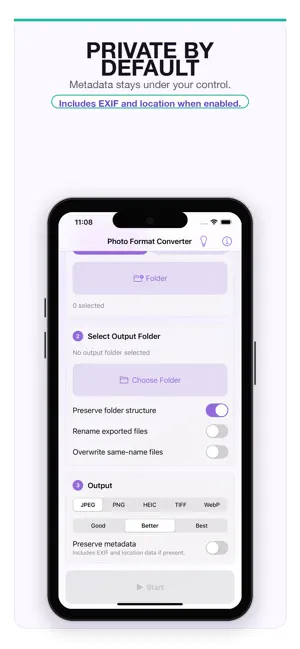
Photo Format Converter is a focused image conversion utility for Apple devices, built for people who want their files converted without ads, subscriptions, accounts, or confusing upsells. Add photos, open supported image files from compatible apps, or scan a folder, choose an output folder, select a target format, choose a quality preset when the output supports compression, then start the conversion. The app is designed for private, local workflows. It does not require an account, does not use analytics, does not show ads, and does not upload your photos to a server. By default, exported files remove embedded metadata; you can choose to preserve metadata when you need it. Key features: - Convert HEIC, HEIF, JPEG, PNG, TIFF, and WebP photos. - Batch convert selected photos. - Open supported image files from compatible apps through the iOS share/open-in flow. - Recursively import supported files from folders. - Export converted files to a folder you choose. - Choose Good, Better, or Best quality for lossy output formats. - Keep folder structure, rename recursively, or overwrite same-name files when needed. - Strip metadata by default for a more private export. - Use a simple first-run guide and built-in About page. Photo Format Converter is intentionally minimal: no cloud account, no subscription, no ads, and no tracking.
What’s new
Version 1.1 · Updated June 2, 2026
Version 1.1 adds a faster way to bring files into Photo Format Converter from other apps. - Open supported image files from compatible apps through the iOS share/open-in flow. - Added a first-run onboarding tip that clearly states the app has no ads ever. - Improved first-run behavior so onboarding appears on a fresh launch but does not interrupt files opened from another app.
App privacy
The developer, Nicholas Wright, reported these privacy practices to Apple.
Data Not Collected
The developer does not collect any data from this app.
Alternatives to Photo Format Converter
Looking for apps like Photo Format Converter? Here are 6 similar apps on the App Store. The highest rated is FaceLift - Natural AI Editor (5.0/5), and all 6 are free to download.
-
 Image Converter: HEIC JPG PNG
-
 Photo KB: Resize & Compress
-
 FaceLift - Natural AI Editor
5.0
FaceLift - Natural AI Editor
5.0
-
 AI Face Swap - Photo Editor
-
 Image Converter Plus
4.8
Image Converter Plus
4.8
-
 Photo Blender: Blend & Mix
4.6
Photo Blender: Blend & Mix
4.6
| App | Rating | Price | Last updated | Compare |
|---|---|---|---|---|
| Photo Format Converter | – | Free | June 2, 2026 | |
| Image Converter: HEIC JPG PNG | – | Free | Jul 1, 2026 | Compare |
| Photo KB: Resize & Compress | – | Free | Sep 22, 2026 | Compare |
| FaceLift - Natural AI Editor | 5.0 / 5 (1) | Free | Mar 9, 2026 | Compare |
| AI Face Swap - Photo Editor | – | Free | Aug 24, 2026 | Compare |
| Image Converter Plus | 4.8 / 5 (5) | Free | Oct 14, 2026 | Compare |
| Photo Blender: Blend & Mix | 4.6 / 5 (7) | Free | Oct 14, 2026 | Compare |