

Image Converter Plus
Denys Lebiediev Photo & Video iPhoneiPadiPod touch
Image Converter Plus is a free Photo & Video app for iPhone and iPad by Denys Lebiediev. Rated 4.8/5 from 5 ratings. Requires iOS 16.0.
- Rating
- 4.8
- 5 ratings
- Price
- Free
- on the App Store
- Size
- 42 MB
- Age 4+
- Updated
- Oct 14
- 2026 · v1.3.0
Screenshots

About Image Converter Plus
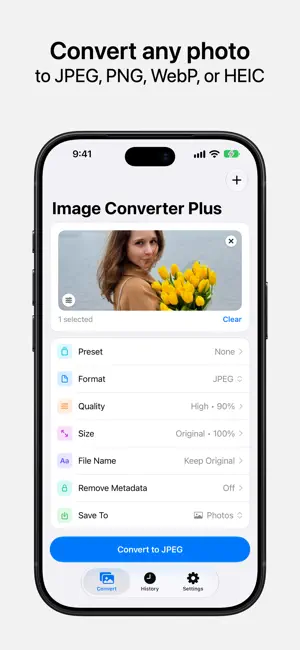
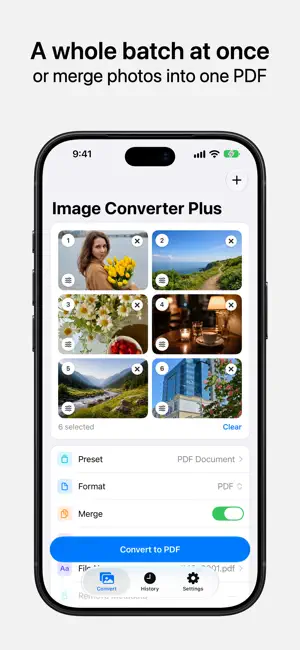
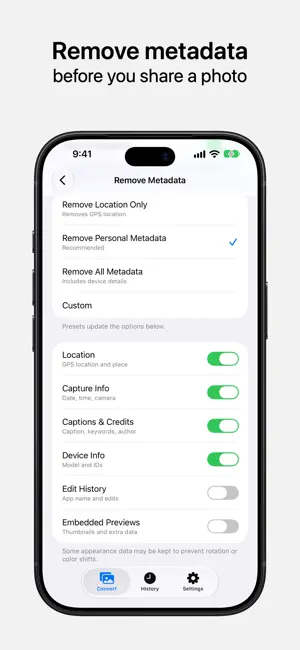
Image Converter Plus converts photos to JPEG, PNG, WebP, HEIC, AVIF, TIFF, or PDF, entirely on your iPhone or iPad. Adjust the quality and size, remove location and other hidden metadata, and convert a whole batch at once. Nothing is uploaded, and no account is needed. Convert Any Photo • Convert HEIC to JPEG for Windows, PNG to WebP for the web, or anything in between • Fine-tune quality to reduce file size, or keep every pixel with lossless PNG • Resize from half to double the original dimensions • Keep the original file name, or add your own prefix or suffix • Start from 10 built-in presets - JPEG High Quality, Quick Share, Private Photo, PDF Document, and more. Reorder, hide, or personalize them • Pick photos from your library or the Files app, and save the results to Photos, to Files, or straight to the share sheet A Whole Batch at Once • Convert dozens of photos in one go, with your settings applied to all of them • Give any photo in the batch its own format, quality, size, or file name • Merge photos into a single multi-page PDF • On iOS 26, a large batch keeps converting after you leave the app, with progress shown as a Live Activity Remove Metadata Before You Share A photo carries more than what you see. GPS coordinates, the camera model, the capture date, edit history, and even a small preview of the original can travel inside the file as EXIF and other metadata. Image Converter Plus removes what you choose, on your device, before you share. • Remove Location Only takes out GPS coordinates and place names • Remove Personal Metadata also clears capture details, device identifiers, and captions • Remove All Metadata leaves only what a photo needs to display correctly • Custom lets you decide category by category Keep Photos Private No cloud. No account. No uploads. Every conversion happens on your device, and your photos never leave it. An internet connection is used only for purchases, update checks, and the optional rewarded ads that free users can choose to watch. Convert from Anywhere • Share sheet: select photos in any app, tap Share, and choose Image Converter Plus • Files: open an image directly in Image Converter Plus from the Files app • Shortcuts: automate with Convert Image, Compress Image, Remove Image Metadata, Make PDF from Images, and Convert with Preset • Siri and Spotlight: say “Convert a photo with Image Converter Plus” • Control Center: add controls for converting, compressing, removing metadata, and making PDFs Find It Later in History • Every conversion is saved with a thumbnail and the settings you used • Export again to Photos, Files, or the share sheet at any time • Auto-delete after 7, 30, or 90 days, or keep everything Designed for Everyone • Full VoiceOver and Dynamic Type support, with haptic feedback throughout • Available in 61 languages, with an in-app picker that switches instantly Go Further with Pro Image Converter Plus is free to use for JPEG, PNG, WebP, and HEIC, at any quality or size. Pro adds: • PDF, AVIF, and TIFF output, including multi-page PDF • Batch conversion, in the app and from the share sheet • Per-photo settings within a batch • Metadata removal, with all four options • No ads Pro is available as a weekly, monthly, or annual subscription, or as a one-time Lifetime purchase that includes Family Sharing. Shortcuts actions require iOS 17.2 or later. Control Center controls require iOS 18 or later. Background conversion with a Live Activity requires iOS 26 or later.
Ratings & reviews
4.8
5 ratings
What’s new
Version 1.3.0 · Updated October 14, 2026
• New Shortcuts actions let you convert and compress images, remove metadata, make PDFs, and apply your presets — on their own or as part of an automation. • Ask Siri, search in Spotlight, or add a control to Control Center to jump straight to choosing images. Control Center controls require iOS 18 or later. • Conversions now continue after you leave the app, with a Live Activity that shows progress and lets you stop the batch. Requires iOS 26 or later. • Open images from the Files app with Image Converter Plus, or make it the default app for a file type, and they go straight to the Convert screen. Requires iOS 26 or later. • A refined design that follows iOS more closely: History is organized by day, Quality and Size presets use segmented controls, sheets apply changes as you make them, and the Convert button uses Liquid Glass on iOS 26. • Smaller, more private files: PDFs made from several photos are now up to 90% smaller, the Private Photo preset keeps photos close to their original size, and Capture Info removal covers every camera setting. • JPEG is now the default output format. You can choose another in Settings > Default Settings. • Fixes an issue where saving to Files sometimes wasn’t recorded in History. • Improves support for larger text sizes, VoiceOver, Increase Contrast, and Reduce Motion. Thanks for using Image Converter Plus. Questions or ideas? Reach us any time from Settings > Send Feedback.
App privacy
The developer, Denys Lebiediev, reported these privacy practices to Apple.
Data Used to Track You
The following data may be used to track you across apps and websites owned by other companies:
- Identifiers: Device ID
- Usage Data: Advertising Data
Data Not Linked to You
The following data, which may be collected but is not linked to your identity, may be used for the following purposes:
- Location: Coarse Location
- Identifiers: Device ID, User ID
- Usage Data: Product Interaction, Advertising Data
- Purchases: Purchase History
- Diagnostics: Crash Data, Performance Data, Other Diagnostic Data
Used for: Third-Party Advertising, Analytics, App Functionality
Alternatives to Image Converter Plus
Looking for apps like Image Converter Plus? Here are 6 similar apps on the App Store. The highest rated is JPEG-PNG Image file converter (4.7/5), and all 6 are free to download.
-
 JPEG-PNG Image file converter
4.7
JPEG-PNG Image file converter
4.7
-
 Photo Resizer: resize image
4.7
Photo Resizer: resize image
4.7
-
 JPG/PNG Converter
4.6
JPG/PNG Converter
4.6
-
 Compress Photos & Pictures
4.7
Compress Photos & Pictures
4.7
-
 Video Converter and Compressor
4.7
Video Converter and Compressor
4.7
-
 Video Compress - Shrink Videos
4.5
Video Compress - Shrink Videos
4.5
| App | Rating | Price | Last updated | Compare |
|---|---|---|---|---|
| Image Converter Plus | 4.8 / 5 (5 ratings) | Free | October 14, 2026 | |
| JPEG-PNG Image file converter | 4.7 / 5 (17,277) | Free | Jan 14, 2026 | Compare |
| Photo Resizer: resize image | 4.7 / 5 (696) | Free | Jul 17, 2026 | Compare |
| JPG/PNG Converter | 4.6 / 5 (453) | Free | Sep 14, 2026 | Compare |
| Compress Photos & Pictures | 4.7 / 5 (22,599) | Free | Oct 22, 2026 | Compare |
| Video Converter and Compressor | 4.7 / 5 (2,312) | Free | Sep 28, 2026 | Compare |
| Video Compress - Shrink Videos | 4.5 / 5 (11,545) | Free | Aug 23, 2026 | Compare |