

Prose - Hemingway Style Editor
Aditya Perswal Productivity iPhoneiPadiPod touch
Prose - Hemingway Style Editor is a free Productivity app for iPhone and iPad by Aditya Perswal. Rated 5.0/5 from 2 ratings. Requires iOS 18.2.
- Rating
- 5.0
- 2 ratings
- Price
- Free
- on the App Store
- Size
- 5 MB
- Age 4+
- Updated
- May 25
- 2026 · v1.1
Screenshots
About Prose - Hemingway Style Editor
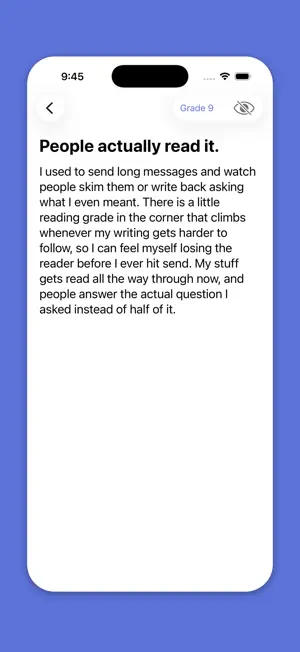
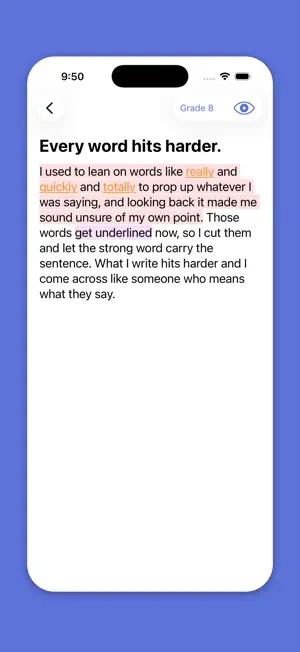
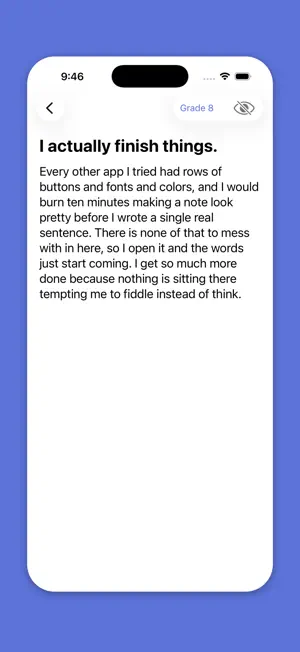
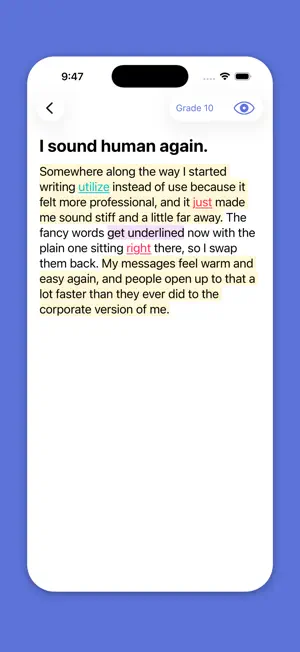
You write all day. Slack messages, follow-up emails, the text you rewrite three times before sending. Nobody tells you whether any of it was easy to read until after it is already gone. Prose is a notes app with a readability grade in the corner. It updates every time you change a word, so you can see whether your writing is getting clearer before you send it to anyone. There is nothing between your thought and your writing. No formatting toolbar, no font picker, no checkboxes, no settings to configure. You open a note and start typing. Because there is almost nothing to the app, it opens instantly and never slows down no matter how many notes you have. Tap the grade chip and Prose tells you three things. Whether your reader can follow what you wrote, how long it will take them to read it, and how many words you have (so you know if what you wrote fits in a LinkedIn post, a tweet, or a cover letter before you paste it somewhere and find out the hard way). The notes in Prose are for the things you write that need to land. The email after a kickoff where you want to make sure you and the client heard the same thing. The toast you are giving at your friend's wedding tomorrow night. The message to someone you have not talked to in a while where you need to get the words right. The note to a colleague where you are explaining something complicated and you want them to understand it the first time through. Warren Buffett explains the insurance business in sentences a twelve-year-old can follow. He writes at a sixth grade reading level. Most people write at twelfth because school taught them that longer sentences and bigger words meant better writing. The people reading your Slack messages at 4pm on a Tuesday do not agree. Prose saves every keystroke automatically. Close the app mid-thought and come back whenever you want. Your draft is where you left it. Everything stays on your phone and nothing is uploaded anywhere.
What’s new
Version 1.1 · Updated May 25, 2026
Added highlight feature for: - Long Sentences - Medium Sentences - Passive Voice - Adverbs - Inflated Vocabulary - Filler Words Brightened the indigo-blue sections for dark-mode users. Changed grading to 0-12, then undergrad, then grad, then post-grad.
App privacy
The developer, Aditya Perswal, reported these privacy practices to Apple.
Data Not Collected
The developer does not collect any data from this app.
Alternatives to Prose - Hemingway Style Editor
Looking for apps like Prose - Hemingway Style Editor? Here are 6 similar apps on the App Store. The highest rated is Concise: Hemingway Editor (5.0/5), and all 6 are free to download.
-
 Concise: Hemingway Editor
5.0
Concise: Hemingway Editor
5.0
-
 Prose Meld - AI Writing Coach
-
 charla: nobody's listening
-
 Vividly: ADHD Task Coach
-
 Benchpad — Scratchpad Notes
-
 Summify: AI Summary & Learn
| App | Rating | Price | Last updated | Compare |
|---|---|---|---|---|
| Prose - Hemingway Style Editor | 5.0 / 5 (2 ratings) | Free | May 25, 2026 | |
| Concise: Hemingway Editor | 5.0 / 5 (2) | Free | Sep 8, 2026 | Compare |
| Prose Meld - AI Writing Coach | – | Free | Sep 21, 2026 | Compare |
| charla: nobody's listening | – | Free | Sep 9, 2026 | Compare |
| Vividly: ADHD Task Coach | – | Free | Sep 24, 2026 | Compare |
| Benchpad — Scratchpad Notes | – | Free | Aug 13, 2026 | Compare |
| Summify: AI Summary & Learn | – | Free | Jun 9, 2026 | Compare |