

AutoCorrect AI
Tony Schwartz Productivity iPhoneiPadiPod touch
AutoCorrect AI is a free Productivity app for iPhone and iPad by Tony Schwartz. Requires iOS 17.0. Updated June 30, 2026.
- Price
- Free
- on the App Store
- Size
- 2 MB
- Age 4+
- Updated
- Jun 30
- 2026 · v1.002
Screenshots

About AutoCorrect AI
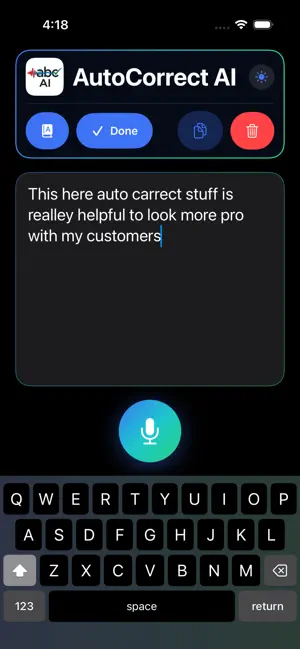
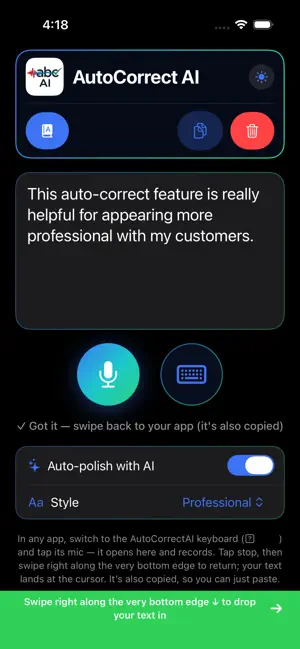
AutoCorrect AI — talk instead of type, anywhere on your phone. Stop thumb-typing. Tap the mic, say what you mean, and AutoCorrect AI turns your voice into clean, ready-to-send text — then drops it right where your cursor is, in any app. Messages, Mail, Notes, Slack, your group chat: just speak. And it doesn't only transcribe. It finishes the writing. Turn on Auto-polish and AI cleans up the grammar, drops the "ums" and filler, adds punctuation, and shapes your words into something you'd actually send — in the tone you choose. Why people love it • It sounds like you wrote it. Optional AI polish turns rambling speech into clean, finished text. • Pick your tone. Casual, Professional, or Snarky — the same dictation comes out matching the vibe. • It spells names right. Other dictation tools butcher people's names. AutoCorrect AI learns the correct spelling (and can pull from your Contacts) so "Caitlin," "Katelyn," and "Kaitlyn" come out the way you mean. • Works in every app. A built-in keyboard puts the mic one tap away, wherever you're typing. • Lands where you need it. Your finished text inserts right at the cursor — and it's copied to the clipboard too, so you can paste anywhere. • Type when you'd rather. Switch to typing any time; on Mac, use your hardware keyboard and Copy or drag the text into any app. How it works 1. Switch to the AutoCorrect AI keyboard and tap the mic. 2. It opens the app and starts recording — just talk. 3. Tap stop. With Auto-polish on, your text is cleaned up in your chosen style. 4. Swipe back to your app — your polished text is waiting at the cursor. Your voice stays on your device Speech is transcribed on-device using Apple's speech recognition — your audio never leaves your phone. AI polish is optional: only when you turn it on is your text (never your audio) sent to be cleaned up. Leave it off and nothing is sent. Built for iPhone, iPad, and Mac Use it on the go, or on an Apple Silicon Mac with your keyboard and Copy/drag-and-drop. Talk. Polished. Done.
What’s new
Version 1.002 · Updated June 30, 2026
bug fixes
App privacy
The developer, Tony Schwartz, reported these privacy practices to Apple.
Data Not Collected
The developer does not collect any data from this app.
Alternatives to AutoCorrect AI
Looking for apps like AutoCorrect AI? Here are 6 similar apps on the App Store. The highest rated is Clip Flow: Snippet Manager (5.0/5), and all 6 are free to download.
-
 Clip Flow: Snippet Manager
5.0
-
 DeeperAI
-
 To+Do
4.7
-
 Annotime: Smart AI Notes
4.9
-
 Call.io: AI Phone Assistant
4.0
-
 Translator+ : AI Translate
4.6
| App | Rating | Price | Last updated | Compare |
|---|---|---|---|---|
| AutoCorrect AI | – | Free | June 30, 2026 | |
| Clip Flow: Snippet Manager | 5.0 / 5 (5) | Free | Oct 21, 2026 | Compare |
| DeeperAI | – | Free | Oct 25, 2026 | Compare |
| To+Do | 4.7 / 5 (3,736) | Free | May 1, 2024 | Compare |
| Annotime: Smart AI Notes | 4.9 / 5 (19) | Free | Oct 1, 2026 | Compare |
| Call.io: AI Phone Assistant | 4.0 / 5 (17) | Free | Sep 26, 2026 | Compare |
| Translator+ : AI Translate | 4.6 / 5 (146) | Free | Aug 9, 2026 | Compare |
Compare AutoCorrect AI with the top alternatives: ratings, updates, ASO score and keyword gaps →