

SpeechTrack: Live Voice Clone
Wing Shun Vincent Chu Productivity iPhoneiPadiPod touchMac
SpeechTrack: Live Voice Clone is a free Productivity app for iPhone and iPad by Wing Shun Vincent Chu. Requires iOS 17.0. Updated September 14, 2026.
- Price
- Free
- on the App Store
- Size
- 189 MB
- Age 4+
- Updated
- Sep 14
- 2026 · v2.2
Screenshots

About SpeechTrack: Live Voice Clone
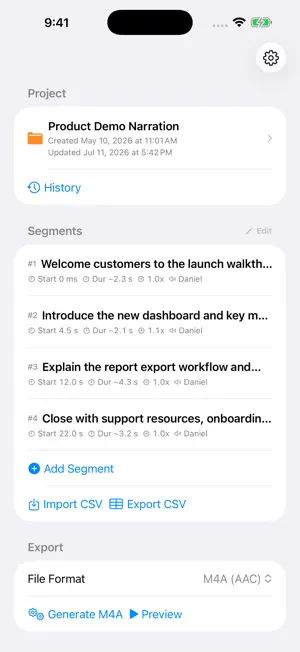
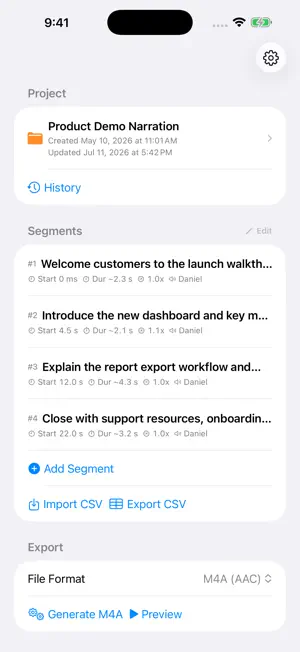
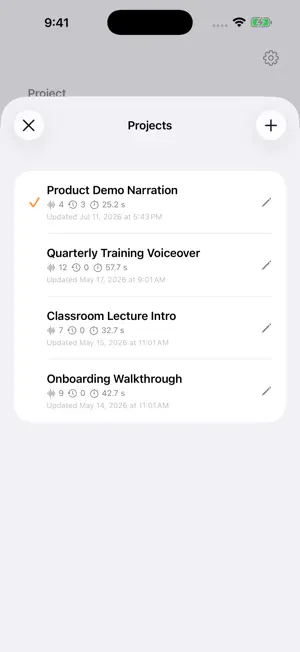
SpeechTrack is an on-device voice studio and timed narration editor. Create an English voice from your own permitted audio, then type and hear it speak or build one polished audio track with exact timing. VOICE STUDIO Use a 5–15 second clear English recording or imported audio file. In Live mode, new text speaks automatically after you pause typing. In Complete mode, prepare the whole message and speak when you are ready. Save everyday phrases for reuse, or copy a voice you already use in a project. Voice samples, profiles, text, and generated audio stay on your device. The free Voice Studio includes one active voice and 30 seconds of generated speech per day on each device, shared across Live and Complete. Voice setup and editing remain free, and time resets at local midnight. SpeechTrack Pro Lifetime removes the daily Studio speech limit for existing and new Pro customers. TIMED NARRATION Write a script, place each segment on an exact timeline, choose a local Apple system voice or a voice you created, then preview or export the result. It is made for presentation rehearsals, product demos, training, classroom lectures, onboarding, and repeatable narration. For project narration, free use lets you keep one cloned voice and create previews or exports with up to 30 seconds of estimated speech. Apple system and cloned voices both count; timeline silence does not. SpeechTrack Pro Lifetime removes both project limits. FEATURES • Live type-to-speech after a short typing pause • Complete mode for full messages • Reusable saved phrases • On-device English voice creation from a short recording or audio file • Local Apple system voices and adjustable speech speed • Exact start times, with optional leading and trailing silence • M4A, WAV, or AIFF export when supported by the device • CSV import and export for spreadsheet workflows • Saved project versions before you retime or rewrite • Control whether overlapping segments mix or move into sequence SpeechTrack works without an account or cloud voice service. Only create or copy a voice you own or have explicit permission to use.
What’s new
Version 2.2 · Updated September 14, 2026
Meet Voice Studio, a focused space for using an English voice you create on your device. Live mode speaks new text automatically after you pause typing, while Complete mode prepares the full message for playback when you are ready. Record or import a voice sample, copy an existing saved voice into Studio, and keep reusable phrases close at hand. Voice setup and editing remain free. Free use includes 30 seconds of generated Studio speech per device each day; existing and new SpeechTrack Pro Lifetime customers get unlimited Studio speech.
App privacy
The developer, Wing Shun Vincent Chu, reported these privacy practices to Apple.
Data Not Collected
The developer does not collect any data from this app.
Alternatives to SpeechTrack: Live Voice Clone
Looking for apps like SpeechTrack: Live Voice Clone? Here are 6 similar apps on the App Store. The highest rated is TT变声器-AI配音变声&文字转语音 (5.0/5), and 5 of the 6 are free to download.
-
 EasyTierConnect
-
 Vocaly — Voice Cloning Studio
1.0
Vocaly — Voice Cloning Studio
1.0
-
 Voice Changer & Clone: Voix
-
 TT变声器-AI配音变声&文字转语音
5.0
TT变声器-AI配音变声&文字转语音
5.0
-
 MCBackup Pro - Contacts Backup
4.8
MCBackup Pro - Contacts Backup
4.8
-
 文字转语音助手-声音克隆与AI配音软件
1.0
文字转语音助手-声音克隆与AI配音软件
1.0
| App | Rating | Price | Last updated | Compare |
|---|---|---|---|---|
| SpeechTrack: Live Voice Clone | – | Free | September 14, 2026 | |
| EasyTierConnect | – | Free | Aug 31, 2026 | Compare |
| Vocaly — Voice Cloning Studio | 1.0 / 5 (2) | Free | Aug 9, 2026 | Compare |
| Voice Changer & Clone: Voix | – | Free | Aug 17, 2026 | Compare |
| TT变声器-AI配音变声&文字转语音 | 5.0 / 5 (2) | Free | Jul 28, 2026 | Compare |
| MCBackup Pro - Contacts Backup | 4.8 / 5 (127) | 1.99 USD | Mar 20, 2026 | Compare |
| 文字转语音助手-声音克隆与AI配音软件 | 1.0 / 5 (1) | Free | Sep 21, 2026 | Compare |