

SuperTimetable: Class Schedule
Hyewon Lee Productivity iPhoneiPadiPod touch
SuperTimetable: Class Schedule is a free Productivity app for iPhone and iPad by Hyewon Lee. Requires iOS 26.1. Updated October 24, 2026.
- Price
- Free
- on the App Store
- Size
- 24 MB
- Age 4+
- Updated
- Oct 24
- 2026 · v1.2.2
Screenshots


About SuperTimetable: Class Schedule
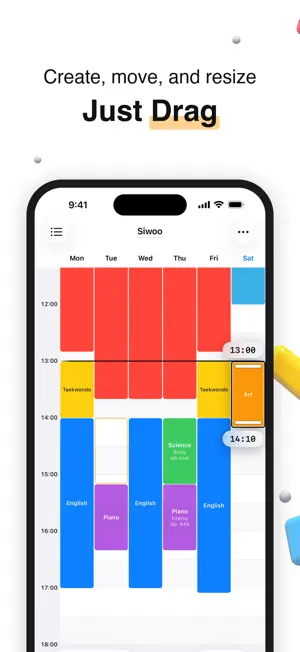
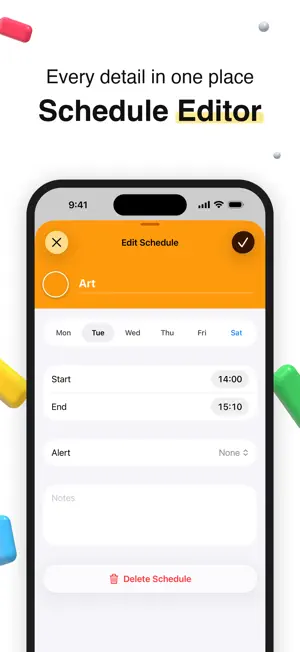
A timetable you can draw Bring the week you have in mind to life on screen. Drag across an empty time slot to create an event without entering start and end times one by one. Time labels and haptic feedback guide you as you drag, and you can fine-tune the times in the editor. Plan daily life by the clock or school classes by period. ■ Flexible editing, easy changes A change of plans does not have to mean starting over. · Drag event blocks to a different day or time. · Use alignment guides to match nearby events’ start and end times. · Undo a change or bring it back with redo. · Lock a finished timetable to prevent accidental edits. ■ Simpler recurring events Save yourself the work of editing every class or activity one by one. · Manage events with the same title and color as a group. · Apply title or color changes to other events in the group. · Compare the before and after before applying changes. · Keep each event’s day, time, notes, and alerts unchanged. · Reuse saved event names and colors to add events faster. ■ A timetable built around class periods Organize school days by the periods you know, rather than clock times. · Create a timetable with numbered class periods. · Set class lengths, breaks, and lunch to build period times automatically. · Switch between clock times and class periods as needed. ■ A view that fits your week Focus on the days and hours that matter to you. · Choose the days and time range shown in each timetable. · Enlarge the hours you need for a closer look at your events. · Choose the first day of the week and your time format. · Select light or dark mode, or follow your device settings. ■ Alerts for getting ready and getting started Make room for preparation before an event begins. · Set up to two alerts for each event. · Get separate alerts before an event and when it starts. · Preview alert sounds and choose the one you like. ■ Your schedule beyond the app See today’s plans and what is next without opening the app. · View your week at a glance with a Home Screen widget. · See today’s events around the current time with the Today widget. · Check your next event with a Lock Screen widget. · Choose a separate timetable for each widget. · Check today’s classes or your next event with Siri and Shortcuts. ■ Sharing and printing beyond the screen Put your timetable on the wall or share it with someone else. · Choose a paper size and orientation, then print directly. · Preview the finished result before saving it as an image. · Export to a calendar app to see events alongside your other plans. · Save a file for backup or sharing. · Open a shared timetable as an editable copy and make it your own. ■ Separate timetables for different plans Keep school, extra classes, family plans, and semesters organized separately. · Create multiple timetables for different purposes. · Duplicate a timetable and edit only what has changed. · Swipe through previews to switch timetables quickly. · On iPad, edit beside an event block while keeping your timetable in view. Start right away without an account or login. Timetables are stored on your device. Draw your week, right at your fingertips.
What’s new
Version 1.2.2 · Updated October 24, 2026
- iPhone Duo support: On the unfolded inner display the timetable fills the wide screen and the buttons move to the side bar; the folded outer display works as before. - Ads and Remove ads: A small banner ad now sits below the timetable. Buy "Use without ads" once in Settings and ads disappear on every device signed in with the same Apple Account; if you bought Premium before, you stay ad-free. - Other bug fixes
App privacy
The developer, Hyewon Lee, reported these privacy practices to Apple.
Data Used to Track You
The following data may be used to track you across apps and websites owned by other companies:
- Location: Coarse Location
- Identifiers: Device ID
- Usage Data: Product Interaction, Advertising Data
Data Not Linked to You
The following data, which may be collected but is not linked to your identity, may be used for the following purposes:
- Location: Coarse Location
- Identifiers: Device ID
- Usage Data: Product Interaction, Advertising Data, Other Usage Data
- Purchases: Purchase History
- Diagnostics: Crash Data, Performance Data
Used for: Third-Party Advertising, Analytics, App Functionality
Alternatives to SuperTimetable: Class Schedule
Looking for apps like SuperTimetable: Class Schedule? Here are 6 similar apps on the App Store.
-
 Routine Planner - Time Block
-
 Habit Maker & Weekly Planner
-
 Calendoc: Parallel Calendars
-
 Productivity Planner: Focus
-
 ナノカ - 七日の習慣チェック
-
 FocusDig - Deepfocus Timer
| App | Rating | Price | Last updated | Compare |
|---|---|---|---|---|
| SuperTimetable: Class Schedule | – | Free | October 24, 2026 | |
| Routine Planner - Time Block | – | Free | Oct 21, 2026 | Compare |
| Habit Maker & Weekly Planner | – | Free | Oct 25, 2026 | Compare |
| Calendoc: Parallel Calendars | – | Free | Oct 23, 2026 | Compare |
| Productivity Planner: Focus | – | Free | Sep 4, 2026 | Compare |
| ナノカ - 七日の習慣チェック | – | Free | Sep 22, 2026 | Compare |
| FocusDig - Deepfocus Timer | – | Free | Jul 17, 2026 | Compare |