

Daily Planner: 3 Tasks a Day
Phuc Pham Productivity iPhoneiPadiPod touch
Daily Planner: 3 Tasks a Day is a free Productivity app for iPhone and iPad by Phuc Pham. Requires iOS 17.0. Updated August 19, 2026.
- Price
- Free
- on the App Store
- Size
- 6 MB
- Age 4+
- Updated
- Aug 19
- 2026 · v1.1.1
Screenshots


About Daily Planner: 3 Tasks a Day
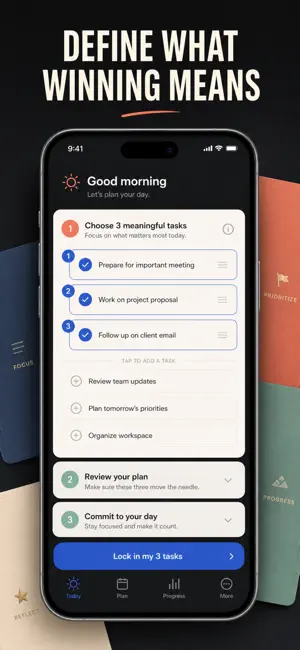
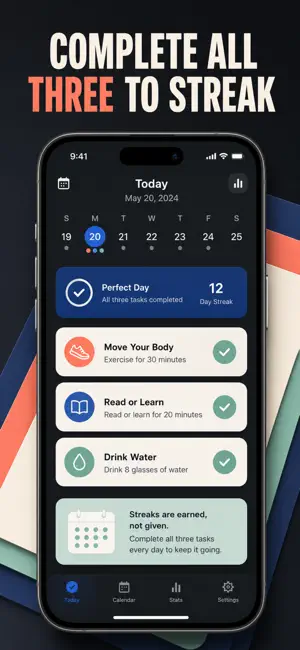
A daily planner that only ever holds three things. Open it in the morning, name the three tasks that would make today a win, and close the app. That is the entire list — there is no inbox, no backlog, no place to hide a fourth task. Most planners are storage. They happily hold two hundred open items, and the five that actually matter drown in the pile. This one is a filter. The cap is three, enforced by the app itself, so choosing what NOT to do becomes part of planning instead of something you avoid. Tag each task with a time of day and an energy level, pick a theme for the day, tick them off, and finish. A day either closes at 3 of 3 or it doesn't — that honesty is the whole point. WHAT YOU GET - Three tasks a day, hard-capped, so you finish your list instead of grooming it - Morning and evening reminders that ask you to set your three, then close them out - Time and energy tags (Morning, Midday, Evening, Anytime / Light, Steady, Deep) so the plan matches how you actually work - A streak that only grows on days you clear all three, plus longest streak, perfect-day count and 30-day completion rate - A Home Screen widget in small and medium showing today's theme, your three, and your progress - Unfinished tasks carried into tomorrow as drafts with one tap, never into a growing pile PERFECT FOR - People who quit to-do apps because the backlog got depressing - Makers and knowledge workers protecting one or two deep-work blocks a day - Anyone rebuilding a routine after burnout who needs small, finishable days - Streak keepers who want the streak to mean something real WHY NOT JUST USE A NOTES APP OR A BIG TASK MANAGER? A notes app lets the list grow forever, and a full task manager rewards you for capturing more. Neither one ever tells you the day is done. This app caps the day at three, records whether you cleared it, and shows the pattern over weeks — which weekdays you actually finish, which part of the day you follow through in, and how often you close a day clean. One line of evening reflection closes the loop. PRIVACY Everything lives on your iPhone. No account, no sign-up, no ads, no tracking, no analytics profile. Reminders are scheduled locally by iOS and never travel through a server. Nothing you write is uploaded anywhere. FULL ACCESS Full access unlocks your complete history beyond the last 7 days and the deeper insight charts: perfect days by weekday, your follow-through rate by time of day, and which daily themes you use most. It is offered as a weekly plan, a yearly plan, or a one-time lifetime purchase — pick whichever you prefer on the plan screen. Tomorrow morning, open the app and write down three things. That's the whole habit. Terms of Use (EULA): https://web-levi.web.app/terms Privacy Policy: https://web-levi.web.app/privacy-policy Questions? [email protected]
What’s new
Version 1.1.1 · Updated August 19, 2026
Bug fixes and performance improvements.
App privacy
The developer, Phuc Pham, reported these privacy practices to Apple.
Data Not Collected
The developer does not collect any data from this app.
Alternatives to Daily Planner: 3 Tasks a Day
Looking for apps like Daily Planner: 3 Tasks a Day? Here are 6 similar apps on the App Store. The highest rated is Zendone: Minimalist To Do List (5.0/5), and all 6 are free to download.
-
 Task Vanish – Focus Clear
-
 ProAuDHDuctive
-
 ThreeTasks
-
 Zendone: Minimalist To Do List
5.0
Zendone: Minimalist To Do List
5.0
-
 Done Bear: GTD Task Manager
-
 3 Things a Day: Top 3 Planner
| App | Rating | Price | Last updated | Compare |
|---|---|---|---|---|
| Daily Planner: 3 Tasks a Day | – | Free | August 19, 2026 | |
| Task Vanish – Focus Clear | – | Free | Jun 4, 2025 | Compare |
| ProAuDHDuctive | – | Free | May 29, 2026 | Compare |
| ThreeTasks | – | Free | Sep 24, 2025 | Compare |
| Zendone: Minimalist To Do List | 5.0 / 5 (2) | Free | Jan 7, 2026 | Compare |
| Done Bear: GTD Task Manager | – | Free | Oct 12, 2026 | Compare |
| 3 Things a Day: Top 3 Planner | – | Free | Oct 19, 2026 | Compare |