

WHAT A PDF! Edit & Sign
Francisco Rodriguez Torres Productivity iPhoneiPadiPod touch
WHAT A PDF! Edit & Sign is a free Productivity app for iPhone and iPad by Francisco Rodriguez Torres. Requires iOS 18.6. Updated October 24, 2026.
- Price
- Free
- on the App Store
- Size
- 63 MB
- Age 4+
- Updated
- Oct 24
- 2026 · v1.9.0
Screenshots


About WHAT A PDF! Edit & Sign
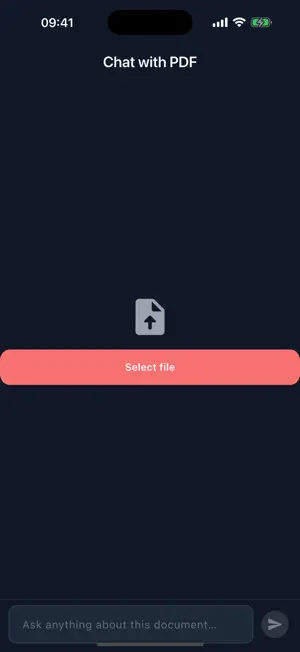
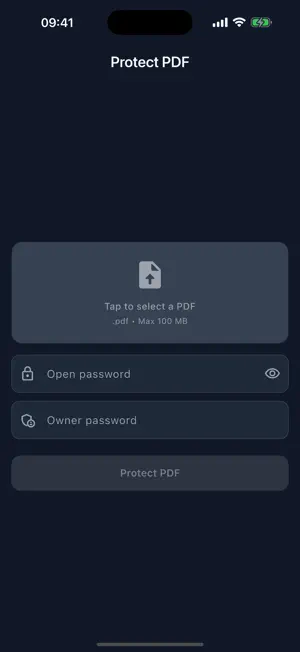
Every PDF tool you need, in one simple app. Convert, edit, sign, protect, and understand your documents right on your iPhone and iPad. Files are processed securely. CONVERT • Word to PDF and PDF to editable Word • Excel and PowerPoint to PDF • Turn several photos into one PDF EDIT • Merge multiple PDFs into one • Split, rotate, and reorder pages • Compress to shrink file size • Add page numbers, crop margins, extract images SIGN • Handwritten signatures • Digital signatures with certificates (.p12 / PAdES), timestamp and long-term LTV validation • Everything stays local on your device • Send a PDF for others to sign, with fields for signature, date and more • Schedule the sending, and cancel or change it before it goes out • See who has signed and download the signed PDF SECURE • Protect PDFs with a password • Remove passwords you own • Add watermarks SMART TOOLS • OCR to extract text from scans and images • Translate PDFs into many languages • Chat with your PDF: ask questions, get answers • Study mode: summaries, flashcards, and quizzes WORKS EVERYWHERE • Open PDFs from Gmail, Files, Photos, and other apps • Handle several files at once • Share results in a tap • Two accounts, work and personal, switching without signing in again • Send large files with a link Free with an account, plus a guest mode to get started right away. Whatever the document, WHAT A PDF! gets it done — fast, secure, and hassle-free.
What’s new
Version 1.9.0 · Updated October 24, 2026
Send PDFs for others to sign • Place fields for signature, date, name, email, free text and checkboxes, across as many pages as the document has • Each signer gets their own fields and their own link • Schedule the sending, and cancel or change it before it goes out • See what you have sent, who has signed, and download the signed PDF • The invitation email now arrives in each signer's own language, chosen one by one Two accounts at once • Work and personal, switching without signing in again Fixes • Word and PowerPoint to PDF no longer fail on files from Google Docs • PDF to Word works again • OCR text recognition fixed • Faster start, and the session no longer gets lost
App privacy
The developer, Francisco Rodriguez Torres, reported these privacy practices to Apple.
Data Linked to You
The following data, which may be collected and linked to your identity, may be used for the following purposes:
- Contact Info: Email Address, Name
- User Content: Photos or Videos, Other User Content
- Identifiers: User ID, Device ID
- Usage Data: Product Interaction
Used for: App Functionality
Alternatives to WHAT A PDF! Edit & Sign
Looking for apps like WHAT A PDF! Edit & Sign? Here are 6 similar apps on the App Store. The highest rated is Sign PDF: eSign & Fill Forms (5.0/5), and all 6 are free to download.
-
 Sign PDF Docs - FastSigner
-
 eSign: Fill and Sign PDF Forms
-
 RcloneView: Photo Backup
-
 Sign PDF: eSign & Fill Forms
5.0
-
 SignPdf - PDF Signer
4.8
-
 PDF Editor: Scanner & Sign
5.0
| App | Rating | Price | Last updated | Compare |
|---|---|---|---|---|
| WHAT A PDF! Edit & Sign | – | Free | October 24, 2026 | |
| Sign PDF Docs - FastSigner | – | Free | Oct 14, 2026 | Compare |
| eSign: Fill and Sign PDF Forms | – | Free | Oct 7, 2026 | Compare |
| RcloneView: Photo Backup | – | Free | Oct 8, 2026 | Compare |
| Sign PDF: eSign & Fill Forms | 5.0 / 5 (1) | Free | Sep 28, 2026 | Compare |
| SignPdf - PDF Signer | 4.8 / 5 (4) | Free | May 13, 2026 | Compare |
| PDF Editor: Scanner & Sign | 5.0 / 5 (1) | Free | Dec 10, 2025 | Compare |