

Sign PDF: eSign & Fill Forms
DECLAN JOHN NANTON Productivity iPhoneiPadiPod touch
Sign PDF: eSign & Fill Forms is a free Productivity app for iPhone and iPad by DECLAN JOHN NANTON. Rated 5.0/5 from 1 ratings. Requires iOS 18.
- Rating
- 5.0
- 1 ratings
- Price
- Free
- on the App Store
- Size
- 43 MB
- Age 4+
- Updated
- Sep 28
- 2026 · v1.5.2
Screenshots
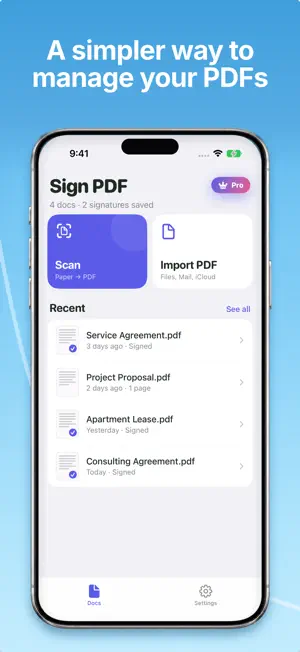

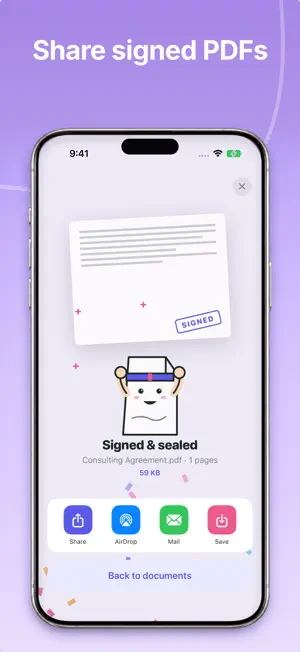
About Sign PDF: eSign & Fill Forms
Sign PDFs in seconds. Scan paper documents into PDF, fill out forms, add a hand-drawn signature, a business stamp or seal, date, or initials — all on your iPhone, all private. Sign PDF turns your phone into a pocket-sized document signer. Built for real life: lease agreements, NDAs, contracts, tax forms, permission slips, invoices, waivers. Scan a paper, sign it, stamp it, send it — no sign-up, no ads, no paywall on the essentials. FEATURES • eSign any PDF — draw, type, or import a signature • Import a stamp or seal — add your business stamp, company seal, or an Approved / Confidential / Date mark; the background is removed automatically, on-device • Built-in document scanner — paper to clean PDF with one tap • Fill forms instantly — tap on any field and type • Add checkboxes, dates, and text overlays • Save multiple signatures and stamps — pick the one you need per document • Export flattened PDFs that look identical on every device • Privacy by design — everything stays on your iPhone, nothing uploaded WHY WE BUILT IT Signing a PDF shouldn't require a $10/month subscription to a corporate service. Sign PDF is built by an indie studio, not a legal giant — it does one thing well and respects your time and your data. DESIGNED FOR EVERYONE - Renters signing leases from their phone - Freelancers turning around contracts on the go - Small business owners stamping and signing their paperwork - Anyone tired of printing, signing, scanning, emailing PRO (OPTIONAL) Upgrade to Sign PDF Pro to unlock: • Batch sign — send multiple PDFs in one go • iCloud sync — your signatures and stamps on every device you own • Unlimited signatures and stamps — store as many as you need • No ads forever Free tier stays free: you can always sign and scan without paying a cent. SUBSCRIPTION PRICING • Weekly — 3-day free trial, then $1.99/week • Monthly — $4.99/month • Annual — $19.99/year (best value) Payment is charged to your Apple ID at confirmation. Subscription auto-renews unless cancelled at least 24 hours before the end of the current period. Manage or cancel anytime in Settings. Terms of Use: https://getsignpdf.pages.dev/terms Privacy Policy: https://getsignpdf.pages.dev/privacy
What’s new
Version 1.5.2 · Updated September 28, 2026
Small changes and bug fixes.
App privacy
The developer, DECLAN JOHN NANTON, reported these privacy practices to Apple.
Data Not Collected
The developer does not collect any data from this app.
Alternatives to Sign PDF: eSign & Fill Forms
Looking for apps like Sign PDF: eSign & Fill Forms? Here are 6 similar apps on the App Store.
-
 PDF Signer: Sign, Stamp, Edit
-
 Easy PDF Signer: Fill & Sign
-
 QuickSign: Sign PDF & eSign
-
 PDF Signature: Sign & Fill
-
 PDF押印&日付入力アプリ
-
 PDF Scanner: Signature maker
| App | Rating | Price | Last updated | Compare |
|---|---|---|---|---|
| Sign PDF: eSign & Fill Forms | 5.0 / 5 (1 rating) | Free | September 28, 2026 | |
| PDF Signer: Sign, Stamp, Edit | – | Free | Oct 28, 2026 | Compare |
| Easy PDF Signer: Fill & Sign | – | Free | Nov 1, 2026 | Compare |
| QuickSign: Sign PDF & eSign | – | Free | Oct 29, 2026 | Compare |
| PDF Signature: Sign & Fill | – | Free | Aug 31, 2026 | Compare |
| PDF押印&日付入力アプリ | – | Free | Mar 26, 2026 | Compare |
| PDF Scanner: Signature maker | – | Free | Sep 10, 2026 | Compare |