

Storyboard Creator
Murat Saygin Graphics & Design iPhoneiPadiPod touchMac
Storyboard Creator is a free Graphics & Design app for iPhone and iPad by Murat Saygin. Requires iOS 17.6. Updated October 28, 2026.
- Price
- Free
- on the App Store
- Size
- 79 MB
- Age 4+
- Updated
- Oct 28
- 2026 · v3.5
Screenshots


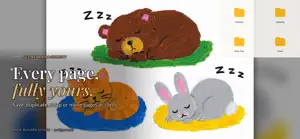

About Storyboard Creator
Storyboard Creator brings eBook, storyboard, and presentation production together in one powerful app. Organize ideas, build scene plans, prepare shot lists, and create card-based layouts that turn creative concepts into structured, elegant, shareable projects. Whether you're crafting an EPUB eBook, designing a PDF publication, or building a PPTX presentation flow, you keep full creative control from start to finish. Design your projects visually with a flexible card system that lets you plan, arrange, and refine your content with precision. Draw directly on each card with layers, images, SVG assets, speech bubbles, and text. FREE Up to 10 projects Up to 20 pages per project Full drawing tools, layers, and card editing Import up to 10 images or SVG files from your device or cloud Import up to 10 projects from ZIP or PNG files PREMIUM — one-time purchase, no subscription Unlimited projects and pages All export formats Unlimited imports Unlocks on every device signed in with your Apple Account If you purchased the app before it became free, Premium unlocks automatically EXPORT FORMATS (Premium) EPUB for eBooks PDF for publications PPTX for presentations PNG for individual cards, ready to reuse across platforms and workflows HTML with Base64-embedded images, or with linked image assets ZIP packages for archiving, sharing, and moving projects between devices Storyboard Creator supports a flexible workflow that adapts to project structures from other platform versions, helping you continue your creative process smoothly across devices and environments. Available on iPhone, iPad, and Mac, the app delivers a fluid, flexible, and professional experience across the Apple ecosystem — so your creativity is always within reach.
What’s new
Version 3.5 · Updated October 28, 2026
• All fonts are now built into the app — works fully offline. • Stickers now open with colorful PNG categories by default. • Theater mode: choose Auto, Book, Table or Single with one tap. • Performance and stability improvements.
App privacy
The developer, Murat Saygin, reported these privacy practices to Apple.
Data Not Collected
The developer does not collect any data from this app.
Alternatives to Storyboard Creator
Looking for apps like Storyboard Creator? Here are 6 similar apps on the App Store.
-
 Layer-Art
-
 Doodle - Vector Drawing
-
 BladeDraw – Vector Drawing
-
 Light Animator
-
 Paintlustrator
-
 Protect+ 3D
| App | Rating | Price | Last updated | Compare |
|---|---|---|---|---|
| Storyboard Creator | – | Free | October 28, 2026 | |
| Layer-Art | – | 1.99 USD | Sep 15, 2026 | Compare |
| Doodle - Vector Drawing | – | 3.99 USD | Sep 16, 2026 | Compare |
| BladeDraw – Vector Drawing | – | Free | Oct 21, 2026 | Compare |
| Light Animator | – | 7.99 USD | Jun 24, 2026 | Compare |
| Paintlustrator | – | Free | Oct 11, 2026 | Compare |
| Protect+ 3D | – | Free | Aug 31, 2026 | Compare |
Compare Storyboard Creator with the top alternatives: ratings, updates, ASO score and keyword gaps →