

Torika: Manga Library Manager
Marin Palanker Book iPhoneiPadiPod touchMac
Torika: Manga Library Manager is a free Book app for iPhone and iPad by Marin Palanker. Requires iOS 18.0. Updated September 28, 2026.
- Price
- Free
- on the App Store
- Size
- 18 MB
- Age 12+
- Updated
- Sep 28
- 2026 · v1.2.2
Screenshots

About Torika: Manga Library Manager
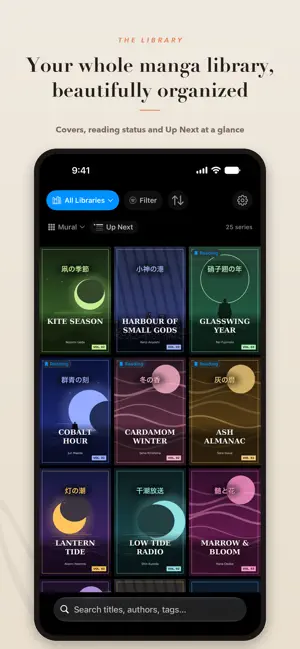
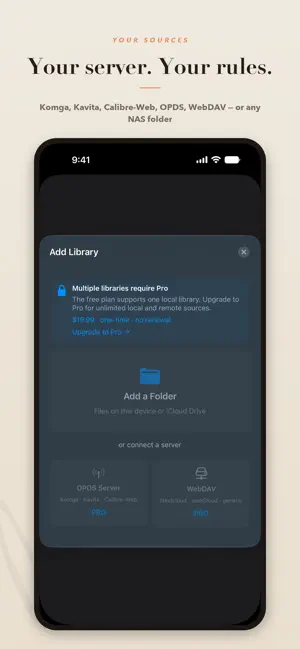
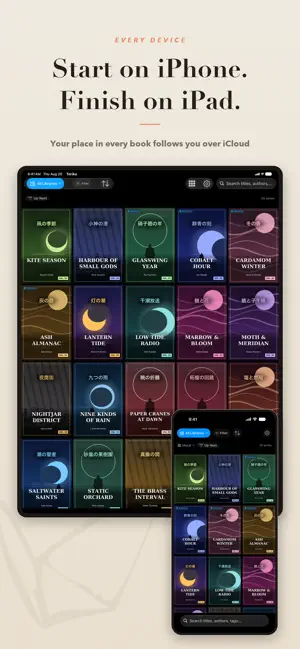
Other apps only open your books. Torika manages your library. Point it at a folder — or at the Komga, Kavita, WebDAV, or OPDS server you already run — and every series comes back identified, with a real cover, genres, description, and volume count. The same library then shows up on your Mac, iPad, and iPhone, with no server of ours to set up and no account to make. IT KNOWS WHAT YOUR FILES ARE. Most readers show you a filename and whatever the file happened to carry inside. Torika matches each series against MangaBaka's database and fills in the real covers, genres, themes, publication year, and volume counts your files never had. Nothing gets moved and nothing gets renamed — your files stay where you put them, because Torika manages the library, not your disk. ONE LIBRARY, WHEREVER YOU KEEP IT. Local folders and iCloud Drive, your NAS over WebDAV, your own Komga, Kavita, or Calibre-Web server over OPDS — they arrive as one shelf instead of four apps, and reading position, filters, and preferences follow through your own iCloud. If you already run a server, keep it. If you don't run one, you don't have to stand one up to get the library. (Remote sources are Pro.) FREE, WITH A ONE-TIME PRO UPGRADE. Connect a source free, whatever it is and however big. The free tier shows part of your library, with every reader feature. Pro shows the rest, and adds sources, tracker sync, Fix Match, and Refresh Metadata. One purchase, never a subscription. IN SYNC WITH THE TRACKER YOU ALREADY USE. Connect AniList, MyAnimeList, or MangaBaka once and Torika updates status and reading progress as you read — finish a volume and it will show as complete, change reading status there and it shows in your library. Your AniList custom lists become filters over your own shelves. (Tracker sync is Pro.) A READER FOR EACH FORMAT. Paged manga gets right-to-left support and two-page spreads on iPad and Mac. Webtoons and manhwa get continuous vertical scroll, detected automatically, and EPUB light novels get a real prose reader with typography, margins, and theme controls for long sessions. CBZ, CBR, EPUB, and PDF files are all supported. REDISCOVER WHAT YOU ALREADY HAVE. Torika will also help surface the series that have been abandoned halfway, volumes downloaded but never opened, series where you own the complete set, and the one that just finished publishing while you weren't looking. FIND ANYTHING, OR JUST BROWSE. Filter by tag, genre, publisher, reading status, or content rating, and hide the tags you'd rather not see. Group shelves by author, demographic, or decade, and save a search as a shelf. Or open the app and let it hand you something. PRIVATE BY DEFAULT. There's no account, no ads, and no analytics — nothing about what you read is sent anywhere. Series titles only go to metadata providers for the sources you turn on, and your reading stays between you and your devices.
What’s new
Version 1.2.2 · Updated September 28, 2026
Downloads just got better — they keep going in the background, and you can now better look after your storage and data. Plus a lot of rough edges sanded down. • Background downloads — start a big batch and leave the app; it keeps going and resumes where it left off, even after a restart. • Up Next syncs — queue a series on your Mac and it's waiting on your iPhone and iPad. • Keep volumes ready — automatically keep the next few unread volumes of a series downloaded. • Respect to your data and space — automatic downloads stay off cellular, and Torika won't fill a nearly-full device. • Storage that manages itself — set a limit and the oldest downloads clear first, mark a series Keep Offline so it's never removed, or tidy finished volumes automatically. • Faster, smoother downloads — no lag during a big batch, and large volumes on slow connections finish instead of timing out. • A live download indicator in your library and a cleaned-up Settings + Storage screen. • Easier connecting — errors now tell you what to do, a step-by-step guide is one tap away, and OPDS servers with a self-signed certificate (a home Komga/Kavita) can now connect. • Reader resumes where you left off, page turns stay smooth during background work, and battery is lighter. • Rescans no longer create duplicate volumes, series titles are cleaner, and series info refreshes on its own.
App privacy
The developer, Marin Palanker, reported these privacy practices to Apple.
Data Not Collected
The developer does not collect any data from this app.
Alternatives to Torika: Manga Library Manager
Looking for apps like Torika: Manga Library Manager? Here are 6 similar apps on the App Store. The highest rated is Brevily (5.0/5), and all 6 are free to download.
-
 CoreNodeReader
-
 Klibri
4.8
Klibri
4.8
-
 Soriv
Soriv
-
 Brevily
5.0
Brevily
5.0
-
 Bookmark: Read Together
5.0
Bookmark: Read Together
5.0
-
 MBook: AI Book Reader & Cards
| App | Rating | Price | Last updated | Compare |
|---|---|---|---|---|
| Torika: Manga Library Manager | – | Free | September 28, 2026 | |
| CoreNodeReader | – | Free | Aug 11, 2026 | Compare |
| Klibri | 4.8 / 5 (4) | Free | Oct 3, 2026 | Compare |
| Soriv | – | Free | Aug 6, 2026 | Compare |
| Brevily | 5.0 / 5 (1) | Free | Sep 10, 2025 | Compare |
| Bookmark: Read Together | 5.0 / 5 (1) | Free | Aug 6, 2026 | Compare |
| MBook: AI Book Reader & Cards | – | Free | Aug 9, 2026 | Compare |