

Papiria: Scan, File, Remind
Viktor Frank Redecker Productivity iPhoneiPadiPod touch
Papiria: Scan, File, Remind is a free Productivity app for iPhone and iPad by Viktor Frank Redecker. Requires iOS 16.0. Updated September 12, 2026.
- Price
- Free
- on the App Store
- Size
- 62 MB
- Age 12+
- Updated
- Sep 12
- 2026 · v1.2
Screenshots

About Papiria: Scan, File, Remind
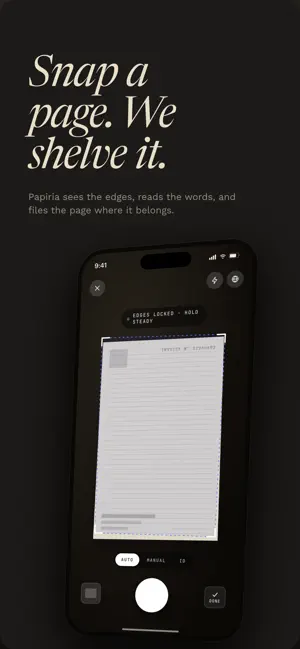
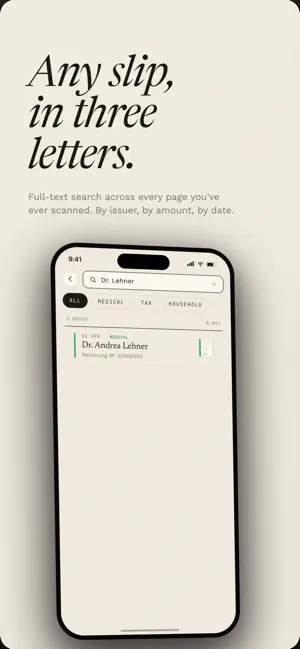
Scan any paper or PDF, and Papiria reads what it is, files it straight into your own iCloud or Drive, and reminds you before deadlines slip. The lease renewal. The electricity bill. The vaccine card you needed at the airport. Finally, a home for your documents. HOW IT WORKS Scan a document with the phone camera. Auto-crop and perspective correction handle the messy parts. Multi-page capture keeps long contracts together. Papiria reads the page. It identifies what kind of document it is, who issued it, when it's dated, what it costs, and which dates are deadlines. Bills become tracked bills. Contracts become tracked contracts. Warranties remember when they expire. The PDF is filed straight into your own iCloud or Drive, in a clean folder structure you control. The metadata stays searchable inside Papiria, so any document is one query away by issuer, date, amount, or content. Deadlines surface back to you. Push notifications fire ahead of every bill, every renewal, every warranty expiry. The pile on your desk stops being a stack of surprises. YOUR DRIVE, YOUR ARCHIVE The PDFs live in your own iCloud or Drive folder, not on Papiria's servers. Delete your account and your data goes with it. GDPR-compliant throughout. WHAT GOES IN Bills, invoices, receipts. Leases and contracts. Insurance policies. Medical records, prescriptions, vaccine cards. IDs, passports, certificates. Tax letters. Warranties. Anything paper. Anything PDF. SEARCH THAT WORKS Full-text search across every document, including the text inside scans. Filter by category, date, issuer, status, or tag. BUILT FOR ONE PERSON Papiria is a personal archive, not a team workspace. The interface reads like an archival paper ledger, calm and considered, with the editorial restraint of a well-set magazine rather than a cluttered dashboard. OFFLINE-FIRST Scans queue locally when you're offline and sync the moment you're back online. No spinners. No lost work. PRIVACY AND CONTROL Papiria stores only the metadata it needs to keep your documents findable. The PDFs themselves stay in your iCloud or Drive. A biometric gate locks the app after a short idle window. WHY NOW Because the bill that arrived two weeks late was sitting somewhere on your desk the whole time. Because tax season would be easier if last year's letters were findable. Papiria. Finally, a home for your documents.
What’s new
Version 1.2 · Updated September 12, 2026
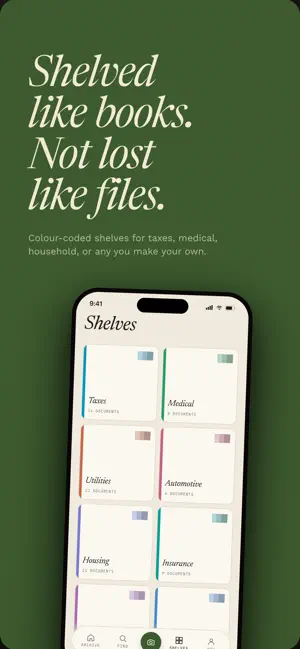
Your own shelves. Create shelves, rename them, and tell Papiria what belongs on each one. New scans get filed there on their own. Part of Papiria+. Select several documents at once. Long-press a document, then move, edit, tag, share or delete the whole selection. Reminders can be switched on or off for a batch of invoices. Find. Filter by document date, scan date or due date. Recent searches keep their filters. Long-press a recent search to remove it. One folder per shelf. Documents in your Google Drive or iCloud now sit in a folder named after their shelf. Existing archives are moved once, after you confirm. Scanning. Drag pages into a different order before you save. Pages are compressed on the phone, so scans with many pages upload again. Up to 20 pages per scan. Imports. Files you already have are skipped instead of imported twice. A batch that runs past your monthly limit waits for you and imports after an upgrade instead of being dropped. Your archive opens offline and lists load faster. Fixed: the Shelves tab could stop responding after going back out of a shelf. The Android back button now goes where you expect on every screen.
App privacy
The developer, Viktor Frank Redecker, reported these privacy practices to Apple.
Data Linked to You
The following data, which may be collected and linked to your identity, may be used for the following purposes:
- Purchases: Purchase History
- Identifiers: User ID, Device ID
- Usage Data: Product Interaction
- Health & Fitness: Health
- Financial Info: Other Financial Info
- Contact Info: Email Address, Name
- User Content: Photos or Videos
- Diagnostics: Crash Data, Performance Data
- Other Data: Other Data Types
Used for: Analytics, App Functionality
Alternatives to Papiria: Scan, File, Remind
Looking for apps like Papiria: Scan, File, Remind? Here are 6 similar apps on the App Store. The highest rated is My Local Voice (5.0/5), and 5 of the 6 are free to download.
-
 SyncThemCalendars
-
 MD Flow
1.0
MD Flow
1.0
-
 My Local Voice
5.0
My Local Voice
5.0
-
 Private LLM: Nucleus
4.3
Private LLM: Nucleus
4.3
-
 Simple Comparison Chart App
-
 iWay Mobile
| App | Rating | Price | Last updated | Compare |
|---|---|---|---|---|
| Papiria: Scan, File, Remind | – | Free | September 12, 2026 | |
| SyncThemCalendars | – | Free | Aug 14, 2026 | Compare |
| MD Flow | 1.0 / 5 (1) | Free | Sep 17, 2026 | Compare |
| My Local Voice | 5.0 / 5 (1) | Free | Jan 22, 2026 | Compare |
| Private LLM: Nucleus | 4.3 / 5 (11) | 3.99 USD | Nov 6, 2025 | Compare |
| Simple Comparison Chart App | – | Free | Aug 4, 2024 | Compare |
| iWay Mobile | – | Free | Mar 30, 2026 | Compare |