

Pixly: Room Planner, AI Design
Benipar Corp s.r.o. Photo & Video iPhoneiPadiPod touch
Pixly: Room Planner, AI Design is a free Photo & Video app for iPhone and iPad by Benipar Corp s.r.o. Rated 5.0/5 from 2 ratings. Requires iOS 17.6.
- Rating
- 5.0
- 2 ratings
- Price
- Free
- on the App Store
- Size
- 29 MB
- Age 4+
- Updated
- Oct 29
- 2026 · v1.31
Screenshots


About Pixly: Room Planner, AI Design
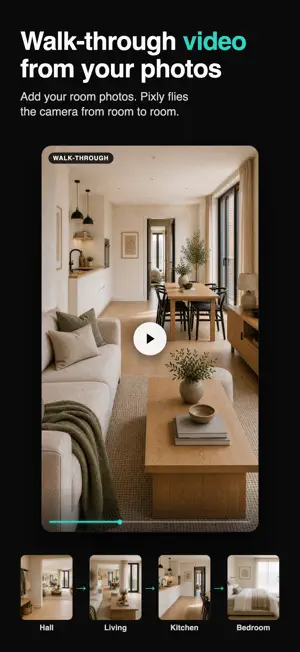
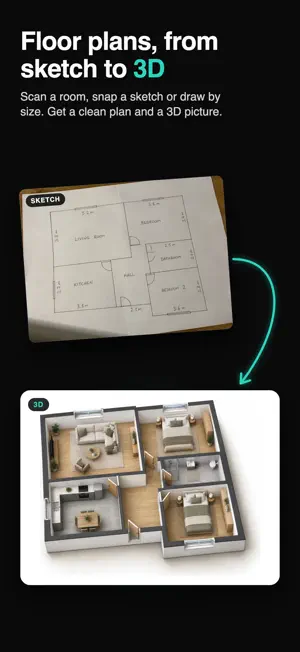
Pixly is the all-in-one AI studio for real estate agents: magazine-quality listing photos, cinematic video and floor plans, in one app. Snap or upload a photo and let Pixly do the work: stage empty rooms, clean up clutter, brighten dull shots, and turn a single photo into a cinematic video. No designers, no expensive shoots, no desktop software. WHAT YOU CAN DO ROOMS • Virtual Staging — furnish empty or dated rooms in a range of interior styles. HD, watermark-free. • Remove Furniture — empty a room completely for a clean restaging canvas. • Declutter — remove mess and personal items while keeping the room and furniture intact. • Restyle — new finishes on walls, floor, cabinets, tiles or furniture. Nothing moves, nothing is added. • Edit Staged Result — change one thing in a staged photo (swap the sofa, add a rug) and keep everything else. OUTSIDE • Sky Replacement — swap a grey sky and relight the house so it reads as one photo. • Lawn Replacement — a healthy lawn where the grass is patchy, bare or burnt. • Exterior Touch-up — sky, lawn, driveway and the bins, hoses and bikes, all in one pass. • Seasonal Reset — shot in winter, on the market in June: the snow goes, the garden comes into leaf. • Day to Night — turn a daytime exterior into a warm twilight scene. • Plot Number — drop a photorealistic 3D price or SOLD sign onto a photo of land. FINISH • HD Upscale — up to 4x the resolution, real detail. Free on any photo Pixly made. • Enhance — turn an amateur shot into a finished, professional photo. Pick from three variants. VIDEO • Before/After Reel — animate an empty-to-staged reveal into a share-ready clip. • Cinematic Motion — turn a single photo into a short video with a real camera move: zoom, orbit, fly-through or crane. • Construction Timelapse — animate an empty plot into the finished building. • Landmark Drop — a price or SOLD marker dropping onto your lot, as a short clip. • Flythrough — a walk through the home from your room photos. The camera flies from each room to the next, one move at a time, and joining them into one film is free. FLOOR PLANS (BETA, FREE) • Floor Plan Creator — scan a room with your iPhone and get a clean floor plan with room sizes. iPhone Pro models measure with LiDAR on their own; on other iPhones you aim at each corner and tap. • No camera needed — draw the plan yourself: type each room’s size, add the rooms next to each other, and drag them into place. Walls that meet are shared. • Fix walls, doors and windows, add furniture, pick a style, and export a PDF or image. Open the same plan on pixly.app for the full editor. FREE ON YOUR IPHONE (NO SUBSCRIPTION) • Property Lines — outline the lot on an aerial photo and save a picture or a clip where the boundary draws itself. • Drone Property Lines — the lines stay on the ground as the drone moves. The video never leaves your phone. • Text Behind Photo — a headline between the house and the sky. WHY AGENTS USE PIXLY • Faster listings — results in minutes, from your phone • Win more listings — show sellers the potential of their space • One simple credit balance — every tool draws from the same pool • Your work, synced — results are saved to your Library PLANS & CREDITS Pixly runs on credits — roughly 1 credit per photo and 5+ per video. Subscribe to the Agent plan for a monthly credit allotment, and top up anytime with one-time credit packs when you need more. Manage or cancel your subscription anytime in your Apple ID settings. Questions? [email protected] Terms of Use (EULA): https://www.apple.com/legal/internet-services/itunes/dev/stdeula/ Privacy Policy: https://pixly.app/privacy
What’s new
Version 1.31 · Updated October 29, 2026
Better room scans: your floor plan keeps the real height of doors and windows, wide openings become sliding doors, and a bathroom gets a suggested basin, kept clear of doors. Replacing a floor plan is safer: the new plan is saved before the old one goes. Small fixes and improvements.
App privacy
The developer, Benipar Corp s.r.o., reported these privacy practices to Apple.
Data Linked to You
The following data, which may be collected and linked to your identity, may be used for the following purposes:
- Purchases: Purchase History
- User Content: Photos or Videos
- Identifiers: User ID, Device ID
- Diagnostics: Crash Data, Performance Data, Other Diagnostic Data
Used for: App Functionality
Data Not Linked to You
The following data, which may be collected but is not linked to your identity, may be used for the following purposes:
- Usage Data: Product Interaction
Used for: Analytics
Alternatives to Pixly: Room Planner, AI Design
Looking for apps like Pixly: Room Planner, AI Design? Here are 6 similar apps on the App Store. The highest rated is Verba: AI Edits, Video Reels (4.9/5), and all 6 are free to download.
-
 ImmoPhoto: Real Estate Camera
-
 SnapSnapSnap
4.2
SnapSnapSnap
4.2
-
 Momenzo: Real Estate Videos
4.8
Momenzo: Real Estate Videos
4.8
-
 Zillow 3D Home
4.7
Zillow 3D Home
4.7
-
 Verba: AI Edits, Video Reels
4.9
Verba: AI Edits, Video Reels
4.9
-
 AI Avatar Generator - HeyGen
4.8
AI Avatar Generator - HeyGen
4.8
| App | Rating | Price | Last updated | Compare |
|---|---|---|---|---|
| Pixly: Room Planner, AI Design | 5.0 / 5 (2 ratings) | Free | October 29, 2026 | |
| ImmoPhoto: Real Estate Camera | – | Free | Oct 29, 2026 | Compare |
| SnapSnapSnap | 4.2 / 5 (64) | Free | Sep 21, 2025 | Compare |
| Momenzo: Real Estate Videos | 4.8 / 5 (1,442) | Free | Oct 29, 2026 | Compare |
| Zillow 3D Home | 4.7 / 5 (5,666) | Free | Oct 20, 2026 | Compare |
| Verba: AI Edits, Video Reels | 4.9 / 5 (578) | Free | Oct 28, 2026 | Compare |
| AI Avatar Generator - HeyGen | 4.8 / 5 (29,983) | Free | Oct 27, 2026 | Compare |