

ListenTimer
PocketLabs Health & Fitness iPhoneiPadiPod touchApple Watch
ListenTimer is a free Health & Fitness app for iPhone and iPad by PocketLabs. Requires iOS 17.0. Updated October 18, 2026.
- Price
- Free
- on the App Store
- Size
- 158 MB
- Age 4+
- Updated
- Oct 18
- 2026 · v1.4.4
Screenshots


About ListenTimer
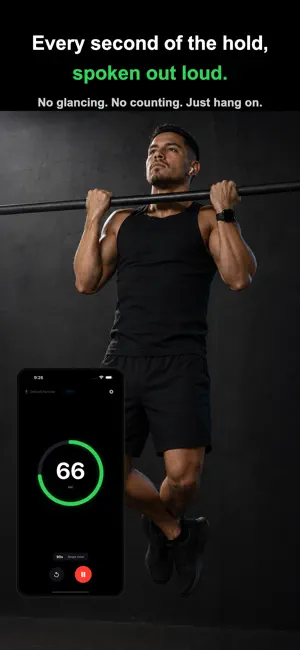
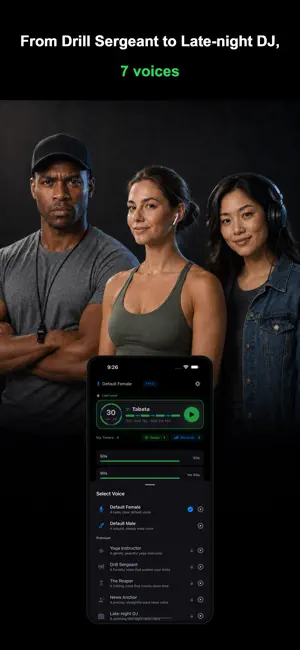
Work. Rest. Repeat — and hear every second of it. Set your intervals, then keep your eyes on your form. ListenTimer reads each second out loud through the whole round, so you always know where you are without looking. Planks, dead hangs, stretches, and breath work all work the same way. [ What it does ] • Per-second voice countdown • Routines (Tabata) — work and rest alternate automatically, with a spoken cue at every phase change • Start instantly with one tap from your Apple Watch complication • Plays nicely with your music and podcasts — audio ducking dips the music just for the count, then brings it right back • Background playback — the count keeps running even when your screen is locked • Live Activity — see the count on your Lock Screen • Haptic feedback — your wrist taps along, even when your ears are covered • Monthly calendar stats — see which days you trained at a glance • Weekly goals & seasons — set a weekly goal on a preset, and your completions build up to a tier over a 3-month season [ Voice characters ] • Default Female (free) — a calm, clear default voice • Default Male (free) — a natural, steady male voice • Yoga Instructor (premium) — a gentle, peaceful yoga instructor • Drill Sergeant (premium) — a forceful voice that pushes your limits • The Reaper (premium) — a chilling voice that counts down time • News Anchor (premium) — a precise, straightforward news voice • Late-night DJ (premium) — a soothing late-night radio voice Each character brings a different tone to your training rhythm. [ Presets ] • Save your favorite times as presets so you can start in a tap • Add, delete, and reorder presets freely • All presets sync to your Apple Watch automatically [ Premium (one-time purchase, not a subscription) ] • Unlocks 5 premium voices • Apple Watch integration — start and control timers right from your wrist • Start straight from a Home Screen or Lock Screen widget — one tap, without opening the app • Custom voice interval — choose exactly how often the count is read • Extended workout stats • Unlimited goals & season widget — set a goal on every preset and see your season score and tier right on your Home Screen • iCloud backup & restore — presets, records, goals, and settings are saved automatically and restored on a new device • Removes in-app ads [ Made for you if ] • You train in rounds — HIIT, Tabata, circuits, boxing, or CrossFit • You can't or don't want to look at the screen mid-workout • You train static holds — planks, dead hangs, pull-ups • You need time awareness during yoga, meditation, or breath work • You want a one-tap workout timer from your Apple Watch [ Privacy & permissions ] • Tracking permission is only requested for personalized ads (declining doesn't affect any app feature) • No microphone, contacts, location, camera, or health data access Support: [email protected] Privacy policy: https://pocketlabs.kr/listentimer-privacy/en
What’s new
Version 1.4.4 · Updated October 18, 2026
Minor stability improvements. Feedback: [email protected]
App privacy
The developer, PocketLabs, reported these privacy practices to Apple.
Data Used to Track You
The following data may be used to track you across apps and websites owned by other companies:
- Identifiers: Device ID
- Usage Data: Product Interaction
Data Linked to You
The following data, which may be collected and linked to your identity, may be used for the following purposes:
- Location: Coarse Location
- Identifiers: Device ID
- Usage Data: Product Interaction, Advertising Data
Used for: Third-Party Advertising, Developer’s Advertising or Marketing, Analytics, App Functionality
Data Not Linked to You
The following data, which may be collected but is not linked to your identity, may be used for the following purposes:
- Diagnostics: Crash Data, Performance Data, Other Diagnostic Data
- Purchases: Purchase History
- Other Data: Other Data Types
- Contact Info: Email Address
- User Content: Other User Content
Used for: Third-Party Advertising, Developer’s Advertising or Marketing, Analytics, App Functionality
Alternatives to ListenTimer
Looking for apps like ListenTimer? Here are 6 similar apps on the App Store. The highest rated is Intervals Aloud: Voice Timer (5.0/5), and all 6 are free to download.
-
 PaceCue Intervals
-
 Intervals Aloud: Voice Timer
5.0
Intervals Aloud: Voice Timer
5.0
-
 Interval Timer - Sound Cue
4.9
Interval Timer - Sound Cue
4.9
-
 Ritmo Workout Timer
-
 RoundShift: Interval Timer
5.0
RoundShift: Interval Timer
5.0
-
 Timme – Fitness Timer
| App | Rating | Price | Last updated | Compare |
|---|---|---|---|---|
| ListenTimer | – | Free | October 18, 2026 | |
| PaceCue Intervals | – | Free | Sep 23, 2026 | Compare |
| Intervals Aloud: Voice Timer | 5.0 / 5 (1) | Free | Oct 19, 2026 | Compare |
| Interval Timer - Sound Cue | 4.9 / 5 (8) | Free | Oct 23, 2026 | Compare |
| Ritmo Workout Timer | – | Free | Oct 18, 2026 | Compare |
| RoundShift: Interval Timer | 5.0 / 5 (1) | Free | Jul 31, 2026 | Compare |
| Timme – Fitness Timer | – | Free | Nov 3, 2026 | Compare |
Compare ListenTimer with the top alternatives: ratings, updates, ASO score and keyword gaps →