

DocuMerge — JPG to PDF
Ahmet Bostancklioglu Productivity iPhoneiPadiPod touch
DocuMerge — JPG to PDF is a free Productivity app for iPhone and iPad by Ahmet Bostancklioglu. Requires iOS 16.0. Updated May 22, 2026.
- Price
- Free
- on the App Store
- Size
- 10 MB
- Age 4+
- Updated
- May 22
- 2026 · v1.0.2
Screenshots


About DocuMerge — JPG to PDF
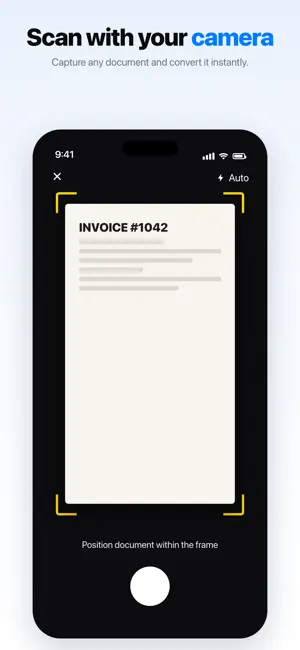
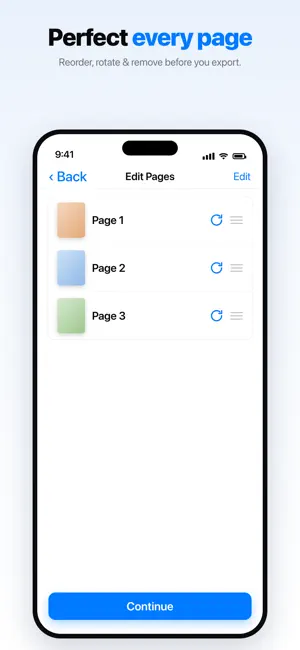
Need to send a receipt, scan an ID, or share a stack of photos as one clean PDF? Stop screenshotting and emailing 12 images at once. DocuMerge turns your photos into professional PDF documents in seconds, right on your iPhone. Whether you're a freelancer organizing receipts, a student combining lecture notes, or just someone tired of messy file attachments, DocuMerge makes paperwork feel effortless. WHY PEOPLE LOVE DOCUMERGE - ONE-TAP CONVERSION Pick your photos, hit convert. That's it. No menus to dig through, no learning curve. - MERGE MULTIPLE IMAGES INTO ONE PDF Combine dozens of JPG, PNG, or HEIC files into a single, shareable document. Reorder them with a long press and drag. - PRIVATE BY DESIGN Everything happens on your device. Your photos never touch a server, never get uploaded, never get analyzed. Your documents are yours. - POLISHED OUTPUT Auto-fit page sizing, A4 or Letter formats, customizable margins, and a clean white background that looks professional every time. - WORKS WITH YOUR WORKFLOW Export directly to Files, Mail, Messages, WhatsApp, or any app that accepts PDF. Save to iCloud Drive in one tap. - NO WATERMARKS, EVER Free users get the same crisp, watermark-free PDFs as everyone else. PERFECT FOR - Freelancers and small business owners filing expense receipts - Students merging lecture notes, screenshots, and study materials - Real estate agents sharing property photos as a single document - Parents collecting school forms, medical records, or ID copies - Anyone who's emailed too many photos at once HOW IT WORKS 1. Open DocuMerge 2. Tap Select Photos and pick the images you want 3. Drag to reorder, rotate, or remove pages 4. Hit Create PDF 5. Share, save, or print. Done. BUILT FOR IPHONE AND IPAD Native SwiftUI design. Dark mode. Dynamic Type. Built to feel like it belongs on your device, because it does. A NOTE FROM THE DEVELOPER DocuMerge started because I was tired of paying a monthly subscription just to merge a few photos into a PDF. So I built the app I wished existed: fast, private, and respectful of your time. If you ever have an idea for how to make it better, my email is on the support page. I read every message. Thanks for trying DocuMerge. I hope it saves you a little time today. Privacy Policy link: https://sites.google.com/view/documergeprivacypolicy/ana-sayfa
What’s new
Version 1.0.2 · Updated May 22, 2026
Thanks for using DocuMerge! This update brings performance improvements and bug fixes for a smoother, faster way to turn your photos into PDFs. Keep the feedback coming.
App privacy
The developer, Ahmet Bostancklioglu, reported these privacy practices to Apple.
Data Used to Track You
The following data may be used to track you across apps and websites owned by other companies:
- Identifiers: Device ID
- Usage Data: Advertising Data
Data Not Linked to You
The following data, which may be collected but is not linked to your identity, may be used for the following purposes:
- Location: Coarse Location
- Identifiers: Device ID
- Usage Data: Advertising Data, Product Interaction
- Diagnostics: Crash Data, Performance Data, Other Diagnostic Data
Used for: Third-Party Advertising, Analytics, App Functionality
Alternatives to DocuMerge — JPG to PDF
Looking for apps like DocuMerge — JPG to PDF? Here are 6 similar apps on the App Store. The highest rated is PDF Maker : Photo to PDF (5.0/5), and all 6 are free to download.
-
 Image Converter & Photo to PDF
-
 Image to PDF Converter - Pro
-
 Listiva: Shared Shopping List
-
 Simple Pdf Utils
-
 Cherry Reader
-
 PDF Maker : Photo to PDF
5.0
PDF Maker : Photo to PDF
5.0
| App | Rating | Price | Last updated | Compare |
|---|---|---|---|---|
| DocuMerge — JPG to PDF | – | Free | May 22, 2026 | |
| Image Converter & Photo to PDF | – | Free | May 14, 2026 | Compare |
| Image to PDF Converter - Pro | – | Free | Apr 16, 2026 | Compare |
| Listiva: Shared Shopping List | – | Free | Feb 24, 2026 | Compare |
| Simple Pdf Utils | – | Free | Aug 22, 2026 | Compare |
| Cherry Reader | – | Free | Jan 28, 2026 | Compare |
| PDF Maker : Photo to PDF | 5.0 / 5 (2) | Free | Oct 14, 2026 | Compare |