

Screenshot AI: Memory & Notes
Petar Perkovski Productivity iPhoneiPadiPod touch
Screenshot AI: Memory & Notes is a free Productivity app for iPhone and iPad by Petar Perkovski. Requires iOS 17. Updated May 28, 2026.
- Price
- Free
- on the App Store
- Size
- 42 MB
- Age 4+
- Updated
- May 28
- 2026 · v1.3
Screenshots



About Screenshot AI: Memory & Notes
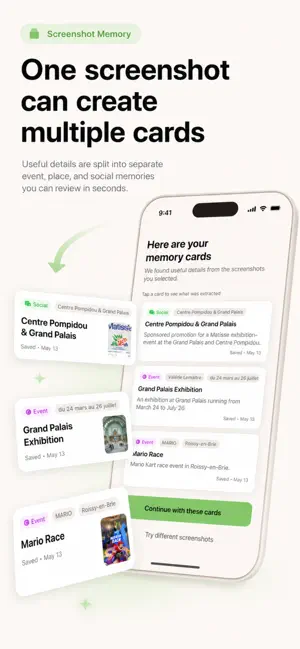
You've saved thousands of screenshots: receipts, bookings, recipes, codes, and places. Finding any of them later means scrolling through hundreds of images hoping to spot the right one. Screenshot AI changes that. It reads every screenshot you select, pulls out what matters, and builds a searchable library you can actually use. Dates, prices, addresses, venues — surfaced automatically and saved as a clean card you can find in seconds. WHAT YOU CAN DO - Search across every saved screenshot. Type a keyword and find the right card instantly, without scrolling. - Get an AI summary of each screenshot. Dates, prices, contacts, and key details extracted automatically. - Organize by category. Receipts, bookings, notes, places, recipes, messages, tasks, documents — sorted the way you think. - Review before saving. Nothing is kept without your approval. You stay in control of what gets kept and what gets deleted. - Keep your originals. Extracted details are saved separately — your original screenshots stay in your library unless you choose to delete them. - Flag sensitive content. Screenshots that look private are surfaced separately so you can decide how to handle them. BUILT FOR PRIVACY Everything runs on your device. No screenshots are uploaded. No account required. You choose what gets processed — sensitive content stays completely private. DESIGNED FOR People who screenshot useful information but later can't find it. The receipt you need to return something. The booking you need to check. The recipe you want to cook. The code you need to use. The address you want to revisit. Screenshot AI turns those screenshots into a library that works for you — not against you. Terms of Use: https://nuuki.app/ocp/terms.html Privacy Policy: https://nuuki.app/ocp/privacy.html
What’s new
Version 1.3 · Updated May 28, 2026
We’ve refreshed the app experience with an updated onboarding flow and improved UI design. This update includes: A smoother and clearer onboarding experience Refined screens and visual improvements General UI polish for a cleaner, more intuitive ap
App privacy
The developer, Petar Perkovski, reported these privacy practices to Apple.
Data Not Linked to You
The following data, which may be collected but is not linked to your identity, may be used for the following purposes:
- Purchases: Purchase History
- User Content: Other User Content
- Identifiers: Device ID
- Usage Data: Product Interaction, Other Usage Data
- Diagnostics: Crash Data, Performance Data, Other Diagnostic Data
Used for: App Functionality
Alternatives to Screenshot AI: Memory & Notes
Looking for apps like Screenshot AI: Memory & Notes? Here are 6 similar apps on the App Store. The highest rated is Catholic AI - Faith Companion (4.6/5), and all 6 are free to download.
-
 Shotbox: Screenshot Organizer
-
 Screenshot Search: CaptureMind
-
 ChatInbox: Email by Sender
4.4
ChatInbox: Email by Sender
4.4
-
 OneVoice: Offline Recorder
-
 ScreenshotAI - AI Notes
3.2
ScreenshotAI - AI Notes
3.2
-
 Catholic AI - Faith Companion
4.6
Catholic AI - Faith Companion
4.6
| App | Rating | Price | Last updated | Compare |
|---|---|---|---|---|
| Screenshot AI: Memory & Notes | – | Free | May 28, 2026 | |
| Shotbox: Screenshot Organizer | – | Free | Oct 21, 2026 | Compare |
| Screenshot Search: CaptureMind | – | Free | Sep 7, 2026 | Compare |
| ChatInbox: Email by Sender | 4.4 / 5 (30) | Free | Oct 22, 2026 | Compare |
| OneVoice: Offline Recorder | – | Free | Oct 13, 2026 | Compare |
| ScreenshotAI - AI Notes | 3.2 / 5 (5) | Free | Oct 18, 2026 | Compare |
| Catholic AI - Faith Companion | 4.6 / 5 (9) | Free | Oct 24, 2026 | Compare |