

ChatInbox: Email by Sender
Innovatism LLC Productivity iPhoneiPadiPod touchMac
ChatInbox: Email by Sender is a free Productivity app for iPhone and iPad by Innovatism LLC. Rated 4.4/5 from 29 ratings. Requires iOS 17.0.
- Rating
- 4.4
- 29 ratings
- Price
- Free
- on the App Store
- Size
- 84 MB
- Age 4+
- Updated
- Oct 16
- 2026 · v2027.1.3
Screenshots


About ChatInbox: Email by Sender
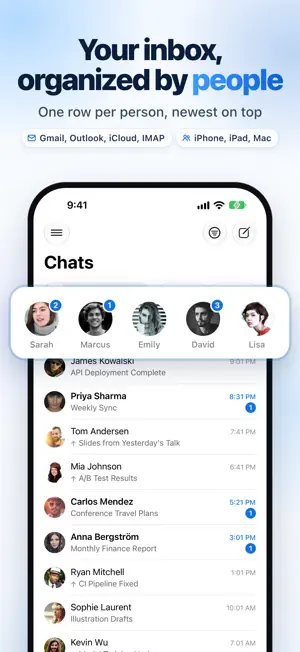
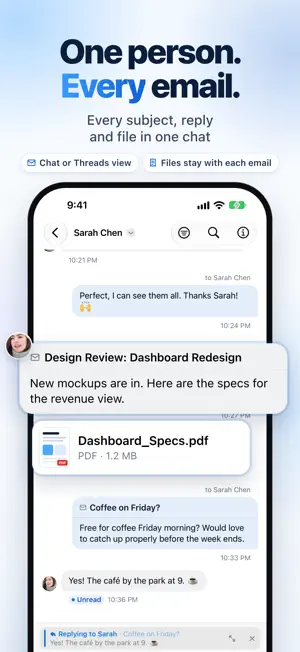
ChatInbox organizes your inbox by people. Each person you email gets one conversation that holds everything you've exchanged: every subject, every reply, every attachment. When a new email arrives, its person moves to the top, with your whole history right there. Newsletters, receipts and alerts file themselves into Feeds, so mail from people is never buried. ORGANIZED BY PEOPLE Your list shows people, not a pile of messages. Tap a person to see every email between you, across every subject, in one place. Read it as cards by thread or as a chat with your replies on the right. Put a company or a team together in one row. PEOPLE FIRST, FEEDS SEPARATE Newsletters, receipts and notifications go to Feeds automatically. Clear a sender in one go: Mark All as Read, Archive All, or Unsubscribe & Delete All. TODAY'S INBOX, DONE FAST Triage sorts today's mail into a plan: what needs a reply, what can be archived, codes you no longer need. Apply it at once, with Undo. AI THAT STAYS ON YOUR DEVICE With Apple Intelligence, ChatInbox shows what people are waiting on you for, lists the questions in an email and drafts your answer, catches you up on what's new from people, and answers questions about your mail with the email it came from. Translate an email in place, on your device. FIND ANYTHING Search reads the words inside your emails and even inside PDFs and other attachments. Or open a person, and everything with them is already there. YOUR ACCOUNTS, YOUR DEVICES Gmail, Outlook, iCloud, Yahoo and any IMAP account. Type your address and ChatInbox finds the settings. Works on iPhone, iPad and Mac, and one purchase covers all three. CALENDAR, TO-DOS AND TAGS See your week beside your mail, turn an email into an event or a to-do, and tag conversations to track them on a board. PRIVACY FIRST Your email never passes through our servers: ChatInbox connects directly to your mail provider. No data mining, no tracking. Turn on image blocking and tracking pixels load only for senders you approve. FREE AND PREMIUM ChatInbox is free with one email account. Premium adds unlimited accounts with Profiles, advanced filters, your full mail history and custom notifications. Try it free for 7 days with the yearly plan, or buy Lifetime once. Terms of Use: https://www.apple.com/legal/internet-services/itunes/dev/stdeula/
Ratings & reviews
4.4
29 ratings
What’s new
Version 2027.1.3 · Updated October 16, 2026
New • Tracking pixels are removed from every email, so senders can't use them to see when you open it. Pictures now load through ChatInbox without cookies. In Settings › Privacy › Remote images, choose "Load images, block trackers" (the default), "Ask first" or "Load everything". Pictures in Spam and from blocked senders wait until you tap Load images. • Attachments are easier to spot. Choose whether files appear above or below an email in Settings › Preferences › Attachments. Threads, newsletter stacks and chat list rows now show when there are files, and the conversation filter has a new "With Files" option. • "Show my replies" adds your own replies when you filter a conversation to a folder. It appears as a chip on the filter banner, which now fits on one line. • Archiving a chat now asks whether to archive all of its emails or only the latest one. You can tell it to remember your answer. Notifications • Each new email gets its own notification with sound again. You can silence notifications from Feeds and new senders. • Notifications arrive more reliably when ChatInbox is in the background, and you're no longer notified about mail you already saw in the app. • Notifications show the email's subject and a preview, and the sender's initials when there's no photo. • Touch and hold a grouped notification to see every email in it, then tap one to open it. • The catch-up summary names each sender and subject. • Opening an email from a notification or from the Digest list now brings you back to that list. You can swipe to archive, delete or mark as read in the list. Improvements • The button that shows or hides quoted text now sits where the quoted text begins and stays in view while you read it, so you can hide it again without scrolling to the end. • Filter, search and Details always appear in a conversation's toolbar, whatever the contact's name. • Collapsed replies in a thread line up with the open email. Fixes • Fixed a crash at launch with some IMAP servers. • Archive no longer moves your sent emails or drafts. • Drafts no longer count as unread, and the Drafts folder stays in sync with your server. • Emails sent between your own accounts now appear in your chats. • Newsletters from a new sender go straight to Feeds. • The Undo message no longer covers the email's action buttons. • The bulk Trash confirmation now shows the correct number of emails. • After you clear a conversation filter, the filter button brings back the chat list's folder.
App privacy
The developer, Innovatism LLC, reported these privacy practices to Apple.
Data Not Collected
The developer does not collect any data from this app.
Alternatives to ChatInbox: Email by Sender
Looking for apps like ChatInbox: Email by Sender? Here are 6 similar apps on the App Store. The highest rated is AI Writer - AI Email Assistant (4.8/5), and all 6 are free to download.
-
 Mailtemi - Mail & Contacts
3.8
Mailtemi - Mail & Contacts
3.8
-
 AI Email Inbox - MailTime Pro
3.2
AI Email Inbox - MailTime Pro
3.2
-
 Mailbox Email Client for Gmail
4.6
Mailbox Email Client for Gmail
4.6
-
 AI Writer - AI Email Assistant
4.8
AI Writer - AI Email Assistant
4.8
-
 All Email Login: Inbox App
4.5
All Email Login: Inbox App
4.5
-
 Email Generator: AI Email App
4.5
Email Generator: AI Email App
4.5
| App | Rating | Price | Last updated | Compare |
|---|---|---|---|---|
| ChatInbox: Email by Sender | 4.4 / 5 (29 ratings) | Free | October 16, 2026 | |
| Mailtemi - Mail & Contacts | 3.8 / 5 (6) | Free | Aug 24, 2026 | Compare |
| AI Email Inbox - MailTime Pro | 3.2 / 5 (41) | Free | Jul 14, 2025 | Compare |
| Mailbox Email Client for Gmail | 4.6 / 5 (30) | Free | Nov 12, 2025 | Compare |
| AI Writer - AI Email Assistant | 4.8 / 5 (8) | Free | Jul 30, 2025 | Compare |
| All Email Login: Inbox App | 4.5 / 5 (13) | Free | Oct 10, 2026 | Compare |
| Email Generator: AI Email App | 4.5 / 5 (39) | Free | Sep 12, 2025 | Compare |