

Password Bunny
passwordbunny, Inc. Productivity iPhoneiPadiPod touch
Password Bunny is a free Productivity app for iPhone and iPad by passwordbunny, Inc. Requires iOS 17.0. Updated November 1, 2026.
- Price
- Free
- on the App Store
- Size
- 144 MB
- Age 4+
- Updated
- Nov 1
- 2026 · v1.1.4
Screenshots


About Password Bunny
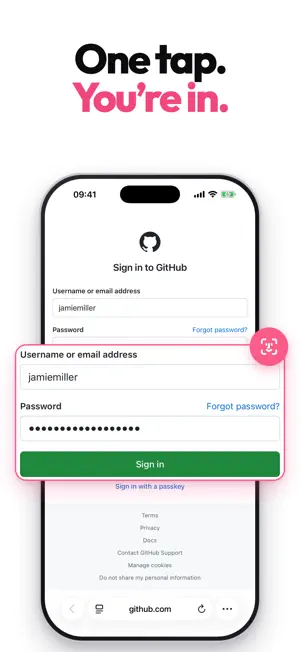
Don't memorize passwords anymore. One tap and Bunny fills in your login. Everything is end-to-end encrypted, and your vault lives only in a cloud you already own — never on our servers. One-tap autofill Tap an empty field and Bunny finds the right account and fills your username and password. It works in Safari and inside other apps, and it unlocks with Face ID or Touch ID. Several accounts on the same site? It lists them and you pick. Bunny Lens for tricky sites On most sites Bunny finds the fields on its own. When a site is hard to read, show Bunny Lens the username, password and one-time code fields and the sign-in button once in Safari, and from your next sign-in it fills the right fields. What you show it syncs to your other devices. Passkeys and one-time codes Sign in without a password wherever passkeys are supported. Keep TOTP two-factor codes on the login they belong to — scan the QR code once when you turn 2FA on, and the code sits next to the password instead of in a separate app. Standard, audited encryption Only you can open your vault. It's sealed with authenticated encryption (XChaCha20-Poly1305) and your master password is hardened with memory-hard Argon2id. Proven standards, no homegrown crypto. Bring your own cloud Keep your vault in iCloud or Google Drive — your account, not ours — or leave it on the device alone. You choose where it lives, and you can move it later. Bunny never sees or stores your data. Import what you already have You can bring your existing logins over from 1Password, Bitwarden, Enpass, Chrome, or Apple Passwords. They work with autofill as soon as they land. Strong password generator Create long, unique passwords in a tap with a live strength meter, then save and autofill them everywhere. Works on every device Local-first, so it opens without a connection, and your changes sync to every device through the cloud account you chose. One vault, everywhere you sign in. Your data stays yours Delete your account from inside the app, under Settings. And when a plan ends, your vault doesn't go with it — keep read-only access and export anytime.
What’s new
Version 1.1.4 · Updated November 1, 2026
- The app download is now much smaller. - The system log is more detailed and easier to read. - We polished every corner for better performance.
App privacy
The developer, passwordbunny, Inc., reported these privacy practices to Apple.
Data Linked to You
The following data, which may be collected and linked to your identity, may be used for the following purposes:
- Location: Coarse Location
- Contact Info: Email Address
- Identifiers: User ID
Used for: App Functionality
Alternatives to Password Bunny
Looking for apps like Password Bunny? Here are 6 similar apps on the App Store. The highest rated is ForSure Password Manager (4.8/5), and all 6 are free to download.
-
 Clib: Read Later & Bookmarks
-
 password123
-
 Intuitive Password®
-
 DrivePassword Password Manager
-
 MyPasswords Password Manager
3.3
-
 ForSure Password Manager
4.8
| App | Rating | Price | Last updated | Compare |
|---|---|---|---|---|
| Password Bunny | – | Free | November 1, 2026 | |
| Clib: Read Later & Bookmarks | – | Free | May 5, 2026 | Compare |
| password123 | – | Free | Sep 1, 2026 | Compare |
| Intuitive Password® | – | Free | Jun 2, 2026 | Compare |
| DrivePassword Password Manager | – | Free | May 16, 2025 | Compare |
| MyPasswords Password Manager | 3.3 / 5 (7) | Free | Oct 10, 2026 | Compare |
| ForSure Password Manager | 4.8 / 5 (4) | Free | Feb 19, 2026 | Compare |
Compare Password Bunny with the top alternatives: ratings, updates, ASO score and keyword gaps →