

Pencilmark: Draw on Web Pages
Prashant Angyan Productivity iPad
Pencilmark: Draw on Web Pages is a free Productivity app for iPad by Prashant Angyan. Requires iOS 17.0. Updated October 19, 2026.
- Price
- Free
- on the App Store
- Size
- 1 MB
- Age 4+
- Updated
- Oct 19
- 2026 · v3.1
Screenshots
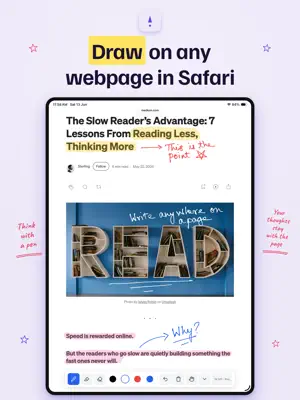



About Pencilmark: Draw on Web Pages
Pencilmark turns Safari into a notebook. Open any webpage and draw right on top of it with your finger. No Apple Pencil needed. Have one? The Pencil draws while your finger scrolls and taps the page as usual, and you can tap the hand button any time to switch your finger back to drawing. Three tools: pen, highlighter, eraser. That's the whole toolbar. Tap the extension icon to start, and drawing stays on as you browse, across every page and tab, until you turn it off. Want a clean view while you read? Hide tucks the toolbar into a small button. Pick a color for the pen and for the highlighter, and Pencilmark remembers each one. On dark pages your ink starts white, so you can always see what you write. Your drawings save for each URL. Come back to the page tomorrow and they're still there. Everything stays in Safari's local storage on your iPad. Nothing is uploaded, synced, or sent anywhere. Works on any site Safari can open: articles, docs, recipes, research papers, forums, wikis. No reader mode, no article extraction. The real page, your marks on top. WHAT YOU GET - Pen and highlighter with colors you choose, saved per tool - White ink by default on dark pages - Stroke eraser that removes one line at a time - Apple Pencil support with pressure sensitivity and palm rejection - Finger drawing on demand, with links and buttons still tappable - Per-page saving via local storage - Works on single-page apps and sites that change URLs HOW TO ENABLE After installing, open Settings on your iPad. Go to Apps, then Safari, then Extensions. Turn on Pencilmark and set it to Allow on All Websites. In Safari, tap the puzzle-piece icon in the address bar and tap Pencilmark to start drawing. Takes about a minute. BUILT FOR READING Pencilmark is a reading tool, not a note-taking app. The point is to slow down, underline the sentence that matters, highlight the paragraph you want to remember. PRIVACY No account. No sign-up. No analytics. No telemetry. No network calls. Your drawings exist on your iPad and nowhere else. See our full privacy policy at pokkle.com/pencilmark/privacy Questions or feedback: [email protected]
What’s new
Version 3.1 · Updated October 19, 2026
Draw while zoomed in. Before this version, drawing paused whenever you pinch-zoomed a page; you had to zoom back out to draw. Now the Apple Pencil draws, highlights and erases at any zoom level. Lines stay the same width on screen no matter how far you zoom, and the ink is sharp at every size. The toolbar and the small color pill stay visible while zoomed; they hide while your fingers move and reappear when the pinch or pan stops. A finger still pans the zoomed page, so you can zoom in with two fingers and write small notes between the lines. The Pencil only draws now. Before, writing over a search box or a text field could type into it, a line across a link could break, and a long stroke on a link could open a menu or start a drag. Now text fields stay out of the Pencil's way while the toolbar is open, so writing over a search box leaves ink only. A finger tap on a field still opens the keyboard, and typing works as before. The pen and the eraser keep working after you close and reopen the iPad cover. Before, they could stop responding until the page reloaded. Ink now works on pages whose content sits inside an embedded frame. Some pages place their whole content in a frame; before, the Pencil did nothing there. Now the ink appears inside the frame, is saved, and follows the frame's own scroll.
App privacy
The developer, Prashant Angyan, reported these privacy practices to Apple.
Data Not Collected
The developer does not collect any data from this app.
Alternatives to Pencilmark: Draw on Web Pages
Looking for apps like Pencilmark: Draw on Web Pages? Here are 6 similar apps on the App Store. The highest rated is Drawboard PDF Annotate, Markup (4.8/5), and all 6 are free to download.
-
 Drawboard PDF Annotate, Markup
4.8
Drawboard PDF Annotate, Markup
4.8
-
 LiquidText
4.6
LiquidText
4.6
-
 UPDF - AI-Powered PDF Editor
4.6
UPDF - AI-Powered PDF Editor
4.6
-
 Flexcil Note & Good PDF Reader
4.4
Flexcil Note & Good PDF Reader
4.4
-
 Prodrafts - Infinite Notes
4.8
Prodrafts - Infinite Notes
4.8
-
 Foxit PDF Editor
4.5
Foxit PDF Editor
4.5
| App | Rating | Price | Last updated | Compare |
|---|---|---|---|---|
| Pencilmark: Draw on Web Pages | – | Free | October 19, 2026 | |
| Drawboard PDF Annotate, Markup | 4.8 / 5 (1,981) | Free | Oct 21, 2026 | Compare |
| LiquidText | 4.6 / 5 (6,381) | Free | Sep 24, 2026 | Compare |
| UPDF - AI-Powered PDF Editor | 4.6 / 5 (694) | Free | Jul 2, 2026 | Compare |
| Flexcil Note & Good PDF Reader | 4.4 / 5 (412) | Free | Oct 21, 2026 | Compare |
| Prodrafts - Infinite Notes | 4.8 / 5 (3,890) | Free | Oct 17, 2026 | Compare |
| Foxit PDF Editor | 4.5 / 5 (4,763) | Free | Sep 15, 2026 | Compare |