

Photo Importer + SD Card Cull
Metasync, Corp Photo & Video iPhoneiPadiPod touch
Photo Importer + SD Card Cull is a paid Photo & Video app for iPhone and iPad by Metasync, Corp. Requires iOS 18.0. Updated September 28, 2026.
- Price
- 2.99 USD
- on the App Store
- Size
- 5 MB
- Age 4+
- Updated
- Sep 28
- 2026 · v1.1.1
Screenshots


About Photo Importer + SD Card Cull
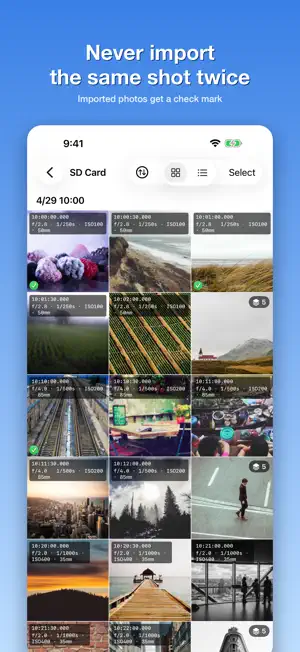
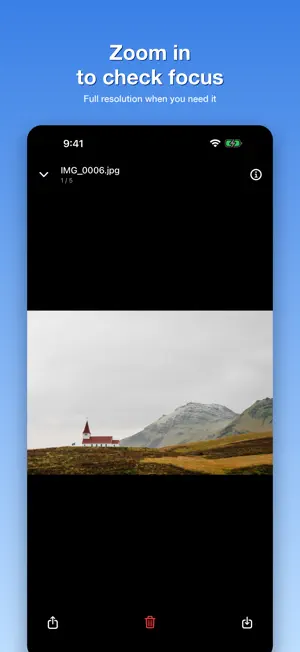
Browse the photos on your SD card or USB drive like the Photos app, and import only the keepers to your iPhone or iPad. Bursts are grouped automatically, thumbnails show aperture, shutter speed and ISO, and imported shots get a check mark so you never import the same photo twice. Photo Importer + is for photographers who want to pick their best RAW / JPEG shots before importing everything. It opens any storage visible in the Files app: SD card readers, USB drives, external SSDs, iCloud Drive and more. ■ Why you need it If you just want everything on your iPhone, plug in a card reader and use the built-in Photos import. That works fine. But when you shot hundreds of frames and want the best one, the Photos import screen only gives you tiny thumbnails you cannot zoom. You end up importing everything and sorting later, wasting storage and time. Photo Importer + gives you the same grid as the Photos app, plus the tools that make culling fast, while the photos stay on the card. ■ Bursts grouped automatically High-speed bursts fill the grid with near-identical frames. Photo Importer + reads the EXIF capture time (millisecond precision) and groups frames shot less than a second apart. The grid shows one representative frame; tap to open the group and compare every frame. RAW+JPEG pairs and photos from several cameras are handled correctly. Unlike the Photos app's Burst feature, this works on RAW and JPEG from any camera. You can turn it off in Settings. ■ Shooting info on every thumbnail Overlay any of these on the grid thumbnails: • Capture time (ms precision) • Exposure (aperture, shutter speed, ISO, focal length) • Camera • Lens • File name • File size Spot the shot with the wrong aperture or the ISO that went too high without opening a single file. Choose which items to show and their order in Settings. ■ See what you've already imported Photos saved to Photos or copied to a folder get a check mark. The record survives reinserting the card, so you never have to remember where you left off. Filter with “Show Unimported Only” and continue culling from where you stopped. ■ How people use it • Open a burst group and pick the decisive moment • Compare aperture, shutter speed and ISO across frames to choose the best exposure • Pinch-zoom to check focus straight from the SD card • Review photos stored on a USB stick or SSD on the iPad • Between shoots, continue culling from the last imported photo ■ More features • Photos-style grid, 1 to 5 columns • Automatic sections by capture date (month / day / hour) • Tap to open, pinch to zoom, full resolution when zoomed past 1:1 • Save selected photos to Photos or to any folder • Share, or delete what you don't need • RAW preview: DNG / CR2 / CR3 / NEF / ARW / RW2 / ORF / RAF • Sort by name, date or size, ascending or descending • English and Japanese ■ Supported storage • SD cards via USB-C or Lightning card readers • USB drives and external SSDs • iCloud Drive • Any cloud storage visible in the Files app (Dropbox, Google Drive and more) Works with off-the-shelf card readers and drives. No vendor lock-in. ■ What it doesn't do No editing, albums, tags or cloud sync. It does one thing: browse photos on external storage like the Photos app and import only what you want. ■ Privacy Your photos never leave the device. EXIF parsing and overlays are all done locally.
What’s new
Version 1.1.1 · Updated September 28, 2026
• Refreshed App Store listing and screenshots, now available in English. • Minor improvements. Thanks for using Photo Importer +. If it helps your workflow, a review on the App Store means a lot.
App privacy
The developer, Metasync, Corp, reported these privacy practices to Apple.
Data Not Collected
The developer does not collect any data from this app.
Alternatives to Photo Importer + SD Card Cull
Looking for apps like Photo Importer + SD Card Cull? Here are 6 similar apps on the App Store. The highest rated is PhotoCuller Mobile (5.0/5), and 5 of the 6 are free to download.
-
 QSDC
-
 MiKiMI - Photo Model Matching
-
 HDR Merge Pro
-
 PhotoCuller Mobile
5.0
-
 ND Filters
-
 Capture: Camera & SD Import
3.0
| App | Rating | Price | Last updated | Compare |
|---|---|---|---|---|
| Photo Importer + SD Card Cull | – | 2.99 USD | September 28, 2026 | |
| QSDC | – | Free | Oct 17, 2026 | Compare |
| MiKiMI - Photo Model Matching | – | Free | Oct 21, 2026 | Compare |
| HDR Merge Pro | – | Free | Sep 5, 2026 | Compare |
| PhotoCuller Mobile | 5.0 / 5 (4) | Free | Oct 7, 2026 | Compare |
| ND Filters | – | 0.99 USD | Jan 11, 2026 | Compare |
| Capture: Camera & SD Import | 3.0 / 5 (2) | Free | Oct 14, 2026 | Compare |