

Capture: Camera & SD Import
Karol Olszanski Photo & Video iPhoneiPadiPod touch
Capture: Camera & SD Import is a free Photo & Video app for iPhone and iPad by Karol Olszanski. Rated 3.0/5 from 2 ratings. Requires iOS 17.0.
- Rating
- 3.0
- 2 ratings
- Price
- Free
- on the App Store
- Size
- 14 MB
- Age 4+
- Updated
- Oct 14
- 2026 · v1.4
Screenshots


About Capture: Camera & SD Import
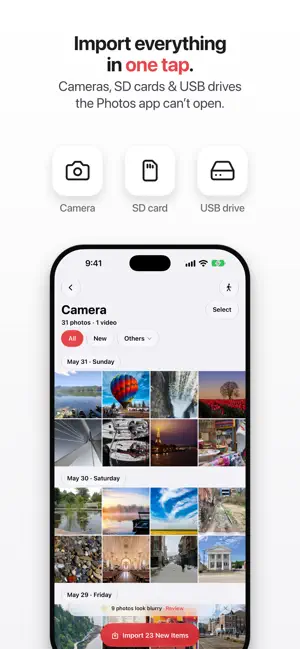
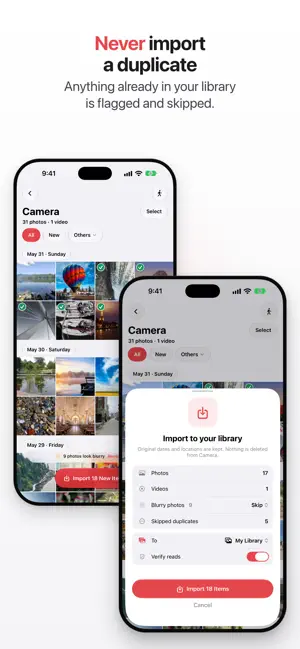
Capture imports photos and videos from a camera, SD card or USB drive into your Photos library. It keeps everything the camera recorded: capture date and time, GPS coordinates, make, model, lens, ISO, aperture, shutter speed and focal length. Capture reads those out of the file and writes them onto the photo explicitly, so each shot lands with the date and place it was taken, not the date you imported it. That is why the app exists. A camera or card that mounts as a drive gets no photo importer, only a file browser, and a plain file copy does not set any of it, so whether the date and place survive then depends on whatever program opens the file next. Connect the camera, card or drive, pick the shots you want, and they go into Photos. NEVER THE SAME PHOTO TWICE Every file is checked against your whole library first, rotated copies included, so anything you already imported comes back flagged. You only carry over what's new. FIX IT BEFORE IT LANDS The camera is not always right: a clock that was never set, no GPS receiver, the wrong lens in the EXIF. Correct any of those fields before the photo reaches your library: date and time on one frame or shifted across a whole batch, keeping the intervals between them; location on a map; copyright, artist and file name. NOTHING TOUCHES THE CARD Your originals are never written to. Every edit goes into the copy Photos gets. Rotation is lossless: one EXIF orientation tag rewritten, the pixels untouched. RAW AS SHOT CR3, NEF, ARW, DNG and more, imported exactly as captured. STAYS ON YOUR DEVICE No account, no cloud, no servers. Nothing leaves your iPhone or iPad. FREE TO START Your first import is the whole card, no limits. After that, the free tier allows 5 items a day. WHAT A PURCHASE CHANGES It lifts the 5-a-day limit. Every capability below works on the free tier, with one exception: recording a route runs the GPS for hours at a time, so it comes with the purchase. FOR THE CARD YOU CAN'T AFFORD TO LOSE • Smart Cull scores sharpness while the card is still being read and flags the soft frames. Page through them full size, keep the ones you blurred on purpose, skip the rest so they never reach your library. • Offload to a drive sends a card straight to an external SSD or a Files folder, no laptop. Every file is read back and hash-checked after writing, with a per-file receipt and a plain “safe to erase” verdict before you format anything. • Record your route while you shoot, then geotag the whole card from it, matched by capture time. Recording keeps going with the screen off and the app closed; nothing is logged unless you start a recording, and tracks stay on your iPhone. • Geotag from any GPX track you already have, matched the same way. • Keep both halves of a RAW+JPEG pair, or just one, and save RAW Photos can't render to Files so it survives. • Old digicam videos (AVI, MPG) convert on import so they play on iPhone (iOS 18+), and a Shortcuts import runs with one tap. One plan, as a monthly or yearly subscription, or a one-time Lifetime purchase. --- Capture is an auto-renewing subscription (monthly or yearly); a one-time Lifetime unlock is also available, and prices are shown in the app before you buy. Payment is charged to your Apple Account at confirmation of purchase. Subscriptions renew automatically unless turned off at least 24 hours before the current period ends; you can manage or cancel anytime in your Apple Account settings. Privacy Policy: https://capture.karololszanski.com/privacy Terms of Use: https://www.apple.com/legal/internet-services/itunes/dev/stdeula/
What’s new
Version 1.4 · Updated October 14, 2026
Bigger screens, and a memory. • Made for iPhone Duo and iPad: unfold iPhone Duo and a second page opens beside the screen you were on, with your sources, what's ready to import, or the photo on its map. On iPad, the same two pages in landscape, and the iPhone's layout in portrait. • Remembers your cameras: open a camera or card once and Capture remembers where its photos are. Next time it goes straight to them, and a card in a reader is spotted when you plug it in. You can see which folder it imports from, and change it. • Your edits are kept: rotate a photo, change its date, its place or its camera details, and it stays that way when you come back to the card. Edit Details also offers the camera details you used before. • New since last time: on a card you have imported from before, New can show just the shots taken since the last import. • Fix a reset camera clock: when a camera forgets the date and stamps its shots 2001, Capture notices, and suggests a time from the shot taken just before. • Import history: every import is listed in Settings, with where it came from and where it went. • iCloud Shared Albums: photos already in a shared album aren't offered as new, and a batch can go straight to a shared album without being added to your library. • Home Screen: touch and hold the Capture icon to import what's new, record a track, or open your tracks or import history. • Day headers show the year for photos from another year, and the grid scrolls more smoothly.
App privacy
The developer, Karol Olszanski, reported these privacy practices to Apple.
Data Not Collected
The developer does not collect any data from this app.
Alternatives to Capture: Camera & SD Import
Looking for apps like Capture: Camera & SD Import? Here are 6 similar apps on the App Store. The highest rated is 2Shoot: Photo & Video Editor (4.8/5), and all 6 are free to download.
-
 QSDC
QSDC
-
 Photo Import²
4.3
Photo Import²
4.3
-
 USB Backup - Photo & Video
4.7
USB Backup - Photo & Video
4.7
-
 Offline Photo Storage
4.5
Offline Photo Storage
4.5
-
 2Shoot: Photo & Video Editor
4.8
2Shoot: Photo & Video Editor
4.8
-
 PhotoSync – transfer photos
4.7
PhotoSync – transfer photos
4.7
| App | Rating | Price | Last updated | Compare |
|---|---|---|---|---|
| Capture: Camera & SD Import | 3.0 / 5 (2 ratings) | Free | October 14, 2026 | |
| QSDC | – | Free | Oct 17, 2026 | Compare |
| Photo Import² | 4.3 / 5 (9) | Free | Oct 8, 2026 | Compare |
| USB Backup - Photo & Video | 4.7 / 5 (20) | Free | Aug 25, 2026 | Compare |
| Offline Photo Storage | 4.5 / 5 (13) | Free | Aug 22, 2026 | Compare |
| 2Shoot: Photo & Video Editor | 4.8 / 5 (20) | Free | Oct 22, 2026 | Compare |
| PhotoSync – transfer photos | 4.7 / 5 (8,249) | Free | Sep 4, 2026 | Compare |