

PDF Document Scanner - ScanX
Zulfiqar Ali Naz Business iPhoneiPadiPod touch
PDF Document Scanner - ScanX is a free Business app for iPhone and iPad by Zulfiqar Ali Naz. Requires iOS 13.0. Updated August 20, 2026.
- Price
- Free
- on the App Store
- Size
- 129 MB
- Age 4+
- Updated
- Aug 20
- 2026 · v1.0
Screenshots


About PDF Document Scanner - ScanX
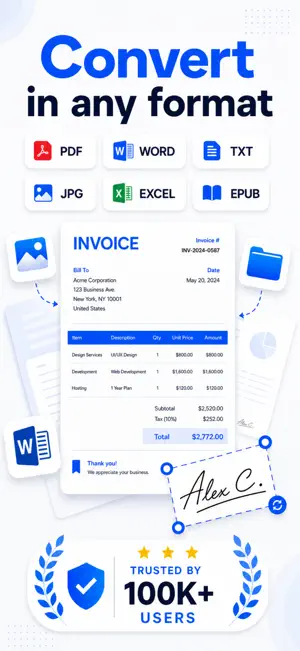
ScanX — PDF Scanner & OCR Turn your iPhone into a fast document scanner. Scan paperwork, receipts, notes, forms, certificates, documents, and study material, then save everything as a PDF. Capture a page with your camera or import an image. Enhance readability, extract text with OCR, combine multiple pages, and organize documents in seconds. BEST FOR • Students scanning notes and assignments • Professionals digitizing contracts, invoices, and reports • Anyone saving receipts, forms, certificates, or paperwork • Users converting photos into PDF files WHAT YOU CAN DO • Scan documents with your iPhone camera • Import photos, JPG, and JPEG images • Convert images and paper documents to PDF • Create single-page or multi-page PDFs • Detect and adjust document edges • Enhance scan quality and readability • Extract text with OCR • Rename and organize documents • Save, print, export, and share PDF files PDF & DOCUMENT SCANNER ScanX helps you digitize paper documents without a traditional scanner. Capture pages anywhere and turn photographed paperwork into organized digital files. Use ScanX as your: • PDF scanner • Document scanner • Receipt scanner • Photo scanner • Paper scanner • OCR text scanner • Image-to-PDF converter CONVERT IMAGES TO PDF Import photos or JPG and JPEG images and convert them into shareable PDF documents. Combine multiple pages into one file for easier storage, printing, and sharing. OCR TEXT RECOGNITION Extract text from supported notes, printed pages, forms, receipts, and other documents without typing everything manually. OCR accuracy may vary depending on image quality, lighting, handwriting, language, camera movement, and document layout. Always review extracted text before using or sharing it. HOW IT WORKS 1. Capture a document or import an image 2. Adjust the detected page 3. Enhance the scan if needed 4. Add more pages 5. Save, print, export, or share the PDF WHY SCANX? • Scan paperwork anywhere • Create PDFs without a desktop scanner • Convert images into PDF files • Extract text from supported documents • Keep receipts and documents organized • Quickly print, export, or share scans Some features may require a subscription, credits, or an in-app purchase. Plans and prices are shown inside the app and may vary by region. Download ScanX and scan, convert, organize, save, and share documents from one app. Privacy Policy: https://fusionbyte.studio/privacy/scanx/ Terms of Use: https://fusionbyte.studio/terms/scanx/
App privacy
The developer, Zulfiqar Ali Naz, reported these privacy practices to Apple.
Data Not Collected
The developer does not collect any data from this app.
Alternatives to PDF Document Scanner - ScanX
Looking for apps like PDF Document Scanner - ScanX? Here are 6 similar apps on the App Store. The highest rated is Zero Budget: Money Planner (5.0/5), and all 6 are free to download.
-
 Abonman - Subscription Manager
-
 Zero Budget: Money Planner
5.0
-
 PDF Scanner : Scan Docs
-
 PDFwow: PDF Converter & eSign
-
 BPC Attendance
-
 Cover Letter AI LetterGenie
| App | Rating | Price | Last updated | Compare |
|---|---|---|---|---|
| PDF Document Scanner - ScanX | – | Free | August 20, 2026 | |
| Abonman - Subscription Manager | – | Free | Dec 12, 2025 | Compare |
| Zero Budget: Money Planner | 5.0 / 5 (1) | Free | Nov 3, 2026 | Compare |
| PDF Scanner : Scan Docs | – | Free | Nov 6, 2025 | Compare |
| PDFwow: PDF Converter & eSign | – | Free | Oct 23, 2026 | Compare |
| BPC Attendance | – | Free | Jun 3, 2026 | Compare |
| Cover Letter AI LetterGenie | – | Free | Jul 15, 2026 | Compare |