

Zero Budget: Money Planner
HARMAN SHARDA Finance iPhoneiPadiPod touch
Zero Budget: Money Planner is a free Finance app for iPhone and iPad by HARMAN SHARDA. Rated 5.0/5 from 1 ratings. Requires iOS 16.4.
- Rating
- 5.0
- 1 ratings
- Price
- Free
- on the App Store
- Size
- 65 MB
- Age 4+
- Updated
- Sep 29
- 2026 · v1.3.0
Screenshots



About Zero Budget: Money Planner
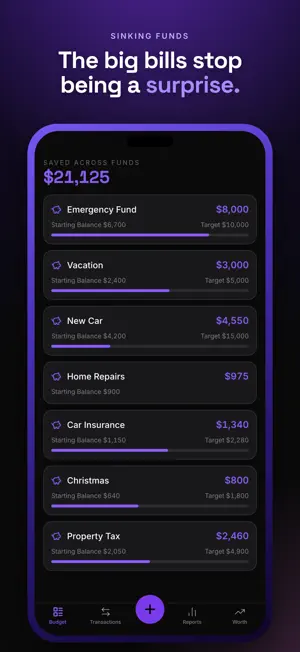
Most money apps tell you what you already spent. Zero asks a better question: what is this money actually for? At the start of the month you give every dollar a job. Rent, groceries, the insurance bill that lands in March. When all of it has a place, you are at zero, and there is nothing left to wonder about. Sinking funds are the part people stay for. Car repairs, insurance, the holidays, a laptop that will eventually die. Put a little aside each month and the balance carries forward instead of resetting on the first, so the big bills stop ambushing you. Debt lives in the same place as everything else. Enter the balance, the rate and the minimum payment, and you get a payoff date that moves as you pay it down. Connect a bank and let transactions arrive on their own, or type them in yourself. Neither one is a lesser version of the app. Either way, rules learn the merchants you see every week and file them for you. Budget on your own, or invite one other person and you will both be looking at the same numbers at the same time. Most arguments about money start with two people holding different information. At the end of the month the reports are blunt about it: what came in, what went out, where it went, and a six month trend so you can tell whether things are genuinely getting better. Zero is free for 30 days. No card, no reminders to upgrade while you are still deciding. After that there are two plans. Basic includes everything you have read about here. Premium adds one thing: an automatic connection to your bank. Prices are shown in the app in your local currency before you buy anything. Payment is charged to your Apple Account at confirmation of purchase. Subscriptions renew automatically unless auto-renew is turned off at least 24 hours before the end of the current period. You can manage subscriptions and turn off auto-renew in your Apple Account settings. Privacy Policy: https://zerobudget.ca/privacy Terms of Use: https://zerobudget.ca/terms
What’s new
Version 1.3.0 · Updated September 29, 2026
Continue with Google at sign-in. Text and figures hold together at the largest system font sizes.
App privacy
The developer, HARMAN SHARDA, reported these privacy practices to Apple.
Data Linked to You
The following data, which may be collected and linked to your identity, may be used for the following purposes:
- Identifiers: User ID, Device ID
- Usage Data: Product Interaction
- Purchases: Purchase History
- Financial Info: Other Financial Info
- Contact Info: Email Address, Name
Used for: Analytics, App Functionality
Alternatives to Zero Budget: Money Planner
Looking for apps like Zero Budget: Money Planner? Here are 6 similar apps on the App Store. The highest rated is Waypoint Budget Planner App (5.0/5), and all 6 are free to download.
-
 Waypoint Budget Planner App
5.0
Waypoint Budget Planner App
5.0
-
 Budget Bestie
4.7
Budget Bestie
4.7
-
 Buddy: Budget Planner App
4.7
Buddy: Budget Planner App
4.7
-
 Budget app - spending tracker
4.7
Budget app - spending tracker
4.7
-
 Goodbudget Budget Planner
4.6
Goodbudget Budget Planner
4.6
-
 Wealthsimple
4.7
Wealthsimple
4.7
| App | Rating | Price | Last updated | Compare |
|---|---|---|---|---|
| Zero Budget: Money Planner | 5.0 / 5 (1 rating) | Free | September 29, 2026 | |
| Waypoint Budget Planner App | 5.0 / 5 (3) | Free | Oct 17, 2026 | Compare |
| Budget Bestie | 4.7 / 5 (3,167) | Free | Oct 17, 2026 | Compare |
| Buddy: Budget Planner App | 4.7 / 5 (9,576) | Free | Oct 18, 2026 | Compare |
| Budget app - spending tracker | 4.7 / 5 (16,205) | Free | Oct 19, 2026 | Compare |
| Goodbudget Budget Planner | 4.6 / 5 (13,510) | Free | Oct 16, 2026 | Compare |
| Wealthsimple | 4.7 / 5 (112) | Free | Oct 17, 2026 | Compare |