

Duplicate Photos: Clean Up
Phuc Pham Photo & Video iPhoneiPadiPod touch
Duplicate Photos: Clean Up is a free Photo & Video app for iPhone and iPad by Phuc Pham. Requires iOS 18.0. Updated August 19, 2026.
- Price
- Free
- on the App Store
- Size
- 7 MB
- Age 4+
- Updated
- Aug 19
- 2026 · v1.1
Screenshots
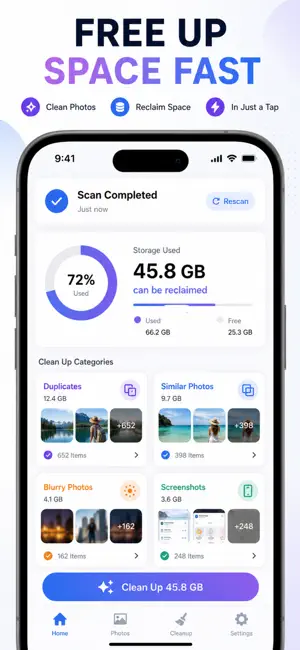


About Duplicate Photos: Clean Up
Your camera roll is full of the same shot ten times over — burst photos, near-identical selfies, screenshots you forgot about, and blurry frames eating your storage. Duplicate Photo Finder scans your entire library and surfaces every one of them so you can clear the clutter in minutes. Unlike a plain gallery, this app actually understands what's a duplicate. It hashes each image to catch pixel-perfect copies, uses on-device visual intelligence to group photos that merely look alike, and separates out screenshots, oversized files, old shots, and out-of-focus frames — each in its own category so you decide exactly what goes. WHAT YOU GET - Exact duplicate detection that catches identical copies down to the pixel - Similar-photo grouping that bundles near-matching bursts and selfies together - A dedicated sweep for screenshots, large files, and years-old photos - Blurry-shot detection that flags out-of-focus frames automatically - A swipe-to-review mode: keep or delete one photo at a time, with undo - An Insights dashboard showing reclaimable space broken down by category PERFECT FOR - Anyone whose iPhone storage is "almost full" from photos - Serial burst-shooters and selfie-takers with hundreds of near-copies - People who screenshot everything and never clean up - Frequent travelers clearing space before the next trip WHY NOT JUST DELETE BY HAND Scrolling your whole camera roll to spot duplicates is hopeless — copies sit thousands of photos apart and blurry frames blend in. This app compares every image for you and lines up the clutter in one place, so a cleanup that would take an afternoon takes a few taps. PRIVACY Every scan runs entirely on your device. Your photos are never uploaded, never sent to a server, and never leave your iPhone. Deletions go through Apple's own photo system, so anything you remove lands safely in Recently Deleted first. FULL ACCESS Free scanning covers a preview of your library. Unlock the full-library scan plus similar-photo, screenshot, large-file, old-photo, and blurry detection with Premium: - Weekly Premium - Annual Premium - Lifetime Premium (one-time purchase) Payment is charged to your Apple ID. Subscriptions renew automatically unless canceled at least 24 hours before the period ends; manage or cancel anytime in your App Store account settings. Scan your library today and see how many gigabytes you can win back. Terms of Use (EULA): https://web-levi.web.app/terms Privacy Policy: https://web-levi.web.app/privacy-policy Questions? [email protected]
What’s new
Version 1.1 · Updated August 19, 2026
Bug fixes and performance improvements.
App privacy
The developer, Phuc Pham, reported these privacy practices to Apple.
Data Not Collected
The developer does not collect any data from this app.
Alternatives to Duplicate Photos: Clean Up
Looking for apps like Duplicate Photos: Clean Up? Here are 6 similar apps on the App Store. The highest rated is Photo Sweeper AI Pro (5.0/5), and all 6 are free to download.
-
 DupeLens: Photo Cleaner
-
 Photo Sweeper AI Pro
5.0
-
 Alike: Similar Photo Cleaner
-
 Poof: Swipe Photo Cleaner
-
 PhotoPikr: Swipe Photo Cleaner
-
 Censor Photo: Redact & Blur
| App | Rating | Price | Last updated | Compare |
|---|---|---|---|---|
| Duplicate Photos: Clean Up | – | Free | August 19, 2026 | |
| DupeLens: Photo Cleaner | – | Free | Oct 17, 2026 | Compare |
| Photo Sweeper AI Pro | 5.0 / 5 (2) | Free | Oct 15, 2026 | Compare |
| Alike: Similar Photo Cleaner | – | Free | Oct 1, 2026 | Compare |
| Poof: Swipe Photo Cleaner | – | Free | Oct 5, 2026 | Compare |
| PhotoPikr: Swipe Photo Cleaner | – | Free | Oct 1, 2026 | Compare |
| Censor Photo: Redact & Blur | – | Free | Oct 26, 2026 | Compare |