

ReMac
rudy saad Utilities iPhoneiPadiPod touch
ReMac is a free Utilities app for iPhone and iPad by rudy saad. Rated 5.0/5 from 1 ratings. Requires iOS 17.0. Updated June 9, 2026.
- Rating
- 5.0
- 1 ratings
- Price
- Free
- on the App Store
- Size
- 8 MB
- Age 4+
- Updated
- Jun 9
- 2026 · v1.0.1
Screenshots


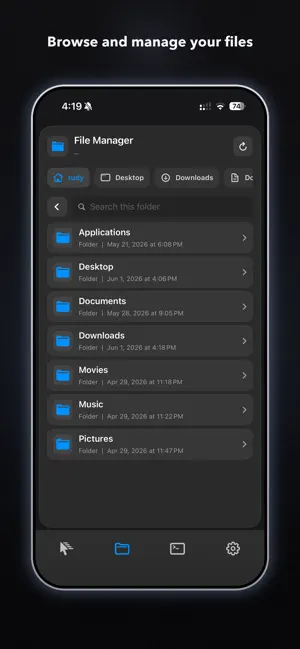
About ReMac
ReMac turns your iPhone into a full remote control for your Mac. See your Mac's screen live, move the cursor with a precision trackpad, type with your keyboard, browse your files, and run Terminal commands, whether you are across the room or across the world. WHAT YOU CAN DO - Live screen mirroring: watch your Mac in real time and control it with a smooth, responsive trackpad - Files: browse, open and manage everything on your Mac from your phone - Terminal: run multiple live Terminal sessions, ideal for quick fixes on the go - Launch apps: open any Mac app instantly from your iPhone - Keyboard: type on your Mac using your iPhone keyboard OVER WI-FI OR FROM ANYWHERE On the same Wi-Fi network, ReMac connects to your Mac directly and is completely free. Need to reach your Mac while you are away? ReMac Cloud relays the connection securely so you can control your Mac from anywhere, over any network. SECURE BY DESIGN Pairing is done by scanning a QR code shown on your Mac, and every connection is tied to your Mac's verified identity, so only your devices can connect. GETTING STARTED 1. Install the free ReMac companion app on your Mac from https://remac.tech 2. Open ReMac on your iPhone and scan the QR code shown on your Mac 3. You are in control SUBSCRIPTION Control on the same Wi-Fi network is always free. ReMac Cloud is an auto-renewing subscription that unlocks remote control from outside your local network. - Price: $2.99 / month] ; $24.99 / year (prices may vary by region) - Payment is charged to your Apple ID at confirmation of purchase - The subscription renews automatically unless auto-renew is turned off at least 24 hours before the end of the current period - Your account is charged for renewal within 24 hours prior to the end of the current period - Manage or cancel anytime in your App Store account settings - Privacy Policy: https://remac.tech/privacy - Terms of Use (EULA): https://www.apple.com/legal/internet-services/itunes/dev/stdeula/
What’s new
Version 1.0.1 · Updated June 9, 2026
Smoother, more reliable cloud connections, faster connect on cellular and steadier video when controlling your Mac outside local network.
App privacy
The developer, rudy saad, reported these privacy practices to Apple.
Data Linked to You
The following data, which may be collected and linked to your identity, may be used for the following purposes:
- Purchases: Purchase History
- Contact Info: Email Address, Name
- Identifiers: User ID, Device ID
Used for: App Functionality
Alternatives to ReMac
Looking for apps like ReMac? Here are 6 similar apps on the App Store. The highest rated is Sound Enhancer - Clario (5.0/5), and all 6 are free to download.
-
 QuickLayout - Window Manager
-
 Sound Enhancer - Clario
5.0
Sound Enhancer - Clario
5.0
-
 System Rx
-
 Vibe Wallpapers: HD & 4K
-
 DevIndex
-
 Rapidrive
1.0
Rapidrive
1.0
| App | Rating | Price | Last updated | Compare |
|---|---|---|---|---|
| ReMac | 5.0 / 5 (1 rating) | Free | June 9, 2026 | |
| QuickLayout - Window Manager | – | Free | Sep 25, 2026 | Compare |
| Sound Enhancer - Clario | 5.0 / 5 (1) | Free | Aug 5, 2026 | Compare |
| System Rx | – | Free | May 23, 2026 | Compare |
| Vibe Wallpapers: HD & 4K | – | Free | Mar 11, 2026 | Compare |
| DevIndex | – | Free | Feb 15, 2026 | Compare |
| Rapidrive | 1.0 / 5 (1) | Free | Aug 15, 2025 | Compare |
Compare ReMac with the top alternatives: ratings, updates, ASO score and keyword gaps →