

QuickLayout - Window Manager
KAZUHIRO KAKIMOTO Utilities iPhoneiPadiPod touchMac
QuickLayout - Window Manager is a free Utilities app for iPhone and iPad by KAZUHIRO KAKIMOTO. Requires iOS 13.0. Updated September 25, 2026.
- Price
- Free
- on the App Store
- Size
- 34 MB
- Age 4+
- Updated
- Sep 25
- 2026 · v1.1.6
Screenshots

About QuickLayout - Window Manager
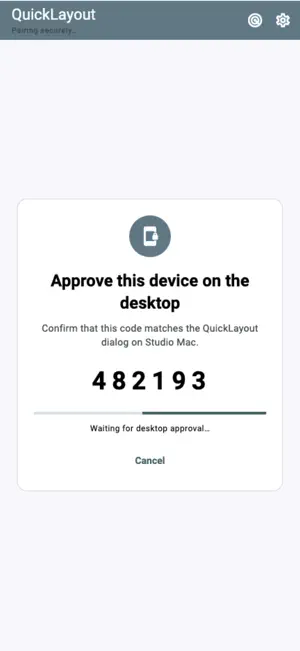
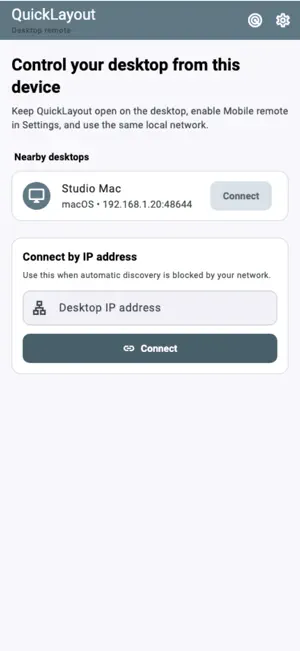
Switch your Mac's saved window workspaces from iPhone or iPad. QuickLayout gives you a touch-friendly list of Layouts on your paired Mac, with search, Apply, desktop status and Undo. A Mac running QuickLayout on the same local network is required for remote operation. Create and edit Layouts on the Mac first. This iOS app does not arrange other iPhone or iPad apps' windows. CHOOSE A WORKSPACE - Browse saved Layouts with their display profile and app/window counts. - Search by Layout name. Favorites set on the Mac appear first. - Keep a focused list on iPhone or use the wider Layout grid on iPad. APPLY AND UNDO - Tap Apply to send the selected Layout to your Mac. - See progress and the desktop's result, including partial results or errors. - Refresh the list and desktop status. - Use Undo when the Mac reports that its previous arrangement can be restored. PAIR WITH YOUR MAC - Enable Mobile remote in QuickLayout's Mac settings and keep the app open. - Find the Mac on your local network or enter its IP address manually. - Compare the six-digit code on both devices and approve pairing on the Mac. - Reconnect to saved, approved desktops. - No QuickLayout account or cloud relay is required. Paired commands use an authenticated encrypted connection. SET UP LAYOUTS ON MAC Install the bundled QuickLayout Window Bridge shortcut when prompted by the Mac app. Save the window arrangements you want to switch between. Layout capture, editing, Quick Placement and automation setup stay on the Mac; your iPhone or iPad selects and applies those saved workspaces. PREVIEW THE INTERFACE Explore demo shows sample Layouts without a Mac connection. It is a labelled interactive preview only: no desktop commands are sent. FREE AND PRO Start with a seven-day trial. Remote-control features remain available in Free after the trial, with advertising. Pro removes ads through a yearly subscription or a one-time lifetime purchase. Restore Purchases is available. Terms of Use: https://kakitiro.com/quickapps/quicklayout/terms/
App privacy
The developer, KAZUHIRO KAKIMOTO, reported these privacy practices to Apple.
Data Linked to You
The following data, which may be collected and linked to your identity, may be used for the following purposes:
- Location: Coarse Location
- Identifiers: Device ID
- Usage Data: Product Interaction, Advertising Data
Used for: Third-Party Advertising, Developer’s Advertising or Marketing, Analytics, App Functionality
Data Not Linked to You
The following data, which may be collected but is not linked to your identity, may be used for the following purposes:
- Diagnostics: Performance Data, Other Diagnostic Data, Crash Data
Used for: Third-Party Advertising, Developer’s Advertising or Marketing, Analytics, App Functionality
Alternatives to QuickLayout - Window Manager
Looking for apps like QuickLayout - Window Manager? Here are 6 similar apps on the App Store. The highest rated is CamViewer - IP Camera Viewer (5.0/5), and all 6 are free to download.


| App | Rating | Price | Last updated | Compare |
|---|---|---|---|---|
| QuickLayout - Window Manager | – | Free | September 25, 2026 | |
| Remotiq PC Remote | – | Free | Aug 4, 2026 | Compare |
| DevIndex | – | Free | Feb 15, 2026 | Compare |
| KoBox Care | – | Free | Nov 4, 2024 | Compare |
| emu98 | 4.8 / 5 (4) | Free | Oct 18, 2026 | Compare |
| CamViewer - IP Camera Viewer | 5.0 / 5 (2) | Free | Oct 22, 2026 | Compare |
| AirAPK | – | Free | Sep 7, 2026 | Compare |