

RunToMax: Running Coach & Plan
Hidai Bar-Mor Health & Fitness iPhoneiPadiPod touchApple Watch
RunToMax: Running Coach & Plan is a free Health & Fitness app for iPhone and iPad by Hidai Bar-Mor. Rated 5.0/5 from 3 ratings. Requires iOS 17.0.
- Rating
- 5.0
- 3 ratings
- Price
- Free
- on the App Store
- Size
- 133 MB
- Age 17+
- Updated
- Oct 17
- 2026 · v1.3.4
Screenshots



About RunToMax: Running Coach & Plan
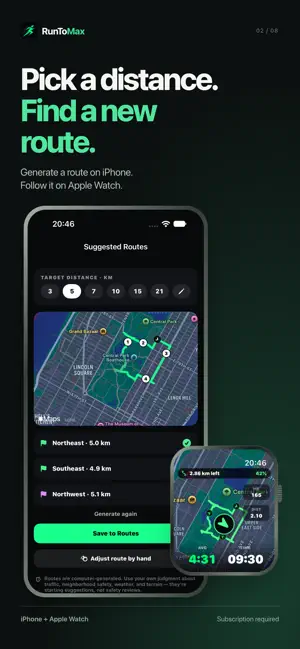
Record your runs on Apple Watch for free. RunToMax Pro tells you what to run today, and why. Every morning, Pro reads your sleep, heart rate variability and recent training, then tells you whether today is for pushing, going easy or recovering. Follow plans and guided sessions on your wrist, with a pace target for every rep. FREE, WITH NO TIME LIMIT • Outdoor and treadmill runs on Apple Watch, with one data screen and five fields you choose • Live pace, distance and auto-laps with the Hero Pace lap banner, music controls and heart-rate chest straps • Run summaries with your route map, splits and stats, plus history, Apple Health and export • A cinematic 3D flyover replay of your route, with Apple Maps satellite imagery • This morning's HRV, resting heart rate and sleep compared with your own usual • VO₂ max, HRV and resting heart rate trends from Apple Health • Build a training plan and see its first week, and try a strength session from each category • Design & share for your runs, with RunToMax branding on every export TRY THREE COACHED RUNS If you've never had Pro or a Pro trial, turn on coaching for your next three runs: Today's call, readiness and a guided session on your Watch with a matching route. No subscription starts and there's no deadline. A run counts once it's saved with at least 1 km and five active minutes. AI coaching isn't included. ACCURACY WE ACTUALLY TEST, ON EVERY RUN • Live pace you can trust, distance and auto-laps that add up, precision start, and honest behavior through pauses • Distance, pace and elevation validated run after run against dedicated running watches • Barometric climb tracking, per-runner calorie modeling, and full-resolution heart rate and cadence • When the data cannot support a conclusion, RunToMax says so instead of guessing WITH RUNTOMAX PRO Built for the wrist • Fully configurable watch screens: choose your metrics, layouts and button controls, per run type • Live map with breadcrumb trail, heart-rate zone alerts, audio cues and a target pace for every workout • Follow a route on your wrist, or pick a distance and let RunToMax suggest a new loop • Structured sessions on the watch: intervals, tempo, progressions, with live per-rep pace targets and a coach in your ear for every rep, in the voice you choose Understand every run • A verdict on the watch the moment you stop, and deep analysis on the phone • Training impact, effort score, heat cost, weather, and full charts for pace, heart rate, power and cadence • Race predictions, threshold and training paces, and fitness trends over time Know when to pull back • Morning readiness that fuses your recovery signals into one honest number, and Today's call • Ramp warnings when training load climbs faster than your body can absorb • Heat-adjusted pacing: what the heat should cost you before the run, and what it actually cost after Train on a plan • Training plans built from your real running history: your level, your volume, your race date • Sensible ramps, cutback weeks, and no back-to-back hard days • Every week of your plan on your watch, adapting to how you respond • The full strength library • AI coaching that turns your data into plain-English guidance, grounded in your actual runs RunToMax Pro is an auto-renewing subscription, billed annually or monthly. New subscribers can try it free, where eligible: 14 days with the annual plan, or 7 days with the monthly plan. The price for your country is shown before you subscribe. Subscriptions renew automatically unless cancelled at least 24 hours before the current period ends. Manage or cancel anytime in your App Store account settings. Your saved runs, history and export stay available without a subscription. Terms of Use: https://runtomax.com/terms Privacy Policy: https://runtomax.com/privacy RunToMax is for runners 18 and over. It provides training guidance, not medical advice.
What’s new
Version 1.3.4 · Updated October 17, 2026
What's New — English Fixed, thanks to your feedback Sleep in Trends now matches Today: a night is no longer split at midnight, and a night you entered by hand shows in Trends too. Plan days now follow the real calendar, so a Tuesday run is marked on Tuesday, and a plan started on a Sunday no longer begins the following Monday. If you run in miles, distances and paces now respect that throughout the app: plans, run details, Home, Trends, History, Settings, notifications and widgets, including the threshold pace you type in. Today keeps your readiness when you return to the tab. Easy runs stay easy An easy run from Today's call or a plan day now runs on the watch without a pace target: the suggested pace stays on iPhone as a guide, and the watch no longer tells you to pick it up or ease off on an easy run. One Today card on the watch Home on the watch shows a single Today card: your plan day with the coach's check (as planned, lighter option or not checked), or Today's call if you have no plan. After a run on either device it reads Done, and the plan screen has a Check now button. Paste a coach's message as written Import now reads coach prose: "Six 3-minute efforts with 90 seconds easy between" or "twenty-five minutes easy" become the right steps. If a breakdown looks wrong, tap Not right? Try a smart read (Pro). Apple Watch setup, step by step A new setup screen tells you exactly where you are: no Watch paired, app not installed yet, app installed but not opened, or connected, with a retry button and instructions for each. Watch Screens changes now save and sync on their own; the Send to Watch button is gone, and a Sync button sits in the toolbar if you ever need it. Treadmill distance reaches Apple Health When you enter the belt distance after a treadmill run, Apple Health now gets the corrected distance too, on the same workout, with your heart rate and other samples untouched. Coaching to power as well as pace (Pro) If you run with a Stryd pod, pair it on the watch (Settings, Sensors, Stryd Foot Pod) and set a power target on any run setup, on iPhone or on the watch, in watts or as a percentage of your threshold power. The session builder takes power on the warm-up, every rep and recovery, and the cool-down. During a session, the interval display on your wrist shows your 5-second power against each step's target and tells you PUSH ON, EASE OFF or ON POWER. On any run, add the Power vs target field to a screen. Spoken cues and wrist taps switch on separately. After the run, see your average power against the target for every rep. Enter your threshold power on iPhone, in Trends or Settings, or on the watch under Workout, Your numbers, or confirm RunToMax's own estimate with one tap. A percentage target with no confirmed threshold no longer blocks the run: it starts with power guidance off and the watch says why. Power comes from your pod only; without one, nothing changes. AI coaching, your choice AI coaching is off until you turn it on. When that is the only thing missing, Today shows a Turn on AI button and says the read was written on your iPhone, the smart read asks first, and after you go Pro the app asks once. Smaller changes Watch Settings keep every target under Workout, Targets, with one short line per row. The Watch Screens editor groups its metric fields into menus. Big numbers on the Track Lap and Equal grid run faces are one weight lighter and easier to read. Settings has a Join r/RunToMax link under About & help, and the run page shows it once. Standing still with a pod reads Resting.
App privacy
The developer, Hidai Bar-Mor, reported these privacy practices to Apple.
Data Linked to You
The following data, which may be collected and linked to your identity, may be used for the following purposes:
- Health & Fitness: Health, Fitness
- Purchases: Purchase History
- Identifiers: Device ID, User ID
- Usage Data: Product Interaction
- User Content: Other User Content
- Other Data: Other Data Types
Used for: Analytics, App Functionality
Data Not Linked to You
The following data, which may be collected but is not linked to your identity, may be used for the following purposes:
- Diagnostics: Performance Data, Crash Data
Used for: Analytics, App Functionality
Alternatives to RunToMax: Running Coach & Plan
Looking for apps like RunToMax: Running Coach & Plan? Here are 6 similar apps on the App Store. The highest rated is Flux Run: AI Running Coach (5.0/5), and all 6 are free to download.
-
 Flux Run: AI Running Coach
5.0
Flux Run: AI Running Coach
5.0
-
 Nuvo: Fitness Nutrition Coach
-
 Workout Planner - Endravo
5.0
Workout Planner - Endravo
5.0
-
 RunBoost: Running Coach
-
 StartRunning: Zero to 5K
-
 HYTRAIN : Coach HYROX
5.0
HYTRAIN : Coach HYROX
5.0
| App | Rating | Price | Last updated | Compare |
|---|---|---|---|---|
| RunToMax: Running Coach & Plan | 5.0 / 5 (3 ratings) | Free | October 17, 2026 | |
| Flux Run: AI Running Coach | 5.0 / 5 (3) | Free | Oct 21, 2026 | Compare |
| Nuvo: Fitness Nutrition Coach | – | Free | Oct 14, 2026 | Compare |
| Workout Planner - Endravo | 5.0 / 5 (3) | Free | Oct 20, 2026 | Compare |
| RunBoost: Running Coach | – | Free | Oct 7, 2026 | Compare |
| StartRunning: Zero to 5K | – | Free | Sep 23, 2026 | Compare |
| HYTRAIN : Coach HYROX | 5.0 / 5 (1) | Free | Aug 25, 2026 | Compare |