

Flows: Time Tracker
Paul Stanton Productivity iPhoneiPadiPod touchApple Watch
Flows: Time Tracker is a free Productivity app for iPhone and iPad by Paul Stanton. Requires iOS 17.0. Updated August 20, 2026.
- Price
- Free
- on the App Store
- Size
- 16 MB
- Age 4+
- Updated
- Aug 20
- 2026 · v1.9.3
Screenshots


About Flows: Time Tracker
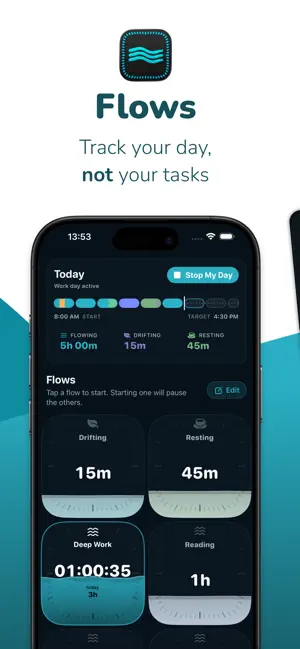
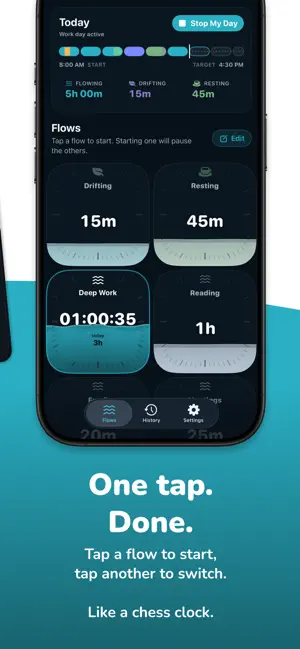
Most time trackers are built for billing. Flows is built for understanding your day. Tap a card to start tracking. Tap another to switch. That's it. No projects, no timers to manage, no descriptions to fill in. Create your own flows: broad categories like Deep Work, Meetings, Admin, Resting, whatever matches how you actually spend your time. Flows records it and shows it back to you in a way that makes sense at a glance. Because work isn't just what was on screen. And your day is more than a timesheet. DRIFTING Not every minute gets deliberately assigned. Step away. Forget to tap. Take a break. Lose half an hour. Flows doesn't treat that as a gap or a failure. It becomes Drifting, a built-in flow that quietly catches the time you didn't claim. Move it later if you want. Leave it if it belongs there. Most trackers punish missing time. Flows treats it as part of the day. (One reason it sits well with ADHD brains, and anyone who forgets to tap.) SEE YOUR WHOLE DAY AT ONCE The day-bar is a coloured ribbon showing every minute of your day in the flow it belongs to. No spreadsheets. No reports to decode. Just the shape of the day, visible at a glance. MEET DROPLET Droplet is the small companion who lives in your timeline. No dashboards to read — Droplet notices the shape of your week and reflects it back in a sentence or two: which flows carried the days, when the drifting clustered, how the rhythm moved. Curious about something? Just ask. Ask Droplet answers from your own tracked time — "how much did I flow this week?", "where did my time go?" — in plain, warm language. Never a score. Never advice you didn't ask for. REFLECTIONS Zoom out to a week or a month and Flows shows its shape at a glance: a simple bar for each day, your flows laid out by rhythm, and a short reflection up top. Not "was this a good week?" Just "what kind of week was this?" FIX THINGS WITHOUT BREAKING ANYTHING Forgot to switch? Long-press a flow card to move time from one flow to another after the fact. Long-press any segment in the day-bar to see its history: what it was, what changed, and how it got there. Nothing is destructive. Corrections add clarity, they don't erase the past. FEATURES * One-tap tracking. Start and switch instantly. * Drifting. Built-in time for the moments you didn't claim. * The day-bar. See your whole day as a single timeline. * Droplet, a companion who reflects your week back to you. * Ask Droplet questions about your own time, in plain language. * Weekly and monthly Reflections that show the shape of your time. * Move time between flows after the fact. * Per-segment history and corrections. * Bridges. Flows asks what to do with gaps in your day. * A grace period for accidental taps. * No streaks. No guilt. Nothing to maintain. Ask Droplet and AI-written reflections need a device that supports Apple Intelligence. Everything else works on any supported device. WHAT FLOWS IS NOT * Not a productivity scoreboard. * Not a focus app that locks you out of things. * Not a billing tool with clients, invoices and hourly rates. * Not an automatic activity logger watching your screen. Flows is for people who finish the day and wonder where it went. A calmer way to track your time. Time flows. Know where. Privacy Policy: https://flowsapp.io/privacy Terms of Use: https://www.apple.com/legal/internet-services/itunes/dev/stdeula/
What’s new
Version 1.9.3 · Updated August 20, 2026
• History now includes a Timesheet view — see your day totals laid out like a timesheet, with hours shown in decimal format • Droplet can now break down your day project-by-project when you ask for a summary • Forgot to log your start time? You can now backdate the start of your day right from the confirmation card • Decimal hour formatting now respects your device's language and region settings
App privacy
The developer, Paul Stanton, reported these privacy practices to Apple.
Data Not Collected
The developer does not collect any data from this app.
Alternatives to Flows: Time Tracker
Looking for apps like Flows: Time Tracker? Here are 6 similar apps on the App Store. The highest rated is Shift Work Calendar - ShiftGo (5.0/5), and all 6 are free to download.
-
 10,000 Hours - Mastery Tracker
4.7
-
 Mushtra: Habit Tracker
-
 Toki Time Tracker
-
 Habit Tracker & Timer - Striva
-
 Hustla To-Do List Task Planner
4.0
-
 Shift Work Calendar - ShiftGo
5.0
| App | Rating | Price | Last updated | Compare |
|---|---|---|---|---|
| Flows: Time Tracker | – | Free | August 20, 2026 | |
| 10,000 Hours - Mastery Tracker | 4.7 / 5 (3) | Free | Oct 12, 2026 | Compare |
| Mushtra: Habit Tracker | – | Free | Sep 30, 2026 | Compare |
| Toki Time Tracker | – | Free | Aug 25, 2026 | Compare |
| Habit Tracker & Timer - Striva | – | Free | Apr 17, 2026 | Compare |
| Hustla To-Do List Task Planner | 4.0 / 5 (4) | Free | Oct 29, 2026 | Compare |
| Shift Work Calendar - ShiftGo | 5.0 / 5 (2) | Free | Aug 26, 2026 | Compare |