

Hustla To-Do List Task Planner
Milos Milikic Productivity iPhoneiPadiPod touchMac
Hustla To-Do List Task Planner is a free Productivity app for iPhone and iPad by Milos Milikic. Rated 3.7/5 from 3 ratings. Requires iOS 18.0.
- Rating
- 3.7
- 3 ratings
- Price
- Free
- on the App Store
- Size
- 64 MB
- Age 4+
- Updated
- Sep 24
- 2026 · v2.2.2
Screenshots

About Hustla To-Do List Task Planner
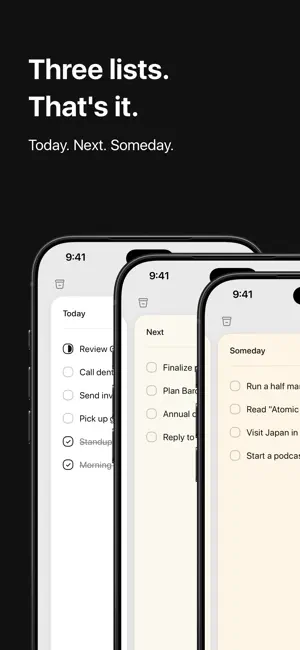
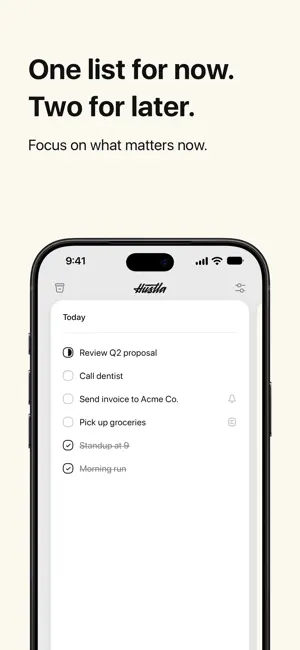
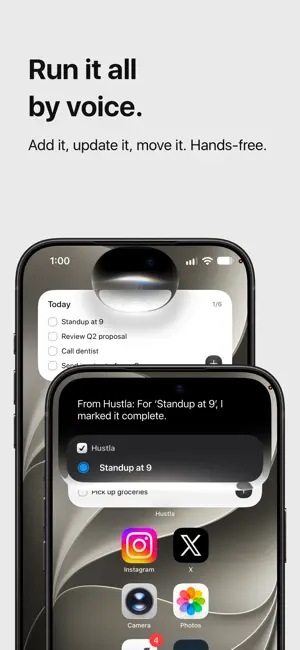
Three lists. That's the whole app. ◆ TODAY — what you're actually doing today. Short, deliberate, ruthless. If it's here, it gets done. ◆ NEXT — what's coming up soon. Real commitments, parked out of your way until they're due. ◆ SOMEDAY — everything else. Ideas, maybe-laters, the stuff rattling around your head. Out of your brain, into the app, no false urgency. No projects. No tags. No nested subtasks. No setup wizard. Open it and go. TYPE IT LIKE YOU'D SAY IT Write "dentist Friday 3pm" and Hustla gives you "Dentist" with a Friday 3:00 PM reminder, on the right card, before you save. No syntax to learn. Nothing to configure. Start with "next:" or "someday:" if you want to aim it somewhere specific. Built on Apple Intelligence and running entirely on your device. Nothing you type or say is sent anywhere. REMINDERS THAT ACTUALLY FIRE Set a reminder on any to-do, and Hustla will chase you for it. No configuration, no rules engine — pick a time, get told. NOTES WHERE THEY BELONG Every to-do holds its own notes. The address, the order number, the thing you meant to say. Attached to the task instead of buried in a separate notes app. CAPTURE IT ANYWHERE - Just talk to Siri. Typos, filler words and near-miss wording still land on the right to-do - Push, bring, send or move a to-do to another card by voice - "Update the notes on X", "Mark X as started", "What's next in Hustla" - Quick Add widget right on your Lock Screen - Long-press the app icon to drop straight into Today, Next, or Someday - Pin "New To-Do" to Control Center or your Action Button - Home screen widgets so today's list is always in view BUILT FOR PEOPLE WHO DON'T WANT A SECOND JOB Most to-do apps make you configure a productivity system before you can write down "call the dentist." Hustla doesn't. Three lists, swipe to move, tap to kill. Clean, fast, and distraction-free by design. SYNCS AND STAYS OUT OF THE WAY iCloud sync across iPhone, iPad, and Mac. Four Liquid Glass app icons. Light, dark, tinted, clear — it adapts. PERFECT FOR - Daily to-do lists that you'll actually finish - Simple GTD workflows - Anyone escaping an overcomplicated task manager FREE TO START Core Hustla is free, including Smart Quick-Add. Pro unlocks with a 7-day free trial on the yearly plan. Monthly, yearly, and a pay-once Lifetime option with Family Sharing are all available — current prices are shown above in In-App Purchases. Stop planning. Start doing. Every Siri phrase Hustla understands: https://hustla.app/siri Apple Intelligence and Siri are trademarks of Apple Inc., registered in the U.S. and other countries and regions. Terms of Use (EULA): https://www.apple.com/legal/internet-services/itunes/dev/stdeula/ Privacy Policy: https://hustla.app/privacy.html
What’s new
Version 2.2.2 · Updated September 24, 2026
- Apple Intelligence — Hustla understands looser phrasing when you type or talk, and Siri picks the right to-do when your wording is close. All on-device. Nothing leaves your device. - Smart Quick-Add — type "dentist Friday 3pm" and get "Dentist" with a Friday 3:00 PM reminder on the right card, before you save. Free, on by default. Add "next:" or "someday:" to pick the card. - Siri finds the to-do you meant — typos, filler words, and near-miss wording no longer trip it up. Adding by voice uses Smart Quick-Add too. - More phrases — push/bring/send/put a to-do to a card, "Update the notes on X", "Mark X as started", "What's next in Hustla". Clearer confirmations. - Other small improvements and bug fixes. Full details on Apple Intelligence and Siri, with every phrase, at hustla.app/siri.
App privacy
The developer, Milos Milikic, reported these privacy practices to Apple.
Data Not Linked to You
The following data, which may be collected but is not linked to your identity, may be used for the following purposes:
- Purchases: Purchase History
- Identifiers: Device ID
Used for: App Functionality
Alternatives to Hustla To-Do List Task Planner
Looking for apps like Hustla To-Do List Task Planner? Here are 6 similar apps on the App Store. The highest rated is Chalk: Simple To Do (5.0/5), and all 6 are free to download.
-
 Flow: Activities & Notes
-
 Chalk: Simple To Do
5.0
Chalk: Simple To Do
5.0
-
 ReminderOS – Smart Reminders
4.0
ReminderOS – Smart Reminders
4.0
-
 Pocket Goals: Save Up Easier
4.8
Pocket Goals: Save Up Easier
4.8
-
 Habit Tracker: Habit Jars
5.0
Habit Tracker: Habit Jars
5.0
-
 Note & Widget
4.2
Note & Widget
4.2
| App | Rating | Price | Last updated | Compare |
|---|---|---|---|---|
| Hustla To-Do List Task Planner | 3.7 / 5 (3 ratings) | Free | September 24, 2026 | |
| Flow: Activities & Notes | – | Free | Aug 17, 2026 | Compare |
| Chalk: Simple To Do | 5.0 / 5 (3) | Free | Jul 18, 2026 | Compare |
| ReminderOS – Smart Reminders | 4.0 / 5 (1) | Free | Sep 14, 2026 | Compare |
| Pocket Goals: Save Up Easier | 4.8 / 5 (5) | Free | Sep 16, 2026 | Compare |
| Habit Tracker: Habit Jars | 5.0 / 5 (3) | Free | May 9, 2026 | Compare |
| Note & Widget | 4.2 / 5 (5) | Free | Jun 12, 2026 | Compare |