

aTask
ALINA JOSEPH Productivity iPhoneiPadiPod touch
aTask is a free Productivity app for iPhone and iPad by ALINA JOSEPH. Rated 5.0/5 from 3 ratings. Requires iOS 15.0. Updated October 10, 2026.
- Rating
- 5.0
- 3 ratings
- Price
- Free
- on the App Store
- Size
- 71 MB
- Age 17+
- Updated
- Oct 10
- 2026 · v6.24
Screenshots


About aTask
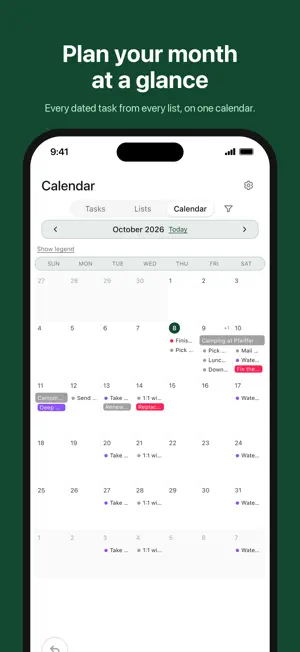
aTask is a no-friction shared task list. Make a list, invite anyone, and check things off together — in real time. Why aTask • Simple by design. Plain task titles, optional tags, no projects-within-projects. • Real-time sync. When anyone on the list checks something off, everyone sees it instantly. • See everything in one place. The Tasks view shows open items across all your lists, with search and filters. • Plan your week on the calendar. Month, week, and day views; drag tasks to reschedule; bulk-move open items from a day. • Tag what matters. Color-coded tags for the categories you actually care about. • Open by default. Anyone you invite can add and complete tasks. Owners can designate trusted tag editors. • Home screen widgets for your list or calendar at a glance. Who it's for • Anyone you share a list with — at home, at work, or anywhere in between. • Teams sharing lightweight to-dos that don't need a full project manager. • Anyone who tried Reminders, Notes, and a half-dozen task apps and wanted something simpler. Privacy • Email + password sign-in (no social tracking). • Your data is stored securely in the cloud, encrypted in transit and at rest. • No ads. No selling your information. The app uses analytics to count first opens and sessions. We do not collect advertising IDs. • Read the full policy at https://atask.anicca26.org/privacy Get started 1. Create a list (e.g. "Groceries", "Weekend Plans", "Move Day"). 2. Add tasks — any length, optional tags and due dates. 3. Tap Share to invite by email or send an invite link. 4. Switch between Lists, Tasks, and Calendar to work the way you think. aTask is built and maintained by Anicca26. Questions, bugs, ideas: [email protected].
What’s new
Version 6.24 · Updated October 10, 2026
What's new in 6.24 • Lists can repeat daily, and a list's repeat schedule is easy to find at the top of Manage. • Calendar: a cleaner header with today's date as the Today button, overlapping events laid out so each one shows, and swiping that works from anywhere. • Press and hold to move calendar items. Moves, Move all, and archives in the day pop-up can be undone. • The Small / Medium / Large text setting now applies to the calendar and small labels everywhere. • Settings opens as a drop-down from the gear. • See when changes are saved on your phone but not yet synced. • Deleting your account shows what happens to each shared list. • Plus many smaller fixes and polish.
App privacy
The developer, ALINA JOSEPH, reported these privacy practices to Apple.
Data Linked to You
The following data, which may be collected and linked to your identity, may be used for the following purposes:
- Contact Info: Email Address
- User Content: Other User Content
Used for: App Functionality
Alternatives to aTask
Looking for apps like aTask? Here are 6 similar apps on the App Store. The highest rated is The Task App (4.9/5), and all 6 are free to download.
-
 The Task App
4.9
The Task App
4.9
-
 Repeatable Checklists & Tasks
4.6
Repeatable Checklists & Tasks
4.6
-
 Vibe Canvas
3.7
Vibe Canvas
3.7
-
 Indeemo: Mobile Ethnography
4.6
Indeemo: Mobile Ethnography
4.6
-
 Text Me That
4.7
Text Me That
4.7
-
 ClawOS
3.1
ClawOS
3.1
| App | Rating | Price | Last updated | Compare |
|---|---|---|---|---|
| aTask | 5.0 / 5 (3 ratings) | Free | October 10, 2026 | |
| The Task App | 4.9 / 5 (10) | Free | Mar 14, 2026 | Compare |
| Repeatable Checklists & Tasks | 4.6 / 5 (5) | Free | Jul 1, 2026 | Compare |
| Vibe Canvas | 3.7 / 5 (19) | Free | Aug 26, 2026 | Compare |
| Indeemo: Mobile Ethnography | 4.6 / 5 (170) | Free | Oct 20, 2026 | Compare |
| Text Me That | 4.7 / 5 (1,537) | Free | Oct 27, 2026 | Compare |
| ClawOS | 3.1 / 5 (25) | Free | Sep 10, 2026 | Compare |
Compare aTask with the top alternatives: ratings, updates, ASO score and keyword gaps →