

Spokt: Read Aloud
Musab Alhariri Productivity iPhoneiPadiPod touch
Spokt: Read Aloud is a free Productivity app for iPhone and iPad by Musab Alhariri. Rated 5.0/5 from 2 ratings. Requires iOS 26.2.
- Rating
- 5.0
- 2 ratings
- Price
- Free
- on the App Store
- Size
- 31 MB
- Age 4+
- Updated
- Sep 21
- 2026 · v2.1.4
Screenshots
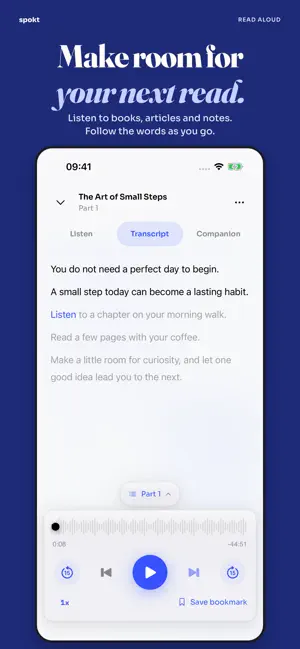


About Spokt: Read Aloud
Make room for your next read. Spokt turns books, articles and notes into audio you can listen to throughout your day. Bring your own audiobooks too, and keep listening, reading and practice together. GIVE YOUR READING A VOICE Start with a supported PDF, EPUB, web article or pasted text. Choose a voice and see the required usage before generating audio. For a long document, start with a selection and listen to ready parts while the rest are being prepared. YOUR AUDIOBOOKS, YOUR PACE Import MP3, M4B and other supported audio files. Use detected chapters or split a long recording into listening parts. Local and online audio share the same player, with playback speed, bookmarks and a sleep timer. TRANSCRIBE THE PART YOU NEED Create a transcript for one listening part or the whole book. Paid plans and Lifetime include unlimited on-device transcription, with no sync-minute charges. Available languages depend on your device and Apple's speech models; a model download may be needed. Long recordings can use significant battery and make your device warm. Keep Spokt open while local transcription runs, and resume after an interruption. Cloud transcription is a separate choice: the selected audio is uploaded for processing and uses sync minutes. Imported audio is not automatically transcribed. With a completed, synced transcript, follow the highlighted words and tap to seek. MORE ROOM FOR THE PAGE Attach a companion PDF or EPUB and read it inside the player. Expand it to full screen for more reading space. Companions stay separate from your audio transcript. Remove an app-owned attachment when you no longer need it. FOCUS, REPEAT AND PRACTISE Use Immersive Mode to focus on a sentence, repeat it and translate. Practise with Listen & Type or Say It Back. In Learner Mode, save vocabulary, choose words for review and explore available podcasts and audiobooks. Features and content availability vary by language. START WITH WHAT YOU HAVE Spokt is free to download and includes a monthly generation allowance. Paid plans, Lifetime and optional voice packs provide the access and allowances shown before purchase. Subscription prices, renewal periods and trial eligibility are displayed in the app. Manage or cancel subscriptions in your Apple Account settings. Keep your original local audio files: imported audio is not backed up as a cloud audio library. Linked folders need access to their originals. Only import content you have the right to use; DRM-protected files are not supported. Privacy: https://spokt.net/privacy.html Terms of Use (EULA): https://www.apple.com/legal/internet-services/itunes/dev/stdeula/
What’s new
Version 2.1.4 · Updated September 21, 2026
A clearer player, with more room to read. • One familiar player for local and online audio, with clearer tools and floating part selection. • Read companion PDFs and EPUBs inside Spokt and expand them to full screen. • Split long audiobooks into listening parts and transcribe the part you need. • Unlimited on-device transcription is included with paid plans and Lifetime, without using sync minutes. Language and device support varies. • Clear progress, pause/resume and recovery for local transcription, plus battery and heat guidance. • Improved Plus access checks, companion opening and attachment removal. • Clearer states for parts without a transcript, and more reliable player-header taps.
App privacy
The developer, Musab Alhariri, reported these privacy practices to Apple.
Data Linked to You
The following data, which may be collected and linked to your identity, may be used for the following purposes:
- Identifiers: Device ID, User ID
- Usage Data: Product Interaction
- Purchases: Purchase History
- Contact Info: Email Address, Name
- Diagnostics: Crash Data, Performance Data, Other Diagnostic Data
Used for: Analytics, App Functionality
Alternatives to Spokt: Read Aloud
Looking for apps like Spokt: Read Aloud? Here are 6 similar apps on the App Store. The highest rated is Audiary - Text to Speech (5.0/5), and all 6 are free to download.
-
 Audiary - Text to Speech
5.0
Audiary - Text to Speech
5.0
-
 OpenVox – AI Text to Speech
5.0
OpenVox – AI Text to Speech
5.0
-
 Ghost Reader Live
5.0
Ghost Reader Live
5.0
-
 Easy Click Control
-
 Minutary: AI Meeting Notes
5.0
Minutary: AI Meeting Notes
5.0
-
 Challenge 100 - Make Habit
| App | Rating | Price | Last updated | Compare |
|---|---|---|---|---|
| Spokt: Read Aloud | 5.0 / 5 (2 ratings) | Free | September 21, 2026 | |
| Audiary - Text to Speech | 5.0 / 5 (2) | Free | Sep 14, 2026 | Compare |
| OpenVox – AI Text to Speech | 5.0 / 5 (2) | Free | Sep 26, 2026 | Compare |
| Ghost Reader Live | 5.0 / 5 (1) | Free | Oct 15, 2026 | Compare |
| Easy Click Control | – | Free | May 22, 2026 | Compare |
| Minutary: AI Meeting Notes | 5.0 / 5 (1) | Free | Aug 30, 2026 | Compare |
| Challenge 100 - Make Habit | – | Free | Jul 7, 2026 | Compare |
Compare Spokt: Read Aloud with the top alternatives: ratings, updates, ASO score and keyword gaps →