

OpenVox – AI Text to Speech
Nitesh Kumar Sharma Productivity iPadMac
OpenVox – AI Text to Speech is a free Productivity app for iPad and Mac by Nitesh Kumar Sharma. Rated 5.0/5 from 2 ratings. Requires iOS 18.4.
- Rating
- 5.0
- 2 ratings
- Price
- Free
- on the App Store
- Size
- 216 MB
- Age 4+
- Updated
- Sep 26
- 2026 · v1.6.1
Screenshots


About OpenVox – AI Text to Speech
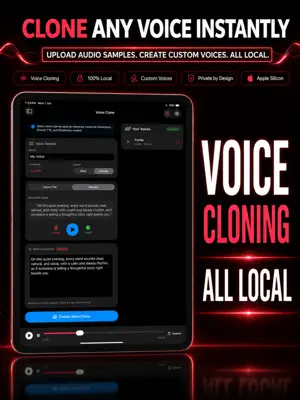
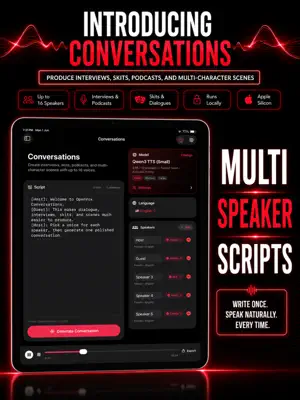
Transform any text into natural, expressive speech — entirely on your iPad. OpenVox is a privacy-first, local AI text-to-speech app optimized for Apple Silicon. Why OpenVox? Privacy-First by Design All processing happens locally on your iPad. After a one-time model download, OpenVox does not initiate network requests for generation or processing. No account required. No telemetry. No analytics. No third-party trackers. All data stored locally. Made for Apple Silicon iPads Powered by MLX acceleration for M1, M2, M4 and newer chips. Near-instant generation for most inputs. Optimized memory usage for smooth, portable performance. 300+ Voices for 600+ languages! Four powerful AI models: OmniVoice — next-gen model for ultra-realistic, expressive, and context-aware speech with voice cloning Qwen3 TTS — best for realism and voice cloning Kokoro — fast, stable, ideal for long content Chatterbox — expressive, emotional, multilingual 600+ languages including English (US & UK), Spanish, French, German, Czech, Japanese, Chinese, Hindi, Portuguese, Italian, Arabic, Korean, Dutch, Turkish, Greek, Polish, Hebrew, Swedish, Finnish, Norwegian, Malay, Russian, Ukrainian, Indonesian, Bulgarian, Hungarian, Danish, Swahili, Urdu, Bengali, Panjabi, Tamil, Telugu, Malayalam, Serbian, Slovak and more. Offline-Ready After initial model download from HuggingFace, everything runs locally. Perfect for travel, secure environments, or reading sensitive documents on the go. Core Features: AI Speech Generation • 300+ voices across 600+ languages • Advanced controls: speed (0.5x–2.0x), temperature, CFG weight, exaggeration • Silence removal and audio normalization • Built-in audio preview • Automatic chunking for long text AI Voice Design • Create new voices by just describing them • Free: 10 Voice Designs • Pro: Unlimited • Perfect for creating voices for your characters Audiobook Generator • Import EPUB, PDF or text files • Chapter-by-chapter management • Batch processing (Pro) • Per-chapter voice customization Voice Changer • Transform MP3 or WAV or M4A audio into different voices • Free: 100 seconds/day • Pro: Unlimited Conversations • Create multi-speaker scripts with up to 4 voices in one generation • Perfect for interviews, podcasts, skits, dialogues, and character scenes • Assign a different voice to each speaker • Import .txt and .pdf scripts directly • Adjustable pause length between dialogue lines Voice Cloning • Clone voices from your own recordings • Free: 3 clones • Pro: Unlimited • 100% local processing Generation History • Saved locally on your Mac • Search, replay, export, or delete • No cloud sync Audio Export • Free: WAV • Pro: WAV + M4A • Commercial use allowed Permissions • Microphone — only for recording voice samples • File access — only when importing files Permissions are requested only when needed. System Requirements • iPadOS 18.0 or later • Apple Silicon (M1 or newer) required • 1–2GB free disk space (Depends on the Models downloaded) • 8 GB RAM (16GB RAM Recommended) • Internet required once for initial model download Start free. Upgrade when ready. Free Tier • 5,000 characters per day • 10 voice designs • 100 seconds voice conversion per day • 3 voice clones • 2,000 characters per generation • All 300+ voices included • WAV export (24kHz lossless) • All models available • No ads. No tracking. OpenVox Pro (One-Time Purchase) • Everything in Pro plus below • Unlimited generations • Unlimited voice designs • Unlimited voice conversion • Unlimited voice clones • No character limits • Batch mode • M4A + WAV export • All future AI models included • Lifetime updates • Pay once. Own forever. No subscriptions. Download OpenVox and experience text-to-speech the way it should be — private, powerful, and fully under your control.
What’s new
Version 1.6.1 · Updated September 26, 2026
- Improved Chatterbox Turbo reliability when generating speech from text with unusual punctuation. - Exported SRT subtitles now show speaker names in [Speaker 1] format under AI Transcription.
App privacy
The developer, Nitesh Kumar Sharma, reported these privacy practices to Apple.
Data Not Collected
The developer does not collect any data from this app.
Alternatives to OpenVox – AI Text to Speech
Looking for apps like OpenVox – AI Text to Speech? Here are 6 similar apps on the App Store. The highest rated is Text to Speech – TTS Offline (5.0/5), and 5 of the 6 are free to download.
-
 Text to Speech – TTS Offline
5.0
-
 Spokio: Offline Text to Speech
-
 Koro Voices: Text to speech
4.5
-
 My Local Voice
5.0
-
 LocalLens: On-Device AI
-
 LocalMind AI
| App | Rating | Price | Last updated | Compare |
|---|---|---|---|---|
| OpenVox – AI Text to Speech | 5.0 / 5 (2 ratings) | Free | September 26, 2026 | |
| Text to Speech – TTS Offline | 5.0 / 5 (1) | Free | Sep 30, 2026 | Compare |
| Spokio: Offline Text to Speech | – | Free | Oct 9, 2026 | Compare |
| Koro Voices: Text to speech | 4.5 / 5 (2) | Free | Oct 15, 2026 | Compare |
| My Local Voice | 5.0 / 5 (1) | Free | Jan 22, 2026 | Compare |
| LocalLens: On-Device AI | – | 2.99 USD | Aug 12, 2026 | Compare |
| LocalMind AI | – | Free | Jul 12, 2026 | Compare |