

Bonfiyah: AI Meeting Recorder
Bonfiyah, Inc. Productivity iPhoneiPadiPod touchMac
Bonfiyah: AI Meeting Recorder is a free Productivity app for iPhone and iPad by Bonfiyah, Inc. Rated 5.0/5 from 3 ratings. Requires iOS 17.0.
- Rating
- 5.0
- 3 ratings
- Price
- Free
- on the App Store
- Size
- 199 MB
- Age 12+
- Updated
- Oct 25
- 2026 · v4.4
Screenshots
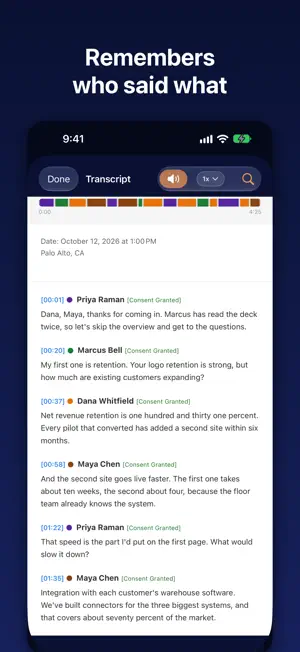
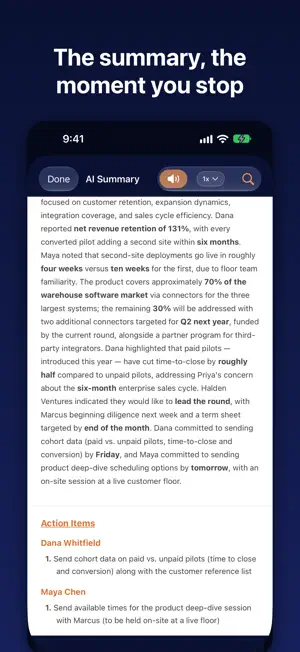


About Bonfiyah: AI Meeting Recorder
Bonfiyah records your in-person meetings and remembers who said what. Put your phone on the table and press record. No meeting bot joins and nobody else installs anything. When you stop, you get a transcript with each person's name on their own words, and an AI summary of what was decided and who owes what. The next time you meet the same people, Bonfiyah recognizes their voices and names them for you. Built for people whose work happens face to face: founders and investors, consultants, field and enterprise sales, researchers, and journalists. HOW IT WORKS Record. One tap, phone on the table. Recording carries on in the background and pauses cleanly if a call comes in. Up to 5 hours per recording. Read who said what. Bonfiyah separates the voices and puts a name on every line. Name a voice once and it stays named. Get the summary. Topics, decisions, action items and open questions, ready to read in the app or send by email. Meet again. The same people are recognized at your next meeting, so each person's history builds itself: the conversations they were in and what they said. ONE APP ON IPHONE, IPAD AND MAC Record on your iPhone, then read on your iPad or Mac. Your conversations, people and projects are the same on all three. PEOPLE, NOT FILES Everyone you record gets their own page with the conversations they were in and their consent status. Speaker Memory Health shows how well Bonfiyah knows each voice. CONSENT BUILT IN When you sign up you confirm, once, that you will get any consent the law requires from the people you record. It covers every recording, so there is no reminder before each one. New recordings start as Internal Use Only, and you can change that for any conversation. Keep track of each person's consent, and mark a conversation privileged (attorney-client) when it is. YOUR DATA Recordings are processed on our servers: AssemblyAI transcribes the audio and Anthropic's Claude writes the summaries and other AI results, both under terms that never use your conversations to train AI models. Original audio is deleted from our servers within 7 days. Your transcripts stay in your account until you delete them, and Pro and Pro AI also back up to your private iCloud. You can delete your account and its data from Settings at any time. PRO AI Everything in Pro, plus Pre-Brief notifications before meetings with people you have recorded, Promise Tracker for commitments made on either side, Contradictions across one person's statements over time, Speaker Insights, and Story Mode recaps. PLANS New accounts get 14 days of Pro and Pro AI. Basic (free): 120 minutes of transcription a month, 3 AI summaries a month, sending a meeting's recap to the people in it, 3 people tracked across recordings, 3 projects, full transcript search. Pro: unlimited recording, people and projects; unlimited AI summaries; Speaker Memory Health; email delivery; iCloud backup; auto-translation. Pro AI: everything in Pro, plus the features above. Pro and Pro AI are auto-renewing monthly subscriptions, charged at the price shown in the App Store at purchase. Subscriptions renew automatically unless cancelled at least 24 hours before the end of the current period. Manage or cancel in Settings > Apple ID > Subscriptions. Privacy Policy: https://bonfiyah.com/legal/privacy Terms of Service: https://bonfiyah.com/legal/terms
What’s new
Version 4.4 · Updated October 25, 2026
Pro and Pro AI now cost less, and both are monthly plans. Need more cloud transcription in a month? Pro and Pro AI members can now buy 12 more hours. You'll find it in Settings > Subscription, and in the note that appears when your monthly hours run out. Settings > Subscription also shows how many hours you've used this month. The plans screen now shows each plan's monthly cloud transcription. Deleting your account now also deletes your Bonfiyah data in iCloud. Deleting all voice signatures now also deletes them from iCloud. To turn voice recognition back on, go to Settings > Danger Zone. Revoking AI consent is clearer. The alert explains what happens, and new recordings stay on your device until you agree again. You can't revoke consent during a recording. iCloud Drive Export is back in Settings, under Sync & Devices. You can create a new project from any Assign to Project list, including on the Record screen. Exports now mark a conversation Privileged when anyone in it is privileged. Settings paths shown in the app now match the Settings screen. Help has updated articles, including your privacy rights. The Person screen scrolls faster. Plus reliability fixes.
App privacy
The developer, Bonfiyah, Inc., reported these privacy practices to Apple.
Data Linked to You
The following data, which may be collected and linked to your identity, may be used for the following purposes:
- Other Data: Other Data Types
- Purchases: Purchase History
- Location: Coarse Location
- Contact Info: Email Address, Name
- Contacts: Contacts
- User Content: Emails or Text Messages, Photos or Videos, Audio Data, Other User Content
- Identifiers: Device ID
Used for: Analytics, App Functionality
Data Not Linked to You
The following data, which may be collected but is not linked to your identity, may be used for the following purposes:
- Diagnostics: Crash Data, Performance Data, Other Diagnostic Data
Used for: Analytics, App Functionality
Alternatives to Bonfiyah: AI Meeting Recorder
Looking for apps like Bonfiyah: AI Meeting Recorder? Here are 6 similar apps on the App Store. The highest rated is MicDesk: Record & Transcribe (5.0/5), and all 6 are free to download.
-
 MicDesk: Record & Transcribe
5.0
MicDesk: Record & Transcribe
5.0
-
 ConnectVithMe- Digital Cards
-
 Voice Memo: AI Transcribe App
2.0
Voice Memo: AI Transcribe App
2.0
-
 AI.Note: Record & Transcribe
4.7
AI.Note: Record & Transcribe
4.7
-
 Ohio Foot & Ankle Seminar
-
 Voice Recorder AI: ThinkScribe
5.0
Voice Recorder AI: ThinkScribe
5.0
| App | Rating | Price | Last updated | Compare |
|---|---|---|---|---|
| Bonfiyah: AI Meeting Recorder | 5.0 / 5 (3 ratings) | Free | October 25, 2026 | |
| MicDesk: Record & Transcribe | 5.0 / 5 (1) | Free | Oct 18, 2026 | Compare |
| ConnectVithMe- Digital Cards | – | Free | Jan 19, 2026 | Compare |
| Voice Memo: AI Transcribe App | 2.0 / 5 (1) | Free | Aug 18, 2026 | Compare |
| AI.Note: Record & Transcribe | 4.7 / 5 (3) | Free | Oct 19, 2026 | Compare |
| Ohio Foot & Ankle Seminar | – | Free | Apr 1, 2026 | Compare |
| Voice Recorder AI: ThinkScribe | 5.0 / 5 (1) | Free | Oct 21, 2026 | Compare |