

TapTalk Dictation
Oliver Lieven Productivity iPhoneiPadiPod touch
TapTalk Dictation is a free Productivity app for iPhone and iPad by Oliver Lieven. Requires iOS 17.0. Updated June 9, 2026.
- Price
- Free
- on the App Store
- Size
- 11 MB
- Age 12+
- Updated
- Jun 9
- 2026 · v1.0.2
Screenshots
Save to Pinterest

About TapTalk Dictation
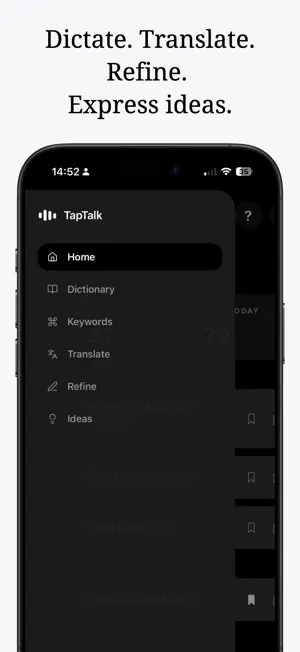
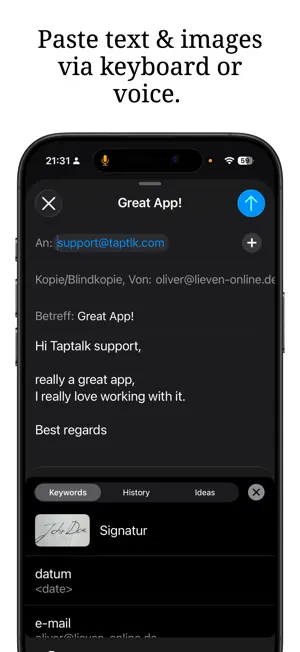
TapTalk is a writing keyboard for people who speak faster than they type. Dictate messages, emails, notes, prompts, support replies, and notes. TapTalk turns speech into usable text, helps you translate and refine it, and keeps reusable content close to your iPhone keyboard. Speak instead of typing Start dictation, speak naturally, and insert the result where you are already writing. Speech recognition runs locally on your iPhone. Write in the language you need Dictate in your language and let TapTalk prepare text in a target language. Reply, draft, and work faster without constantly switching between apps, translators, and notes. Refine existing text Select text and use saved Refine presets or spoken editing instructions such as: - Make this more professional - Make it shorter - Format this as an email - Translate this to English - Turn this into a list Reuse instead of retyping Save frequent text, images, variables, and personal phrases as keywords. Insert them from the keyboard or call them up by voice command. TapTalk helps with: - Dictation instead of typing - Translation while writing - Custom or predefined Refine prompts, such as spelling correction, Professional, Email, and Translator - Spoken editing instructions - Text snippets, images, and variables - Notes you want to capture without inserting them right away - History and saved entries - Preferred spellings for names, terms, and abbreviations - Support for Text Replacements defined in iOS - Local replacements for punctuation, dates, and shortcuts Private on your iPhone TapTalk dictation runs locally. Audio is not uploaded to TapTalk for transcription. Personal keywords, notes, history, dictionary entries, replacements, and settings stay in the local App Group container on your device. Free includes up to 500 dictated words per day. TapTalk Pro removes the daily limit and gives you more room for personal entries and workflows. Privacy Policy: https://taptlk.com/privacy Terms of Use: https://taptlk.com/terms
What’s new
Version 1.0.2 · Updated June 9, 2026
Enhanced suggestions and spelling correction when using the keyboard.
App privacy
The developer, Oliver Lieven, reported these privacy practices to Apple.
Data Not Collected
The developer does not collect any data from this app.
Alternatives to TapTalk Dictation
Looking for apps like TapTalk Dictation? Here are 6 similar apps on the App Store. The highest rated is Spok3n: AI Voice Keyboard (5.0/5), and all 6 are free to download.
-
 Spok3n: AI Voice Keyboard
5.0
-
 dusk bot
5.0
-
 StarCy - Dynamic Island AI
4.0
-
 LudyType - AI Keyboard
4.7
-
 ECTIVE BM X
-
 CiraSync Public Folders O365
3.7
| App | Rating | Price | Last updated | Compare |
|---|---|---|---|---|
| TapTalk Dictation | – | Free | June 9, 2026 | |
| Spok3n: AI Voice Keyboard | 5.0 / 5 (1) | Free | Oct 7, 2026 | Compare |
| dusk bot | 5.0 / 5 (2) | Free | Nov 25, 2026 | Compare |
| StarCy - Dynamic Island AI | 4.0 / 5 (4) | Free | Mar 24, 2026 | Compare |
| LudyType - AI Keyboard | 4.7 / 5 (16) | Free | Nov 20, 2026 | Compare |
| ECTIVE BM X | – | Free | Jan 7, 2025 | Compare |
| CiraSync Public Folders O365 | 3.7 / 5 (10) | Free | Sep 12, 2026 | Compare |
Compare TapTalk Dictation with the top alternatives: ratings, updates, ASO score and keyword gaps →